Excel Convert Table To Text How To Convert Table To Text In MS Word Convert Table To Text In Word 365 Eulasopa Convert Text To A Table With Tab Button In Microsoft Word My Excel Convert Table To Table Excel Convert Table To Range WEB Dec 26 2023 nbsp 0183 32 3 Ideal Methods to Export Excel to txt We can export a single sheet the active sheet multiple sheets or a specific range to txt files A dataset similar to the following is present in each sheet of the sample workbook 1 Export Active Sheet in Excel to
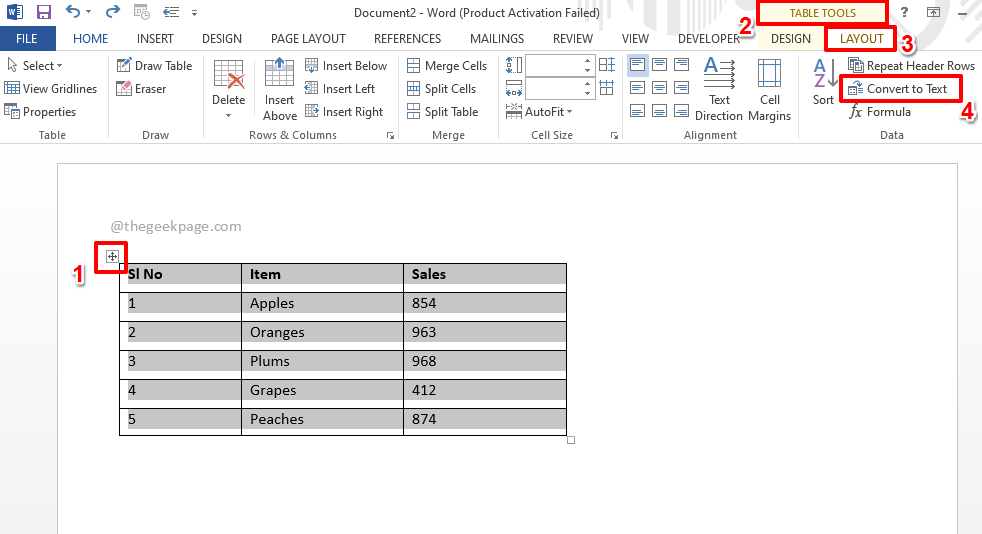
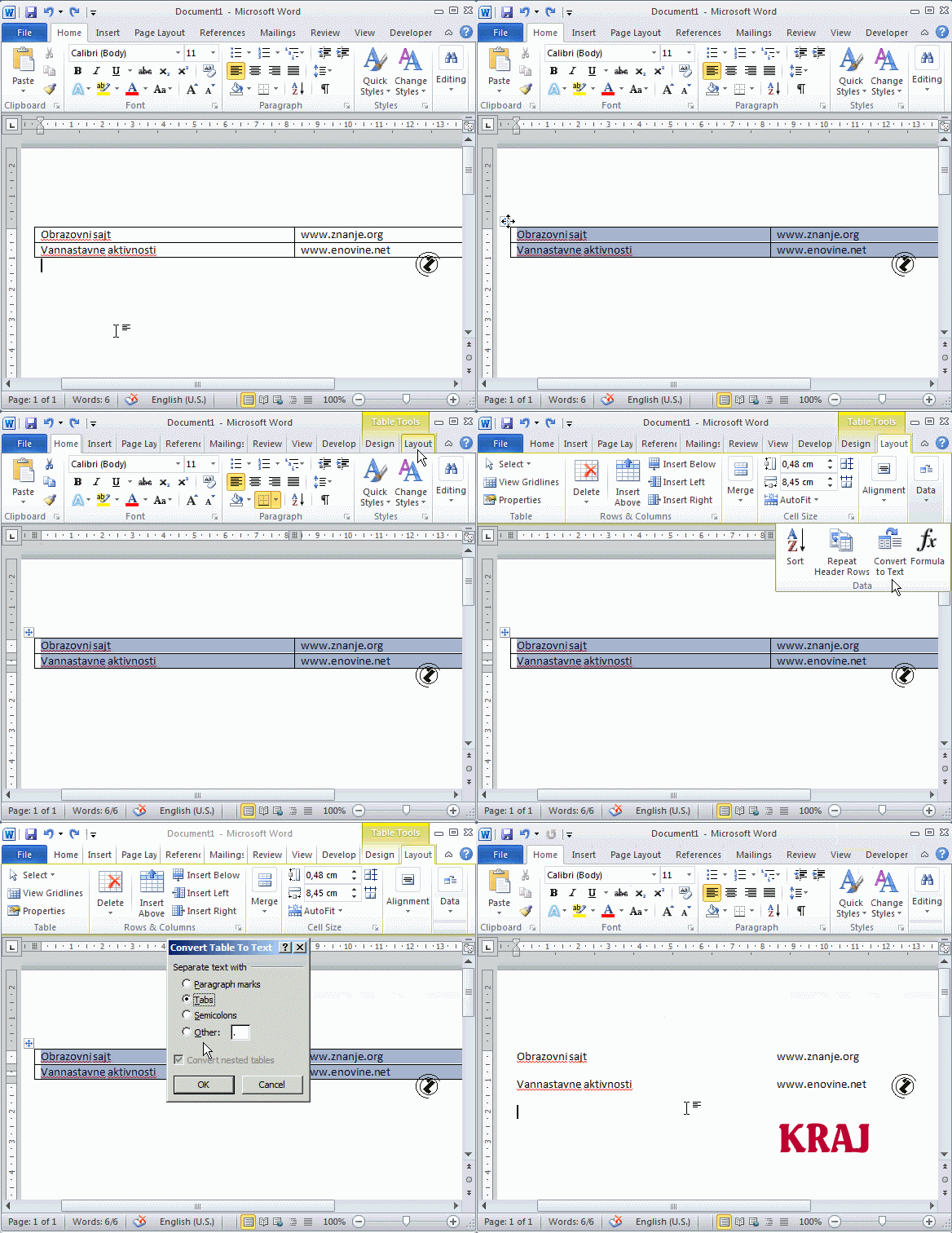
WEB Convert a table to text Select the rows or table you want to convert to text On the Layout tab in the Data section click Convert to Text In the Convert to Text box under Separate text with click the separator character you want to use in place of the column boundaries Rows will be separated by paragraph marks Click OK WEB Apr 13 2010 nbsp 0183 32 5 Answers Sorted by 4 On a different sheet you can enter in cell A1 quot quot amp OriginalSheet A1 Copy Paste that for the full width and length of your original sheet Then you can Paste Special gt Values bock over the originals That should make everything have your little green patch The only caveat is dates
Excel Convert Table To Range WORD 2010 TABLE CONVERT TABLE TO TEXT Learn New Things How To Convert Text To Table In MS Word Easy Steps How To Convert PDF To An Excel File Quick And Easy Convert Tabular Data From PDF To Sheets And Excel Screenshots Learn New Things How To Convert Text To Table In MS Word Easy Steps How To Convert Table To Text And Text To Table In Word How To Convert Picture To Excel Table In A Blink Of An Eye TechWiser How To Convert Jpg To Excel With Able2extract Professional Riset
Excel Convert Table To Text
 Excel Convert Table To Text
https://thegeekpage.com/wp-content/uploads/2022/08/1_convert_to_text.png
WEB 3 62M subscribers Subscribed 3 2K views 3 years ago How to Convert a Table to Text in Excel 2010 Part of the series MS Word amp Excel Converting a table to text in Excel 2010
Templates are pre-designed files or files that can be used for various functions. They can conserve time and effort by offering a ready-made format and design for producing different type of content. Templates can be utilized for personal or professional projects, such as resumes, invites, leaflets, newsletters, reports, discussions, and more.
Excel Convert Table To Text
How To Convert TEXT Into Table In MS Word How To Change Table To Text
WORD 2010 TABLE CONVERT TABLE TO TEXT
Learn New Things How To Convert Text To Table In MS Word Easy Steps
How To Convert PDF To An Excel File Quick And Easy
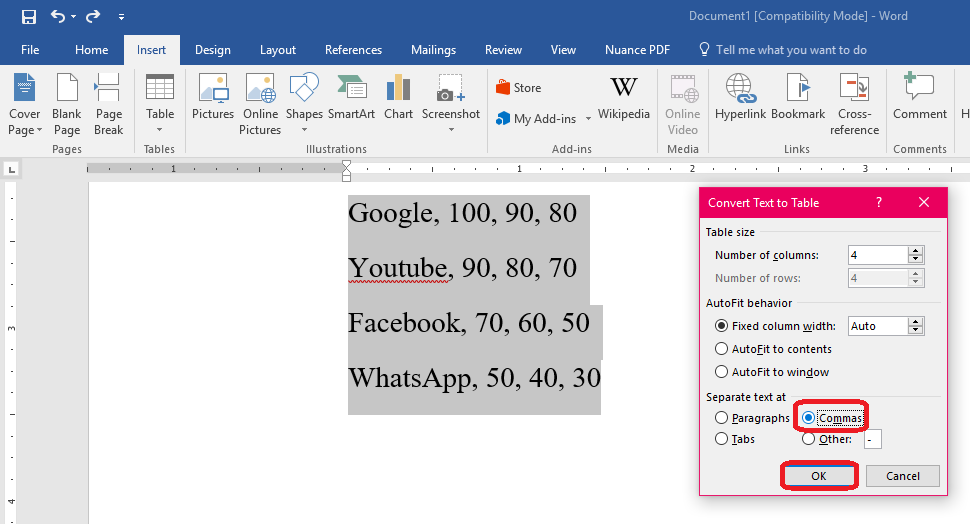
Learn New Things How To Convert Text To Table In MS Word Easy Steps
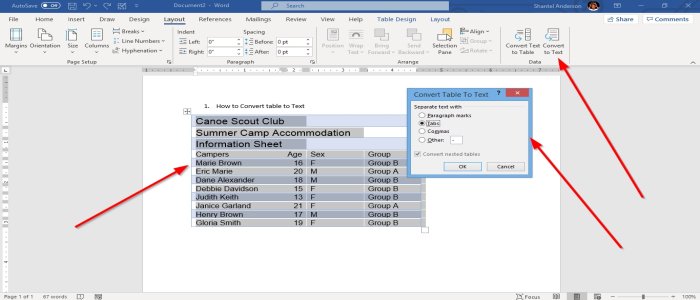
How To Convert Table To Text And Text To Table In Word
WEB Jan 9 2020 nbsp 0183 32 According to your question 1 how do I convert my table to text in Excel 365 click anywhere in the table and then go to Table Tools gt Design on the Ribbon in the Tools group click Convert to Range OR Right click the table then in the shortcut menu click Table gt Convert to Range

WEB Right click on the cell and select the quot Paste Special quot option from the context menu Choose the quot Values quot option to paste the data as text In the quot Paste Special quot dialog box choose the quot Values quot option to paste the data as text This will convert the
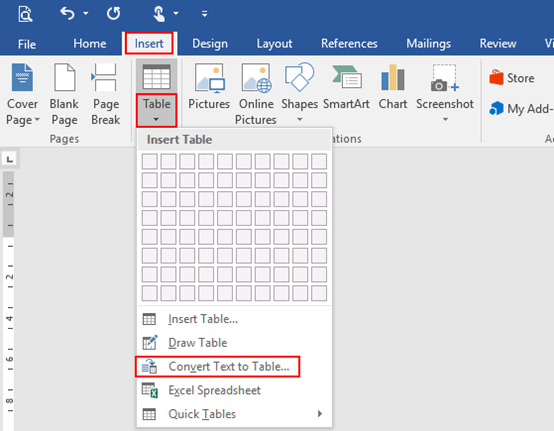
WEB Newer Windows versions Newer Mac versions Web Click anywhere in the table and then go to Table Tools gt Design on the Ribbon In the Tools group click Convert to Range OR Right click the table then in the shortcut menu click Table gt Convert to Range
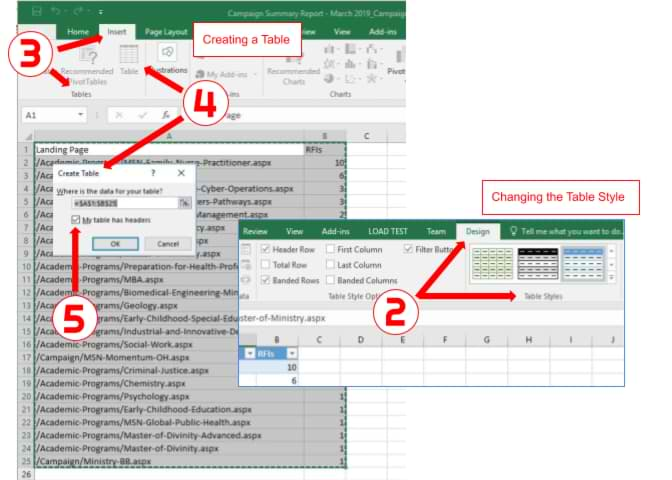
WEB Jan 21 2019 nbsp 0183 32 Re Convert Table to Text You need to select any cell in the table so the quot Table Tools Design quot tab is shown Then select quot Convert to Range quot from the quot Table Tools Design quot tab

WEB May 14 2020 nbsp 0183 32 Convert a Word Table to Text Like Excel a table cell in Word is the intersection of a row and column as shown here 1 Position the cursor anywhere in the table This is usually done by clicking text 2 From the Layout tab choose Convert to Text Data group 3 Choose how to separate the text between table cells 3a
WEB Nov 2 2023 nbsp 0183 32 Convert Excel table to range and turn data range into table by Svetlana Cheusheva updated on November 2 2023 The article looks at how to quickly turn a cell range into a table using the default or selected table style and how to undo a table so it changes back to a normal range WEB 4 days ago nbsp 0183 32 Steps Select cell C12 and enter the following TEXTJOIN quot quot TRUE B5 B10 Press Enter All the values in the column will be arranged horizontally and separated by a comma Read More How to Convert Text to Columns with Multiple Delimiters in Excel Method 2 Converting Text to Column with Delimiter Using the CONCAT Function Steps
WEB Jul 23 2011 nbsp 0183 32 1 Is there a way to convert a table back to plain text eliminating all the table formatting That is eliminate the fill colors but preserve the number formatting I know I can convert it to a normal range by right clicking in the table and then selecting Table and then Convert to Range but that preserves all of the table formatting