Disable Full Screen Optimization Windows 11 SnagPriv exe Does Not Start Snagit Error TechSmith Support How To Disable Full Screen Optimization Full Screen Optimization How To Disable Fullscreen Optimization For Games On Windows 10 How To Enable Or Disable Fullscreen Optimizations In Windows 10 11 How To Disable Enable Full Screen Optimization On Windows FPS Boost Web Jul 3 2022 nbsp 0183 32 8 8K views 1 year ago windows11 How to Disable Enable Full Screen Optimization on Windows FPS Boost Windows full screen optimization is a great feature for gamers who want to optimize their
Web Oct 14 2021 nbsp 0183 32 I recently did a fresh Windows 11 install and set everything up as I like it now I noticed that when I disable the fullscreen optmizations for the r5apex exe and globally in regedit it still runs in optimized fullscreen mode rather than exclusive Web Select the setting under Optimizations for windowed games to turn it On Restart your game Note If you turn on Auto HDR Optimizations for windowed games will be turned on automatically If you want to turn off Optimizations for windowed games you ll need to turn off Auto HDR first
How To Disable Enable Full Screen Optimization On Windows FPS Boost Disable Full Screen Optimization For Applications Games In Windows 10 Disable Full Screen Optimization For Applications Games In Windows 10 How To Disable Full Screen Optimization How To Disable Full Screen Optimization In Windows 11 TechHana Disable Full Screen Optimization For Applications Games In Windows 10 How To Disable Fullscreen Optimizations In Windows 10 DebugHunt How To Disable Fullscreen Optimization For Apps And Games On Windows 10 How To Disable Fullscreen Optimizations Windows 10
Disable Full Screen Optimization Windows 11
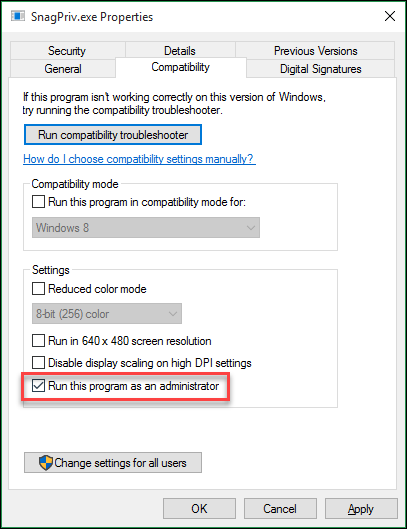 Disable Full Screen Optimization Windows 11
https://support.techsmith.com/hc/en-us/article_attachments/206460188/2016-04-20_11-00-06.png
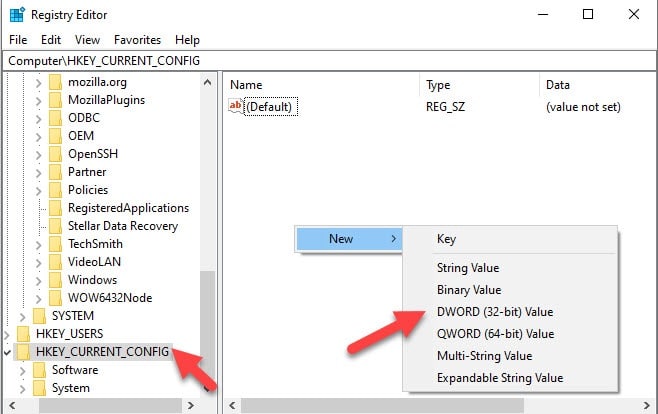
Web Oct 1 2021 nbsp 0183 32 On the right panel right click on the empty white area and select New gt gt DWORD 32 bit Value This will create a new DWORD Name the new DWORD GameDVR DSEBehavior and double click on it Set 2 as the value to disable Fullscreen Optimization Click on OK to save the changes
Pre-crafted templates provide a time-saving option for producing a diverse series of files and files. These pre-designed formats and designs can be used for various personal and professional projects, including resumes, invites, leaflets, newsletters, reports, presentations, and more, enhancing the content production process.
Disable Full Screen Optimization Windows 11

How To Disable Full Screen Optimization In Windows 11 MyLikes
Disable Full Screen Optimization For Applications Games In Windows 10

Disable Full Screen Optimization For Applications Games In Windows 10
How To Disable Full Screen Optimization

Disable Full Screen Optimization For Applications Games In Windows 10
How To Disable Fullscreen Optimizations In Windows 10 DebugHunt
Web May 26 2023 nbsp 0183 32 if you want to disable fullscreen optimisations on windows 11 you also need to quot overrride high DPI scaling behaviour quot and set it to application and you need to check quot disable fullscreen optimisation quot both options best set also for quot all users quot need to be enabled that way or FSO will still be ON on windows 11

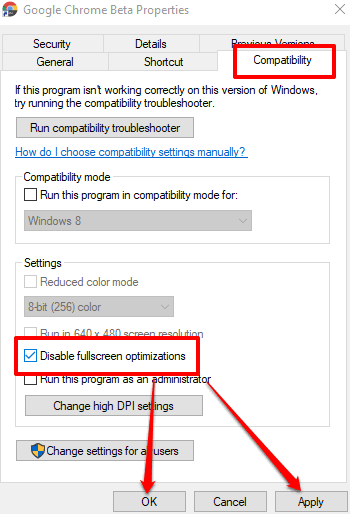
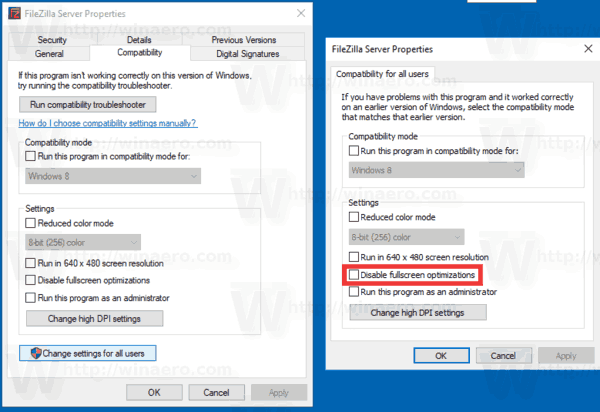
Web Right click on the executable and click on Properties Click on the Compatibility tab If you have multiple users you can click on Change settings for all users Check or uncheck Disable fullscreen optimizations Test your application or game to see if performance has improved Similar A Guide to Discovering Indie Games

Web Apr 27 2023 nbsp 0183 32 Enable or disable Full screen optimizations in Windows 11 10 In this guide we will cover the following ways Using the Registry Editor Applicable to a particular set of users Applicable for all

Web Apr 26 2023 nbsp 0183 32 How to enable or disable Full screen optimizations on Windows 11 10 TheWindowsClub 33 2K subscribers 5 1K views 3 months ago Full Screen Optimizations is a feature on Windows devices that help them

Web Mar 1 2022 nbsp 0183 32 Enable or Disable Fullscreen Optimizations for Games in Windows 11 Microsoft wanted to create the best gaming experience possible so they enhanced the current Full Screen Exclusive FSE mode by creating Fullscreen Optimizations
[desc-11] [desc-12]
[desc-13]