Disable Full Screen Optimization Full Screen Set enter Cockpic No Graphics black Screen Falcon BMS Forum Unticking Disable Full Screen Optimization Gave Me 100fps Boost GlobalOffensive Como Desativar A Otimiza o De Tela Inteira No Windows 10 Dz Techs How To Disable Fullscreen Optimization For Games On Windows 10 Vrogue How To Disable Full Screen Optimization In Valorant Novint Web Feb 12 2018 nbsp 0183 32 To disable Fullscreen Optimizations in Windows 10 do the following Open Settings Go to System Display On the right to the Advanced graphics settings link quot Graphics settings quot On the next page turn off uncheck the option Enable fullscreen optimizations You are done
Web May 29 2023 nbsp 0183 32 How to Disable Fullscreen Optimizations Now there are two ways you can disable fullscreen optimizations on your Windows laptop You can either disable it altogether or disable it for only specific applications Using EXE File Using an application s executable EXE file you can disable fullscreen optimization only for that application Web Dec 28 2018 nbsp 0183 32 Let s see how you can disable it 1 Disable Fullscreen Optimization App Wise This method is more suitable for disabling Fullscreen Optimization for a particular game
How To Disable Full Screen Optimization In Valorant Novint How To Disable Fullscreen Optimization For Apps And Games On Windows 10 Why You Should Disable Fullscreen Optimizations On Windows 10 Windows 10 How To Disable Fullscreen Optimizations Windows 10 MiniTool How To Disable Full Screen Optimization Fix FIFA 23 Not Launching Crashing Freezing Black Screen How To Disable Fullscreen Optimization For Apps And Games On Windows 10 Windows Automatically Resizing After Full Screen Windows 10 Forums
Disable Full Screen Optimization
 Disable Full Screen Optimization
https://winaero.com/blog/wp-content/uploads/2018/02/Windows-10-disable-fullscreen-optimizations-per-app.png
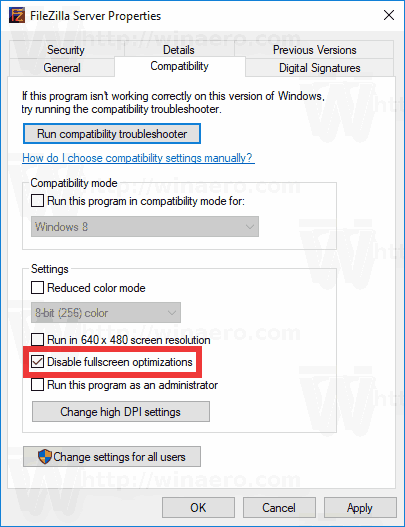
Web Most applications and games are automatically set to use Fullscreen optimization but if your gaming isn t running well you might want to try enabling or disabling Fullscreen optimization Locate the executable for the application or game you want to change Right click on the executable and click on Properties Click on the Compatibility tab
Templates are pre-designed files or files that can be used for various functions. They can save time and effort by offering a ready-made format and design for developing different kinds of content. Templates can be used for individual or professional tasks, such as resumes, invitations, leaflets, newsletters, reports, presentations, and more.
Disable Full Screen Optimization
3 Ways To Disable Full Screen Mode In Microsoft Edge 2022 Saint Www vrogue co
How To Disable Fullscreen Optimization For Apps And Games On Windows 10

Why You Should Disable Fullscreen Optimizations On Windows 10
Windows 10
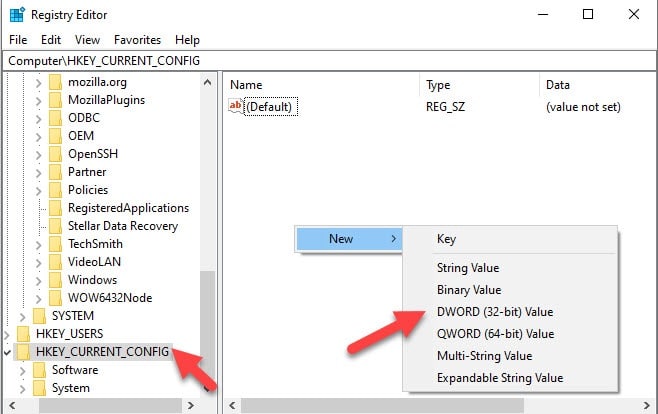
How To Disable Full Screen Optimization

Fix FIFA 23 Not Launching Crashing Freezing Black Screen

Web May 26 2023 nbsp 0183 32 1 Right click or press and hold on the EXE file of the app or game and click tap on Properties 2 Click tap on the Compatibility tab see screenshot below 3 Check disable or uncheck enable default Disable fullscreen optimizations for what you want 4 Click tap on OK

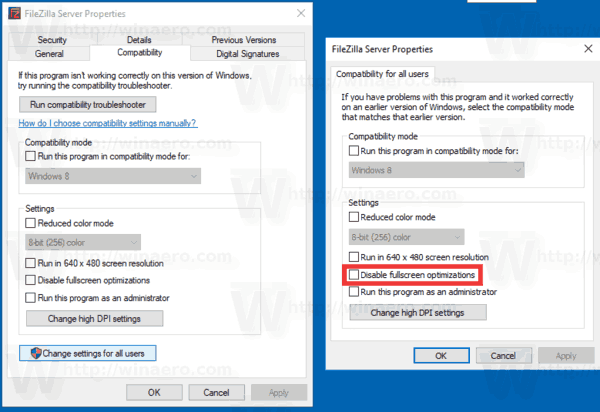
Web Nov 10 2022 nbsp 0183 32 Disable Fullscreen Optimizations for All User 1 Right click the application that you want to disable fullscreen optimizations 2 Choose Properties 3 Then go to the Compatibility tab 4 Then click Change settings for all users 5 In the pop up window check the option Disable fullscreen

Web Apr 6 2020 nbsp 0183 32 1 Right click or press and hold on the exe file or shortcut of a classic app desktop you want and click tap on Properties see screenshot below 2 Click tap on the Compatibility tab check or uncheck default Disable fullscreen optimizations for what you want and click tap on OK see screenshot below

Web Dec 22 2022 nbsp 0183 32 Click on the Properties option from the right click context menu Select the Compatibility option In the Settings section check the Disable fullscreen optimizations option Click on Apply and OK to save the changes Now the application will start without using the Fullscreen Optimizations feature

Web Apr 8 2023 nbsp 0183 32 Press Windows Key I to open Settings then click on System 2 From the left hand menu select Display then in right window pane click on Advanced graphics settings or Graphic Settings 3 Under Fullscreen optimization uncheck Enable fullscreen optimizations to disable fullscreen optimization
[desc-11] [desc-12]
[desc-13]