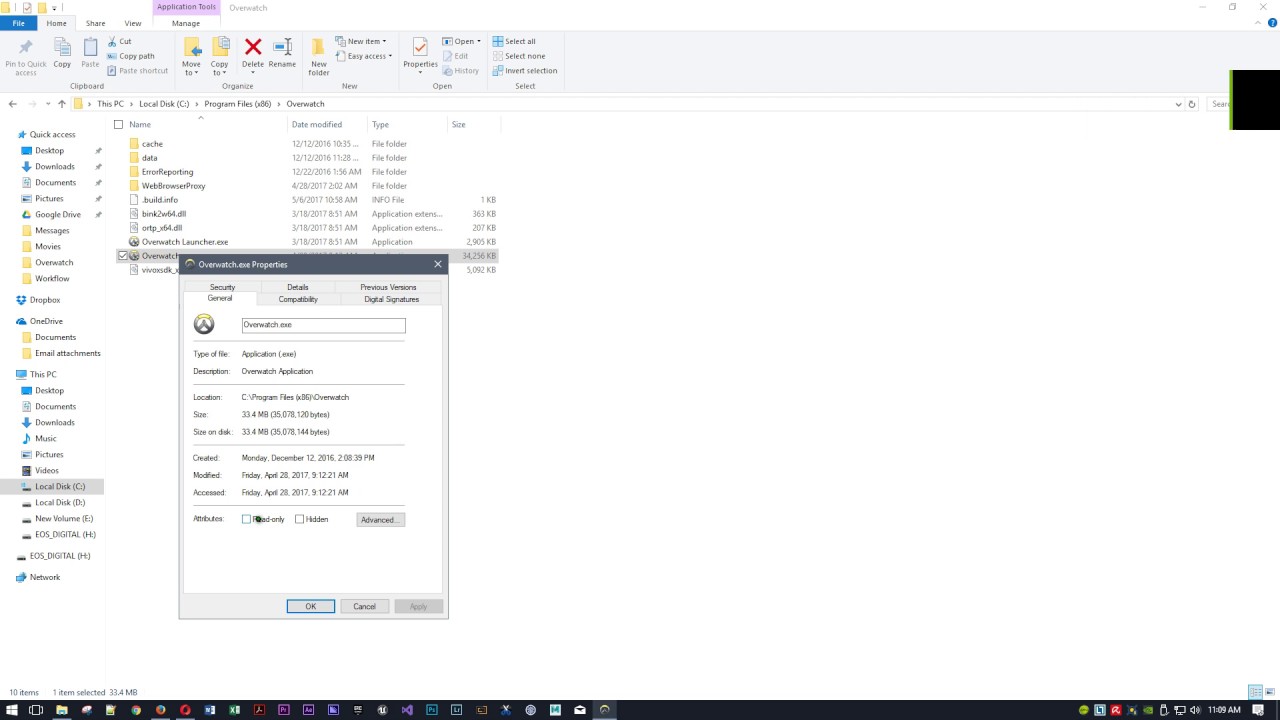
Disable Full Screen Optimization Windows 10 How To Disable Fullscreen Optimization In Windows 10 How To Disable Fullscreen Optimization For Apps And Games On Windows 10 How To Disable Fullscreen Optimization For Apps And Games On Windows 10 Enable Or Disable Fullscreen Optimizations In Windows 10 Tutorials How To Disable Fullscreen Optimization In Windows 10 Web May 29 2023 nbsp 0183 32 Now there are two ways you can disable fullscreen optimizations on your Windows laptop You can either disable it altogether or disable it for only specific applications Using EXE File Using an application s executable EXE file you can disable fullscreen optimization only for that application Here s how you can do so
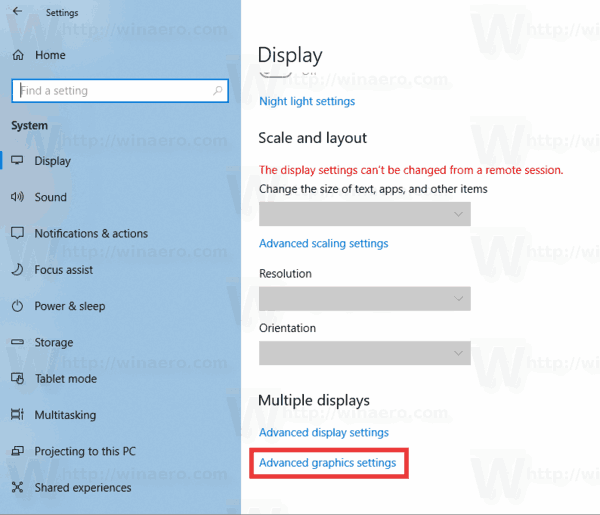
Web Feb 12 2018 nbsp 0183 32 To disable Fullscreen Optimizations in Windows 10 do the following Open Settings Go to System Display On the right to the Advanced graphics settings link quot Graphics settings quot On the next page turn off uncheck the option Enable fullscreen optimizations You are done Web One such optimization is Fullscreen optimizations or FullScreen Exclusive FSE which was created to give the application or game you are running full control of your desktop and display If your application or gaming isn t running properly you can enable or disable Fullscreen optimization
How To Disable Fullscreen Optimization In Windows 10 How To Disable Fullscreen Optimizations In Windows 10 Step By Step How To Disable Full Screen Optimization On Windows 10 For Overwatch Disable Fullscreen Optimizations In Windows 10 How To Disable Full Screen Optimization In Valorant Novint Windows Automatically Resizing After Full Screen Windows 10 Forums How To Enable Or Disable Full Screen Optimizations On Windows 11 10 How To Disable Enable Full Screen Optimization On Windows FPS Boost Windows 10 Optimization YouTube
Disable Full Screen Optimization Windows 10
 Disable Full Screen Optimization Windows 10
https://www.guidingtech.com/wp-content/uploads/Disable-Fullscreen-Optimization-in-Windows-10_4d470f76dc99e18ad75087b1b8410ea9.jpg
Web Feb 27 2023 nbsp 0183 32 How to Automatically Empty the Recycle Bin in Windows 10 amp 11 Windows Update Failed to Install Error 0x80240034 MajorGeeks Com 187 News 187 February 2023 187 How to Enable or Disable Fullscreen Optimizations in Windows 10 amp 11
Pre-crafted templates offer a time-saving option for developing a diverse series of documents and files. These pre-designed formats and designs can be utilized for numerous personal and professional tasks, including resumes, invitations, flyers, newsletters, reports, discussions, and more, improving the content creation procedure.
Disable Full Screen Optimization Windows 10

How To Disable Full Screen Optimization Full Screen Optimization

How To Disable Fullscreen Optimizations In Windows 10 Step By Step
How To Disable Full Screen Optimization On Windows 10 For Overwatch
Disable Fullscreen Optimizations In Windows 10

Windows Automatically Resizing After Full Screen Windows 10 Forums

How To Enable Or Disable Full Screen Optimizations On Windows 11 10

Web Apr 6 2020 nbsp 0183 32 Option One Enable or Disable Fullscreen Optimizations for Specific Apps for Current User in Compatibility Settings Option Two Enable or Disable Fullscreen Optimizations for Specific Apps for All Users in Compatibility Settings OPTION ONE

Web Nov 10 2022 nbsp 0183 32 Disable Fullscreen Optimizations via Settings Press Window s key and I key together to open Settings In the Settings window click System Then click Display tab from the left panel Then choose Advanced graphics settings In the pop up window uncheck the option Enable fullscreen optimizations

Web Dec 22 2022 nbsp 0183 32 Here is how you can do it Right click on the Start menu and select the Settings option This will open the Settings app on your screen In the Settings app click on the System option Next click on the Display option Scroll down and select the Advanced Graphics settings option Now uncheck the

Web Apr 8 2023 nbsp 0183 32 1 Press Windows Key I to open Settings then click on System 2 From the left hand menu select Display then in right window pane click on Advanced graphics settings or Graphic Settings 3 Under Fullscreen optimization uncheck Enable fullscreen optimizations to disable fullscreen optimization

Web Dec 28 2018 nbsp 0183 32 1 Disable Fullscreen Optimization App Wise This method is more suitable for disabling Fullscreen Optimization for a particular game I would recommend it to Windows 10 users who
[desc-11] [desc-12]
[desc-13]