Change Computer Login Password Conversion Of Number Systems How To Change Computer Login Password In Windows 10 Administrator User Windows Password Key How To Change Computer Password For Windows 8 7 XP Vista How To Change Mac Password Through Apple Account Bkfer How To Change Computer Password For The Better Web Select the Reset password link on the sign in screen If you use a PIN instead see PIN sign in issues If you re using a work device that s on a network you may not see an option to reset your password or PIN In that case contact your administrator Answer your security questions Enter a new password
Web Sep 22 2021 nbsp 0183 32 1 Open the Settings app s Accounts page The quickest way to access this page is to launch the Start menu search for Password and then select Change your password This will Web Select Start gt Settings gt Accounts gt Sign in options Select PIN Windows Hello gt Change PIN and then follow the instructions You will need to know and enter your old PIN in order to change to a new one
How To Change Computer Password For The Better How To Change Computer Login Password In Windows 10 Administrator User Windows Password Key Change Computer Login Password Motor Werks IT Support How To Change The Login Password For Windows Account On PC Hong Kong Version Samsung How To Change Computer Password For The Better AlienFox Source Code Toolset Harvests Credentials From 18 Cloud Services SC Media How To Change Computer Login Password In Windows 10 Administrator User Windows Password Key How To Change Account Name In Windows 11 The Top 4 Methods MiniTool Partition Wizard Premium Vector Vector Illustration Of 90s Retro Computer Login And Password Screen Cute Old
Change Computer Login Password
 Change Computer Login Password
https://gullallee.com/wp-content/uploads/2023/07/window.jpg
Web May 9 2023 nbsp 0183 32 Updated May 9 2023 Image maurusone Getty Images If you forgot the password to your Windows PC don t panic Windows 10 and Windows 11 both allow you to reset a forgotten password whether
Pre-crafted templates use a time-saving solution for developing a diverse variety of documents and files. These pre-designed formats and layouts can be utilized for different personal and professional tasks, including resumes, invitations, leaflets, newsletters, reports, presentations, and more, streamlining the content production process.
Change Computer Login Password

How To Change Computer Login Password In Windows 10 Administrator User Windows Password Key
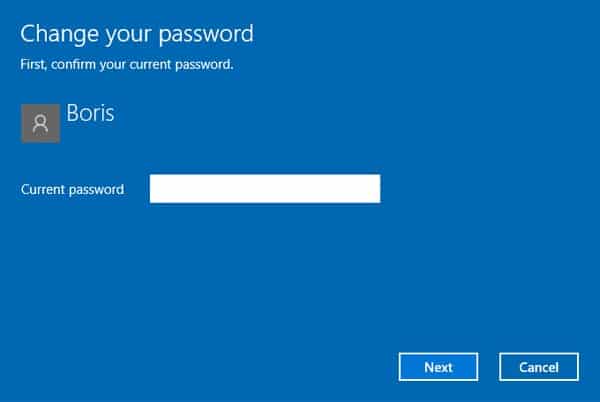
How To Change Computer Login Password In Windows 10 Administrator User Windows Password Key

Change Computer Login Password Motor Werks IT Support

How To Change The Login Password For Windows Account On PC Hong Kong Version Samsung

AlienFox Source Code Toolset Harvests Credentials From 18 Cloud Services SC Media
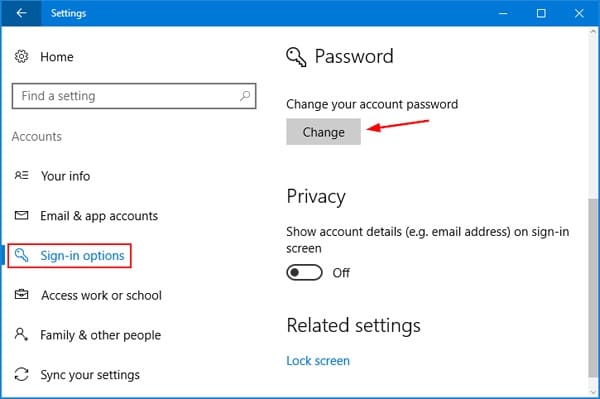
How To Change Computer Login Password In Windows 10 Administrator User Windows Password Key

Web Windows sign in options and account protection Change or manage your password or PIN To change your password or PIN go to Start gt Settings gt Accounts gt Sign in Windows Hello Windows Hello lets you sign in to your devices apps online services and networks using your face Using a security
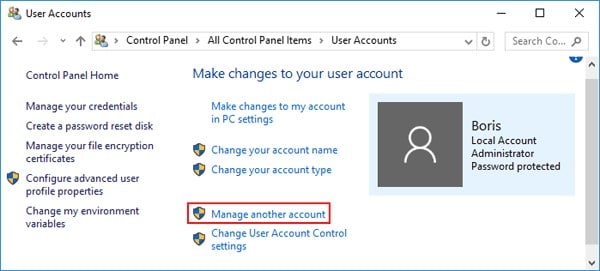
Web Change your local password when you know your current password In Windows search for and open Sign in options Under Password click Change and then follow the on screen instructions to create a new password and hint

Web Here s How Click on Start and then Control Panel Click on the User Accounts and Family Safety link Note If you re viewing the Classic View of Control Panel you won t Click on the User Accounts link In the Make changes to your user account area of the User Accounts window click the Change

Web Oct 10 2019 nbsp 0183 32 Click on quot Sign In Options quot on the left followed by the quot Password quot entry listed under quot Sign In Options quot on the right The Password entry expands to include a quot Change quot button that you click to continue Follow the steps to verify your identity such as looking at a face recognition camera swiping a finger or entering a PIN or password
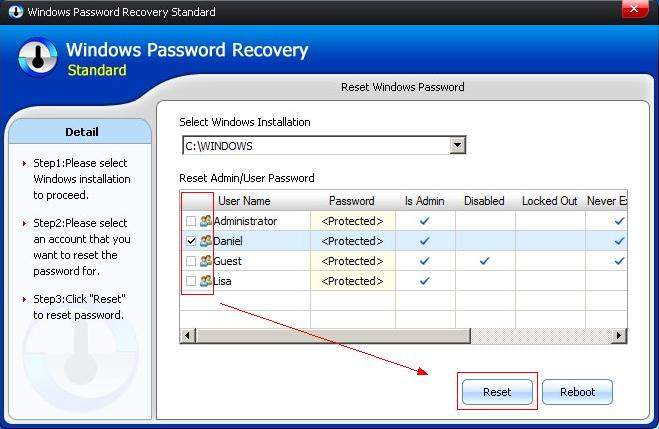
Web May 17 2022 nbsp 0183 32 Under the quot Manage how you sign in to your device quot section select the Password option Click the Change button Source Windows Central Image credit Source Windows Central Confirm your
[desc-11] [desc-12]
[desc-13]