Reset Computer Account Password Reset Computer Account Password YouTube PowerShell Fix Repair The Trust Relationship Between This Workstation And The Primary Domain How To Reset A User Password In Active Directory Password Recovery PowerShell Fix Repair The Trust Relationship Between This Workstation And The Primary Domain Password Surang Lineal Color Icon 2 days agoPress the Windows key R to open the Run dialogue In the text field type secpol msc and hit Enter On the left pane navigate to Account Lockout Policy under the Account Policies folder On the right pane double click on the Reset account lockout counter after option Choose a number between one and 99 999 and hit OK to change
Reset a forgotten Microsoft account password 1 Select Forgot password If the Enter password window is still open select Forgot password If not select Reset 2 Verify your identity For your protection Microsoft must verify your identity before you can proceed with resetting 3 Get a After a computer failure I lost the EWS password I have tried the network reset holding cancel 8883986 Your account also allows you to connect with HP support faster access a personal dashboard to manage all of your devices in one place view warranty information case status and more After a computer failure I lost the
Password Surang Lineal Color Icon User Accounts Password Of User Account Change In Windows Windows Hot Sex Picture When Did Users Last Change Their Password In Active Directory 4sysops Prevent Attacks Using Smart Lockout Azure Active Directory Microsoft Entra Microsoft Learn Windows Event ID 4724 An Attempt Was Made To Reset An Account s Password WindowsTechno Setting Up Cloud Kerberos Trust Passwordless Access To On prem Resources Dybbugt no Relaying 101 LuemmelSec Just An Admin On Someone Else s Computer Command Line AD Password Reset ITPro Today IT News How Tos Trends Case Studies Career Computer Repair Largo Belltech Computer Solutions
Reset Computer Account Password
 Reset Computer Account Password
https://i.ytimg.com/vi/q11OlespaRI/maxresdefault.jpg?sqp=-oaymwEmCIAKENAF8quKqQMa8AEB-AHUBoAC4AOKAgwIABABGGUgZShlMA8=&rs=AOn4CLC7lh4S0DSOvRuJsvTv-dWNIyXm1g
Contact Us Business Support My HP Account HP PCs Change or reset the computer password in Windows 10 If you cannot remember your password or need to change it you have several options HP recommends using a Microsoft account for signing into Windows Using a Microsoft account offers many benefits including easy password recovery
Templates are pre-designed documents or files that can be utilized for numerous functions. They can conserve effort and time by offering a ready-made format and layout for creating different type of material. Templates can be utilized for personal or professional projects, such as resumes, invitations, flyers, newsletters, reports, discussions, and more.
Reset Computer Account Password

Reset A Computer Account In An Active Directory Infrastructure On Windows Server 2016 Windows
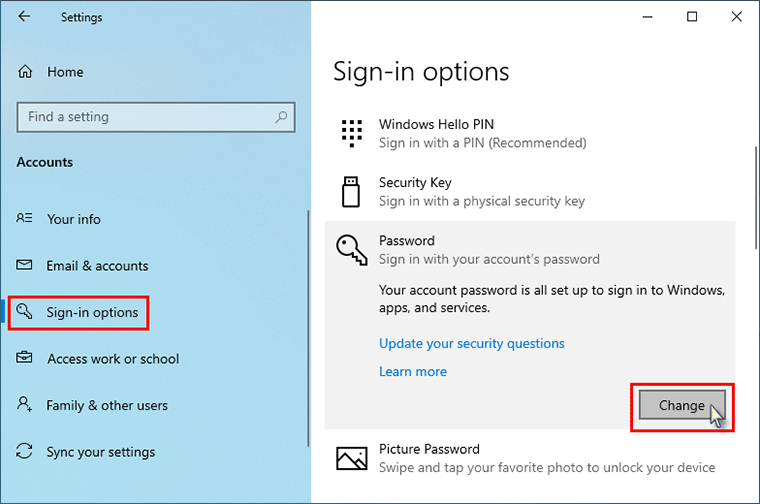
User Accounts Password Of User Account Change In Windows Windows Hot Sex Picture

When Did Users Last Change Their Password In Active Directory 4sysops
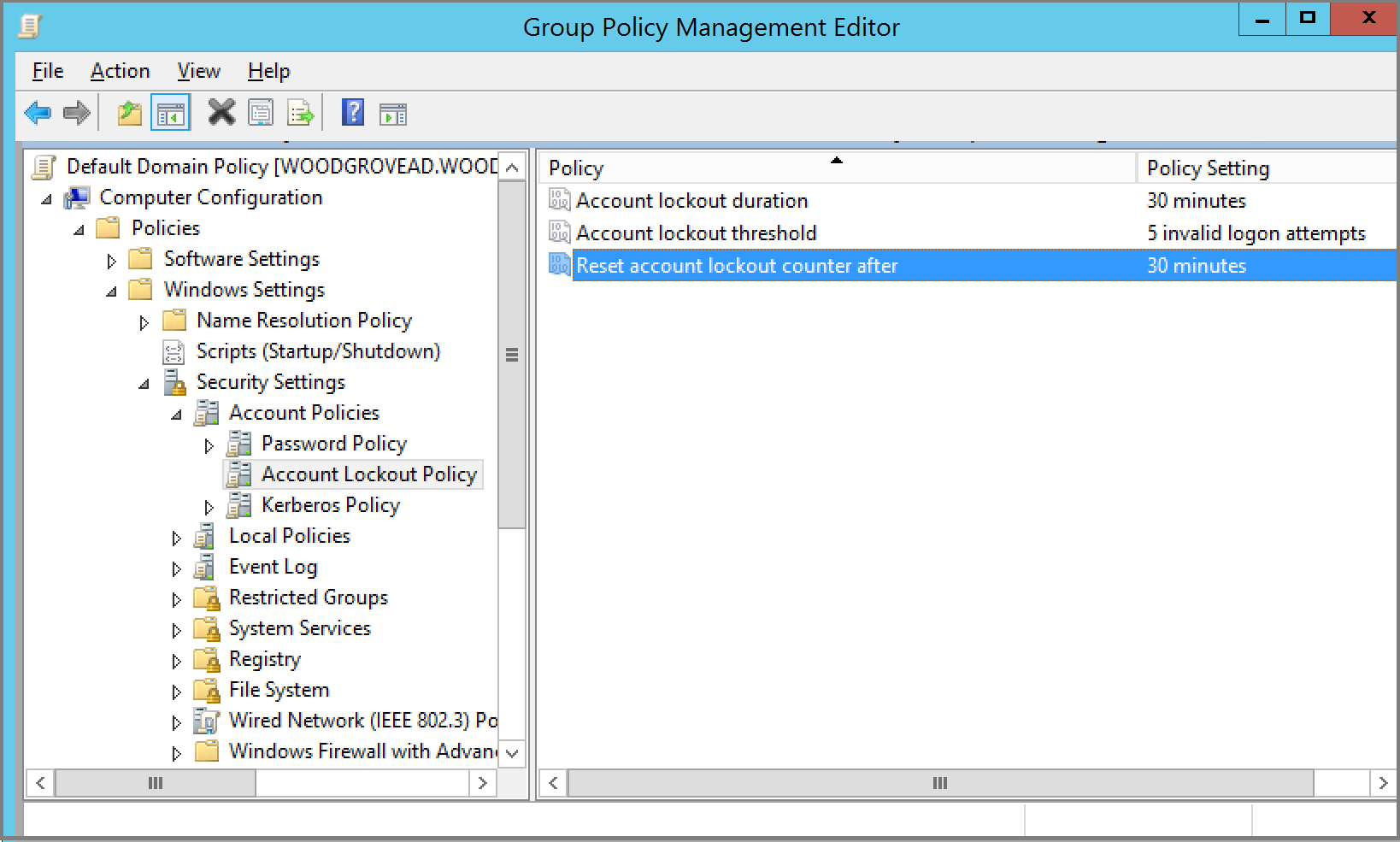
Prevent Attacks Using Smart Lockout Azure Active Directory Microsoft Entra Microsoft Learn

Setting Up Cloud Kerberos Trust Passwordless Access To On prem Resources Dybbugt no

Relaying 101 LuemmelSec Just An Admin On Someone Else s Computer

Answer The machine account password change is initiated by the computer every 30 days by default Since Windows 2000 all versions of Windows have the same value This behavior can be modified to a custom value using the following group policy setting in Active Directory Domain member Maximum machine account password age

In this article Applies to Windows 11 Windows 10 Describes the best practices location values and security considerations for the Domain member Maximum machine account password age security policy setting Reference The Domain member Maximum machine account password age policy setting determines when a domain
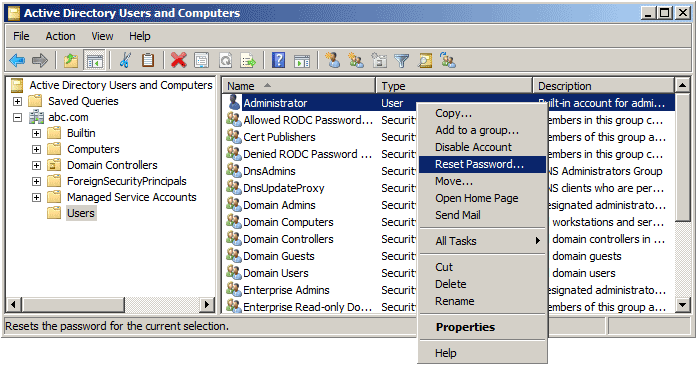
These methods are as follows Using the Netdom exe command line tool Using the Nltest exe command line tool Note The Netdom exe and Nltest exe tools are located on the Windows Server CD ROM Using the Active Directory Users and Computers Microsoft Management Console MMC Using a Microsoft Visual

The Netdom exe tool resets the account password on the computer locally known as a local secret It writes this change to the computer s computer account object on a Windows domain controller that s in the same domain

Change or reset your Windows password If you already know your current password and want to change it Select Start Settings Accounts Sign in options Reset your Windows 11 local account password If you ve forgotten or lost your Windows 11 password for a local account Reset your Microsoft
[desc-11] [desc-12]
[desc-13]