Windows 10 Enable System Protection Command Prompt Oplossing U Moet Systeembescherming Op Deze Schijf Inschakelen How To Enable System Protection In Windows 11 YouTube How To Fix You Must Enable System Protection On This Drive Windows 10 You Must Enable System Protection On This Drive System Restore Error Enable System Protection And Restore In Windows 10 YouTube Solution 1 Use Command Prompt to Rename Registry File and Perform the System Restore Solution 2 Enable System Protection using PowerShell
How do I enable System Restore from command prompt Should I enable System Protection 1 Enable System Protection Using Command Prompt Go to the Windows Start menu and type CMD in the search bar Type the command net start
Enable System Protection And Restore In Windows 10 YouTube How To Fix You Must Enable System Protection On This Drive While Using How To Enable System Restore On Windows 10 System Restore Windows FIX You Must Enable System Protection On This Drive In System Restore 0x81000203 Windows 7 Guide Enable System Protection In Windows 10 Fixed You Must Enable System Protection On This Drive Win10 8 7 How To Enable System Protection In Windows 10 11 GadgetRevo You Must Enable System Protection On This Drive Windows 10
Windows 10 Enable System Protection Command Prompt
 Windows 10 Enable System Protection Command Prompt
https://windowsbulletin.com/wp-content/uploads/2019/10/you-must-enable-system-protection-fixed-500x231.jpg
Turn On or Off System Protection for Drives in Command Prompt You will not be able to Turn on system protection for other drives if system
Templates are pre-designed files or files that can be used for different purposes. They can conserve effort and time by providing a ready-made format and layout for developing different type of material. Templates can be utilized for personal or professional tasks, such as resumes, invitations, flyers, newsletters, reports, presentations, and more.
Windows 10 Enable System Protection Command Prompt
How To Create A Restore Point Enable System Protection In Windows 10

How To Fix You Must Enable System Protection On This Drive While Using

How To Enable System Restore On Windows 10 System Restore Windows

FIX You Must Enable System Protection On This Drive In System Restore

Guide Enable System Protection In Windows 10
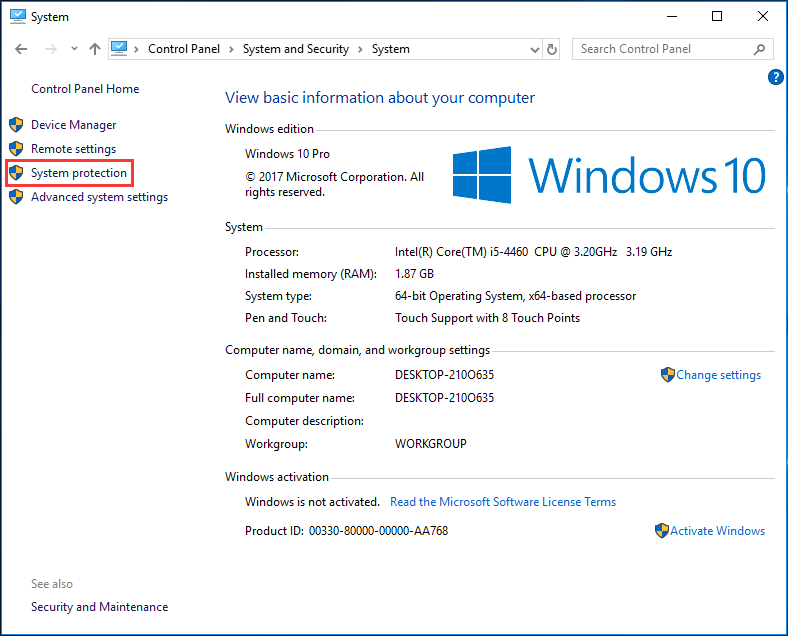
Fixed You Must Enable System Protection On This Drive Win10 8 7

Step 1 Press Win X and then type sysdm cpl in the Run dialog box and press the Enter button

1 At the command prompt type rstrui exe and then press Enter 2 It will open System restore window 3 Click on the System protection link

Enable System Protection CMD Type net start vss and hit Enter Then the Volume Shadow Copy service will be started successfully Input rstrui

1 Enable system protection from the Command Prompt 2 Rename registry files 3 Check the Turn on system protection setting in Windows 4

1 Close the System Restore window an from Troubleshoot Advanced options open Command Prompt 2 In command prompt type the following command and hit Enter
Select the C Drive press the Configure button check Turn on system protection box and click on Apply OK button However such option Open PowerShell as administrator and run the following command Enable ComputerRestore Drive Drive Letter For example if you want to
How to Turn On System Protection in Windows 10 3 Click System Protection in left pane 5 Select option Turn on system protection and click