Install Msi Silently Powershell Install Notepad Silently Using Windows Powershell Code2care How To Silently Install Vcredist X64 Exe Tsivegan Hp Support Assistant Silent Install Msi Lasopadel Hp Support Assistant Silent Installer Sitepanama Customizing Zscaler Client Connector With Install Options For MSI Zscaler Official Google Chrome Help Center where you can find tips and tutorials on using Google Chrome and other answers to frequently asked questions
pip install conda install anaconda prompt pip install conda install 1 102 Tip If you use a work or school account you might not be able to use Google Drive for desktop or your organization might have to install it for you If you have questions ask your administrator On Google
Customizing Zscaler Client Connector With Install Options For MSI Zscaler How To Install MSI Files Silently LiquidSky Installing PowerShell Module In Linux Silently quiet Stack Overflow How To Install PowerShell 7 On Windows 10 Deploying Sketch Up Silent Install Msi Through Group Policy Chicagoskyey Install A Winget App With Custom Arguments And Command Line Switches How To Install Chrome Silently On Windows Using PowerShell Script YouTube Install Adobe Acrobat Pro DC On Virtual Desktop Using PowerShell TechLabs
Install Msi Silently Powershell
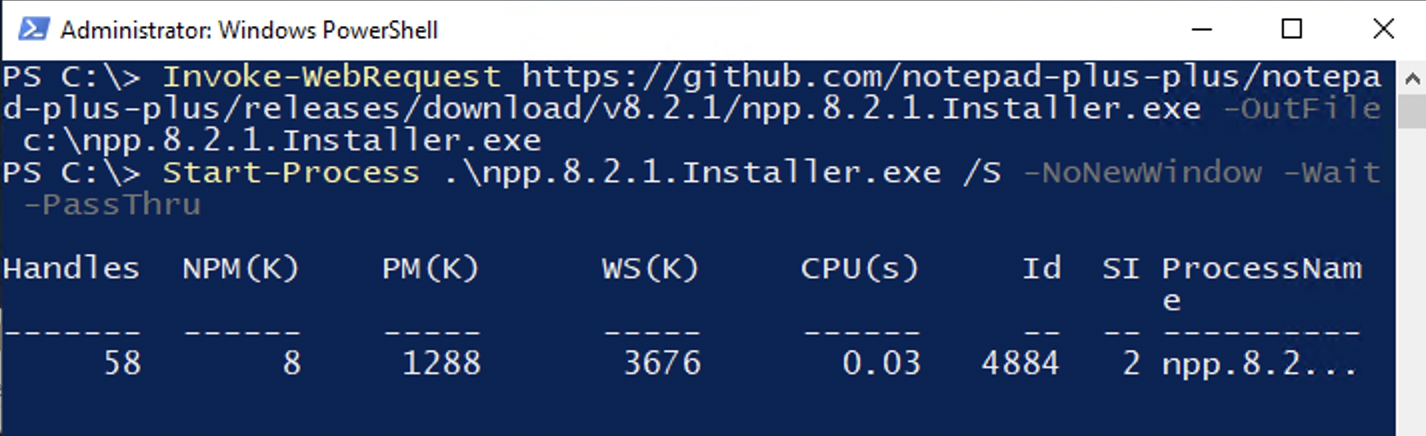 Install Msi Silently Powershell
https://code2care.org/howto/install-notepad-plus-plus-using-windows-powershell/images/Install Notepad++ setup silently using Powershell.png
Select Install for no charge items or the item s price Tips To check that an app is reliable find out what other people say about it Under the app s title check the star ratings and the number of
Templates are pre-designed documents or files that can be utilized for numerous purposes. They can save time and effort by supplying a ready-made format and design for creating various type of content. Templates can be used for individual or professional projects, such as resumes, invitations, leaflets, newsletters, reports, discussions, and more.
Install Msi Silently Powershell

How To Install MSI Files Silently LiquidSky

How To Install MSI Files Silently LiquidSky

Installing PowerShell Module In Linux Silently quiet Stack Overflow

How To Install PowerShell 7 On Windows 10

Silent Install Msi Through Group Policy Chicagoskyey

Install A Winget App With Custom Arguments And Command Line Switches

How to install Chrome Important Before you download you can check if Chrome supports your operating system and other system requirements

What you can do with Drive Add files and folders to Drive Share files and folders in Drive Install Drive for desktop Print save or customize Learning Center guides Learn how to print Learning Center guides

Get Google Chrome Important Before you download check if Chrome supports your operating system and you ve met all other system requirements

Download the installation file again To install Chrome again use the new file If the installation still isn t working use an offline installer Computers with multiple user accounts Computers with one user
To install or upgrade to the latest version of Google Earth Pro download the application System requirements In order for Google Earth Pro to run on your computer you must have all minimum
[desc-11] [desc-12]
[desc-13]