How To Make A Hard Drive Bootable Using Cmd Bootable Hdd Japancruise jp How To Make A Hard Drive Bootable From Dvd Image For Os X On Windows 4 Easy Way To Create Bootable USB For Windows 7 8 10 N morn k Stonanie Efektn aty Create Windows 10 Bootable Hard Drive Four Methods To Make External Hard Drive Bootable Windows 10 Official Google Business Profile Help Center where you can find tips and tutorials on using Google Business Profile and other answers to frequently asked questions
On your computer open Chrome At the top right select More Settings On the left select On startup Open the New Tab page You can add update or remove phone numbers on your Google Account Phone numbers are used for different reasons and you have controls to manage how your numbers are used
Four Methods To Make External Hard Drive Bootable Windows 10 How To Create Windows 11 Bootable Usb Drive Youth Skill Development Four Methods To Make External Hard Drive Bootable Windows 10 MiniTool Hard Drive Utility Windows 10 Hoodmokasin How To Make A Pendrive Bootable Using CMD Command Prompt Step By Know How To Make Partition Bootable In Windows Using CMD OR Diskpart Complete Guide How To Make A Bootable USB Pendrive Windows 10 Make A Hard Drive Bootable For Os X On Windows Pagesfoo Disk Formatting Tool Bootable Masclear
How To Make A Hard Drive Bootable Using Cmd
 How To Make A Hard Drive Bootable Using Cmd
https://www.isumsoft.com/images/windows-10/make-external-hard-drive-bootable-windows-10/make-external-hard-drive-bootable-rufus.png
With a Business Profile on Google you can manage how your business shows up on Maps and Search at no charge Whether you own a storefront business or provide services where your
Templates are pre-designed documents or files that can be utilized for different functions. They can conserve effort and time by offering a ready-made format and design for developing different kinds of content. Templates can be used for personal or expert tasks, such as resumes, invites, flyers, newsletters, reports, discussions, and more.
How To Make A Hard Drive Bootable Using Cmd
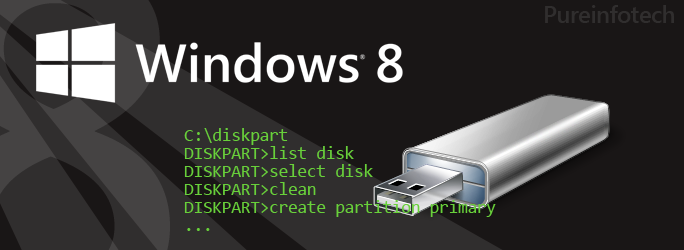
How To Create A Windows 8 Bootable USB Using The Command Prompt step
How To Create Windows 11 Bootable Usb Drive Youth Skill Development

Four Methods To Make External Hard Drive Bootable Windows 10 MiniTool
Hard Drive Utility Windows 10 Hoodmokasin
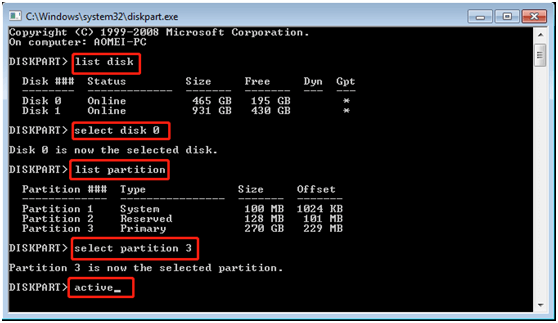
Know How To Make Partition Bootable In Windows Using CMD OR Diskpart
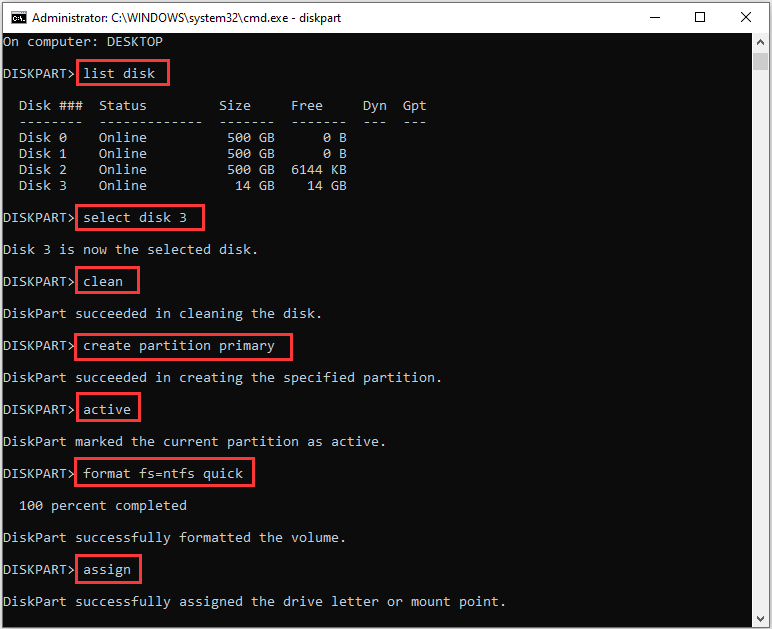
Complete Guide How To Make A Bootable USB Pendrive Windows 10

Create an account Tip To use Gmail for your business a Google Workspace account might be better for you than a personal Google Account

To find your username follow these steps You need to know A phone number or the recovery email address for the account

To use Chrome on Mac you need macOS Big Sur 11 and up On your computer download the installation file Open the file named quot googlechrome dmg quot

You can browse the web more privately in Incognito mode Open Incognito mode Important When you use an Incognito window you can browse more privately
You can upload open share and edit files with Google Drive When you upload a file to Google Drive it will take up space in your Drive even if you upload to a folder owned by someone else
[desc-11] [desc-12]
[desc-13]