How To Make A Drive Bootable Using Command Prompt How To Create A Bootable USB To Install Windows 10 Using The Command How To Bootable Pen Drive With Coding Technical Solves How To Create Windows 11 Bootable USB Disk Using Command Prompt cmd How To Make Bootable Pendrive Without Software Using Command Prompt Create A Bootable USB Pendrive By Using Cmd Command Prompt DESKDECODE COM Web Aug 10 2023 nbsp 0183 32 1 Download or create an image file If you have an image file such as a quot iso quot quot img quot quot usb quot or quot vhd quot file that you want to turn into a bootable USB drive great
Web Oct 1 2021 nbsp 0183 32 Type the following command to make the USB flash drive bootable and press Enter format FS FAT32 quick Type the following command to assign a volume and a drive letter for the USB flash drive Web Dec 4 2020 nbsp 0183 32 Formatting the flash drive First of all plug in a flash drive with a minimum of 4GB of capacity Now go to windows explorer right click on your flash drive and format it
Create A Bootable USB Pendrive By Using Cmd Command Prompt DESKDECODE COM How To Make Pendrive Bootable Using Command Prompt YouTube Complete Guide How To Make A Bootable USB Pendrive Windows 10 How To Create Bootable USB Without Any Software In Windows 10 Using Create A Bootable Usb Drive Windows 10 Using Command Prompt Pasanational Know How To Make Partition Bootable In Windows Using CMD OR Diskpart 4 Easy Way To Create Bootable USB For Windows 7 8 10 How To Format A Bootable USB Drive In Windows 10 EaseUS HOW TO CREATE BOOTABLE USB DISK BOOTABLE PENDRIVE ElecDude
How To Make A Drive Bootable Using Command Prompt
 How To Make A Drive Bootable Using Command Prompt
https://diarioinforme.com/en/wp-content/uploads/2022/11/How-to-create-a-bootable-USB-to-install-Windows-10.jpg
Web May 2 2020 nbsp 0183 32 Creating MBR Bootable USB Drive The Easiest Way 8 Type create partition primary and hit Enter You will now get a prompt DiskPart succeeded in
Pre-crafted templates use a time-saving service for creating a diverse variety of files and files. These pre-designed formats and designs can be used for various personal and professional tasks, including resumes, invites, flyers, newsletters, reports, presentations, and more, improving the material production process.
How To Make A Drive Bootable Using Command Prompt

How To Make A Pendrive Bootable Using CMD Command Prompt Step By

How To Make Pendrive Bootable Using Command Prompt YouTube
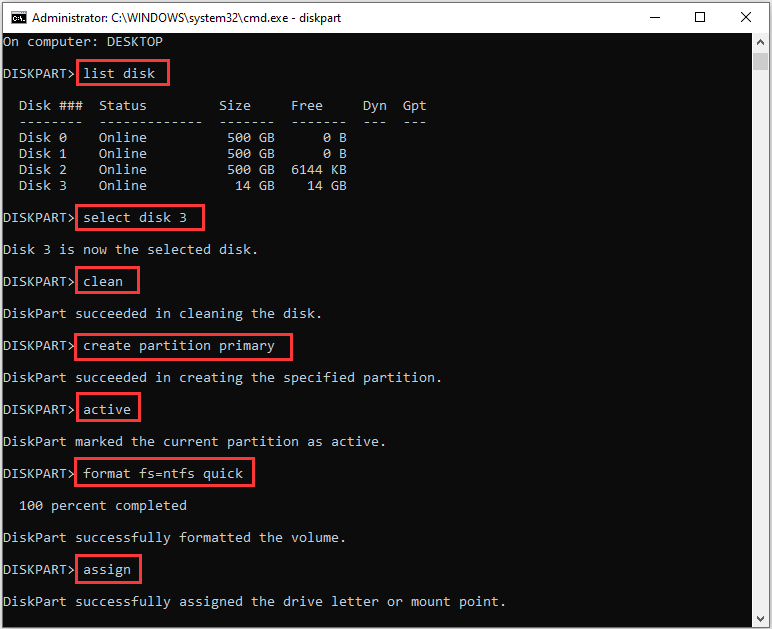
Complete Guide How To Make A Bootable USB Pendrive Windows 10
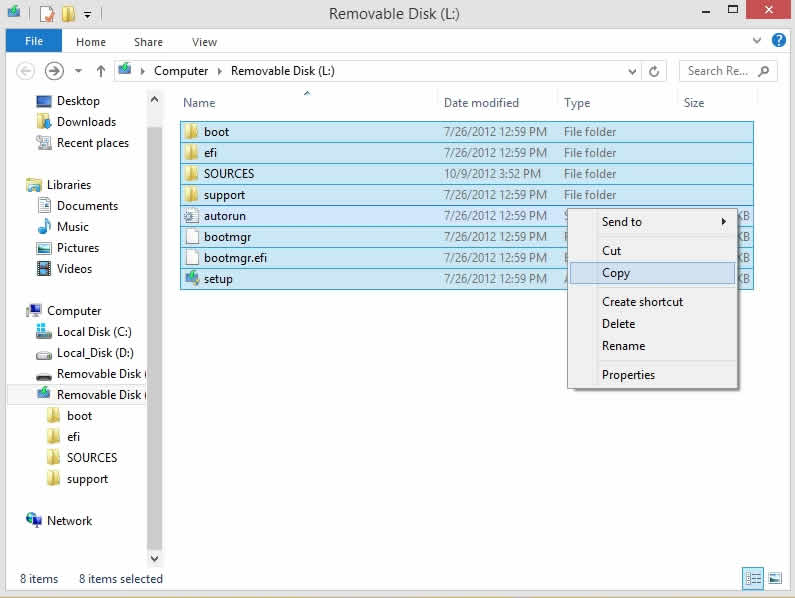
How To Create Bootable USB Without Any Software In Windows 10 Using
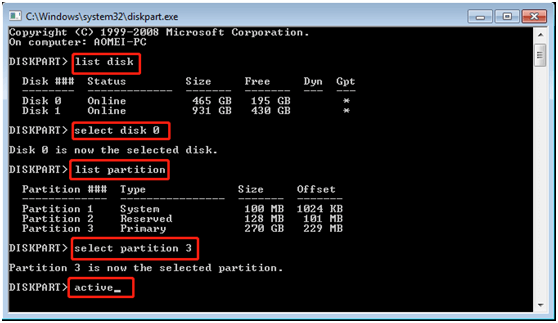
Know How To Make Partition Bootable In Windows Using CMD OR Diskpart

4 Easy Way To Create Bootable USB For Windows 7 8 10

Web Feb 17 2023 nbsp 0183 32 Type the following command to make the USB flash drive bootable and press Enter format FS NTFS quick Quick tip If you re creating a bootable media for a
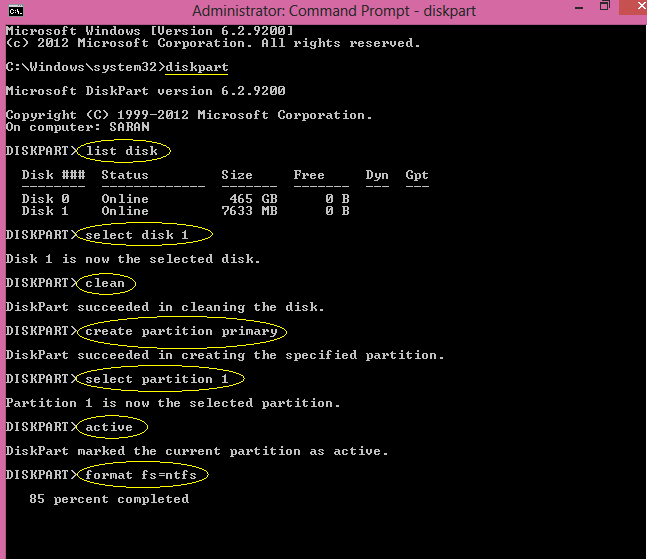
Web Aug 4 2022 nbsp 0183 32 Select Start and type CMD in the search field right click on CMD exe and select Run as administrator Alternatively go to Start gt All programs gt Accessories gt right click on Command Prompt and select

Web Oct 30 2023 nbsp 0183 32 1 How to Create Windows 11 Bootable USB for Supported or Unsupported Hardware 2 How to Make Bootable USB for any OS using Rufus Create a Bootable
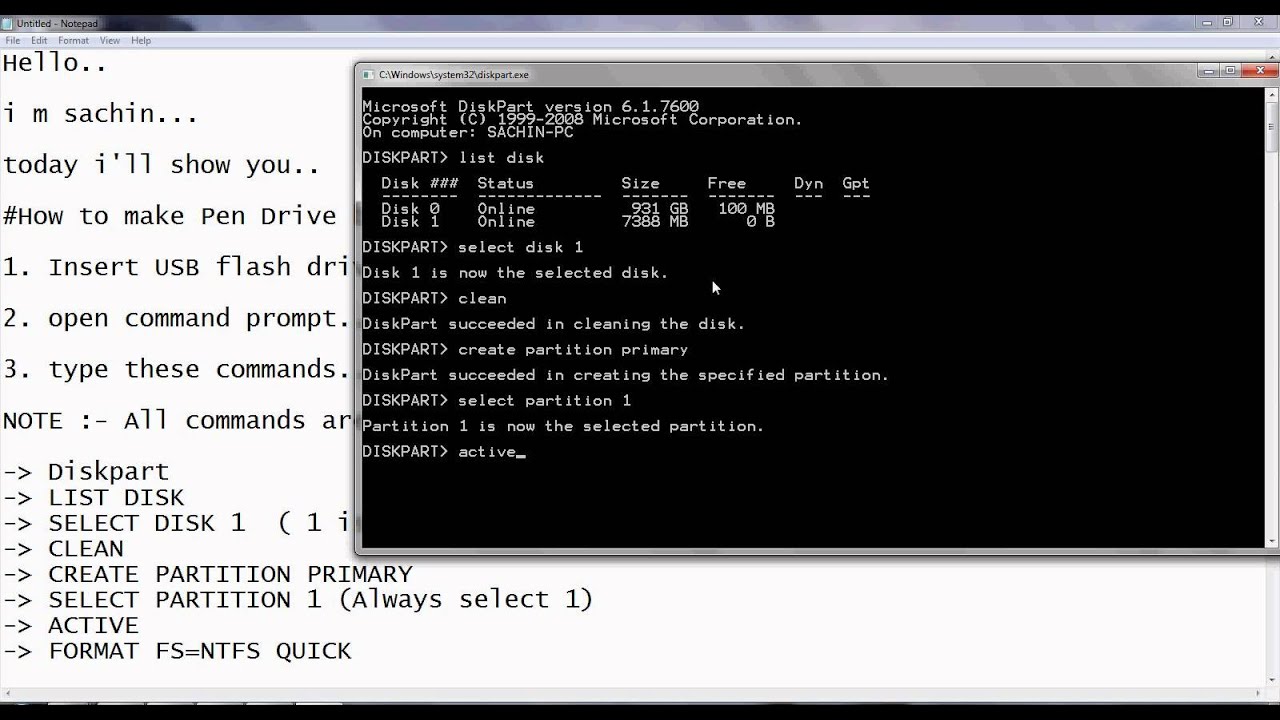
Web May 18 2022 nbsp 0183 32 At the command prompt type select disk lt X gt where X is the drive number or drive letter of the USB flash drive and then click ENTER Type clean and the click
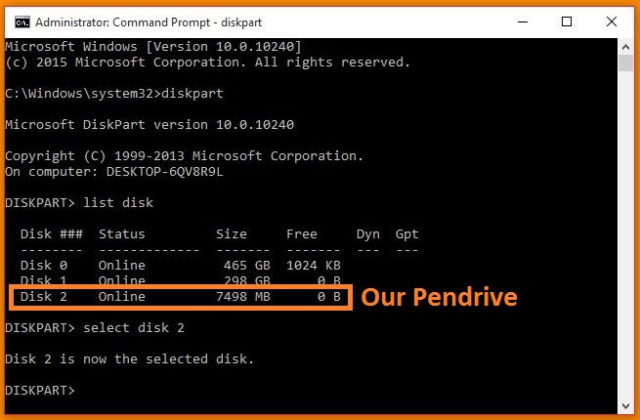
Web Jan 1 2016 nbsp 0183 32 In the begining of last year or the end of 2014 I learnt how to make a bootable flash drive from an iso from a youtube video I tried to find the video but I can t and it s
Web Nov 6 2023 nbsp 0183 32 Select the Windows ISO file and click Open Click the drop down under the Image option and select Standard Windows 11 Installation Leave the Partition Web May 12 2023 nbsp 0183 32 Step 1 Launch CMD tool Press Win R on your keyboard to open Run box and type cmd hand press Enter Step 2 Type diskpart and press Enter Step 3
Web Aug 9 2023 nbsp 0183 32 Step 1 Format the USB Drive Insert the USB drive into an available USB port on your computer Press Win S type quot Command Prompt quot right click on it and select