Git Make Branch Match Origin Git YouTube Git blablabla Git Push Origin Myfeature Install Git On Windows How Git Branches Work Git Hakk nda Merak Edilenler Git Nedir Nas l Kullan l r Emircan Aksu WEB Remote Branches Remote references are references pointers in your remote repositories including branches tags and so on You can get a full list of remote references explicitly with git ls remote lt remote gt or git remote show lt remote gt for remote branches as well as more information
WEB The git branch command does more than just create and delete branches If you run it with no arguments you get a simple listing of your current branches git branch iss53 master testing Notice the character that prefixes the master branch it indicates the branch that you currently have checked out i e the branch that HEAD points to WEB Dec 27 2023 nbsp 0183 32 Reset your local branch to match origin and get up to date Resetting overwrites your local history so do it carefully But when used properly it s a vital tool to sync your local environment with the remote state In this comprehensive guide you ll learn When and why to reset your local branch How to safely backup your local work
Git Hakk nda Merak Edilenler Git Nedir Nas l Kullan l r Emircan Aksu How To Create A New Branch In Git Git Super charging git Rebase With git Absorb DevsDay ru Matchday Origin Git Gitkraken Rashad Mirza Blog Git Cheat Sheet Git Pearltrees
Git Make Branch Match Origin
 Git Make Branch Match Origin
https://i.ytimg.com/vi/Vx3-aMnd-bs/maxresdefault.jpg
WEB Jul 6 2024 nbsp 0183 32 When multiple developers work on the same branch everyone must synchronize their branches frequently to ensure their local copy reflects the latest
Templates are pre-designed documents or files that can be utilized for different purposes. They can save effort and time by offering a ready-made format and design for producing various type of content. Templates can be utilized for individual or professional jobs, such as resumes, invites, flyers, newsletters, reports, presentations, and more.
Git Make Branch Match Origin
gitattributes Best Practices Muhammad Rehan Saeed
How To Create A New Branch In Git

Git
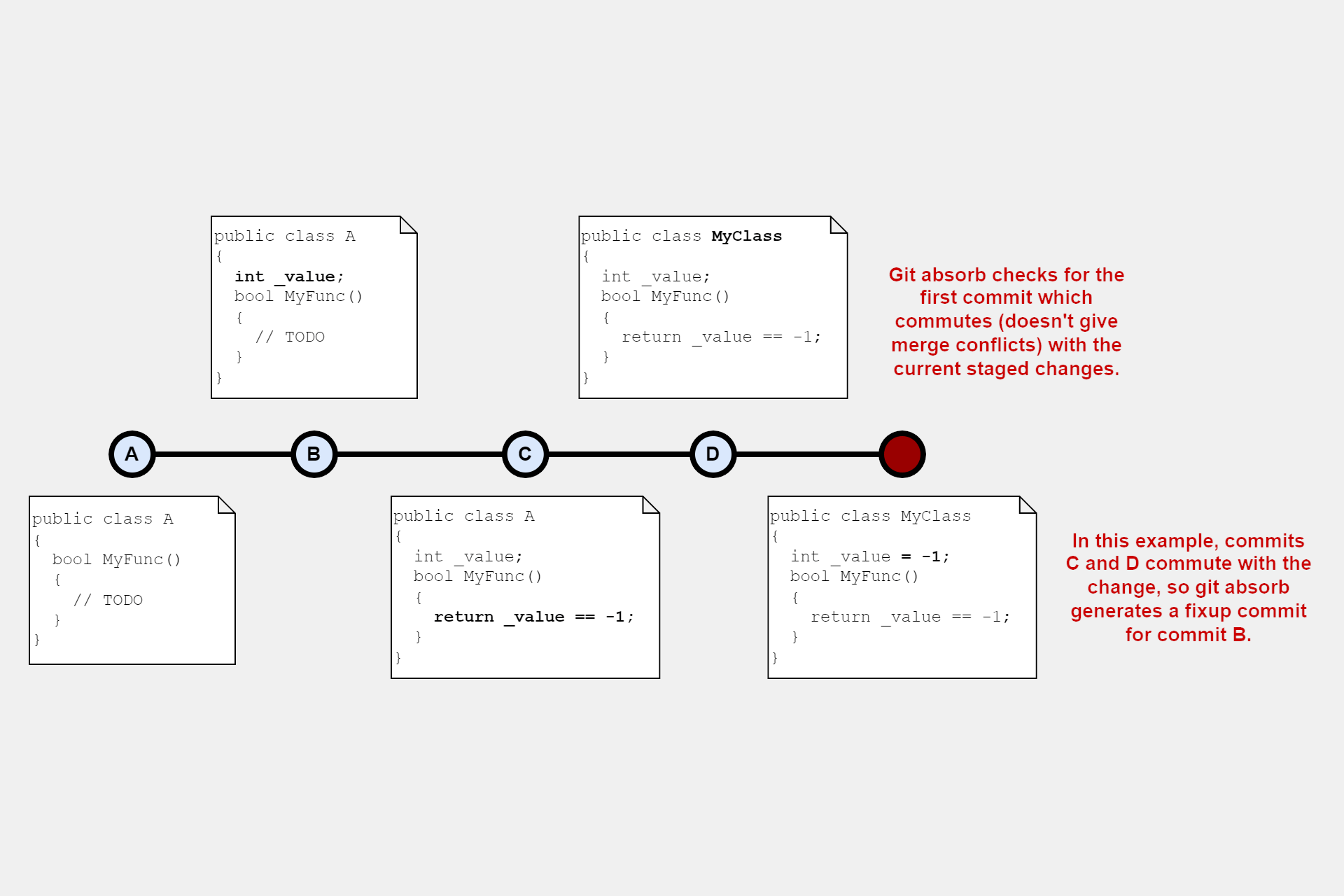
Super charging git Rebase With git Absorb DevsDay ru

Origin

Git Gitkraken

WEB Feb 17 2019 nbsp 0183 32 When a remote repository is initially cloned copies of all branches are stored in your local repository view them with git branch r To update these copies and make them current i e sync them with the remote branch use git fetch

WEB Mar 17 2019 nbsp 0183 32 I made committed and pushed changes to brancha this includes creating committing and pushing new files Now I want to make brancha the exact same content as origin master again because say my changes were wrong and a

WEB Jun 22 2022 nbsp 0183 32 When working on a project one of the challenges you may face is trying to synchronize your work specifically syncing local and remote branches In this article you will learn how to reset and exactly match a local Git branch to a remote branch Here is what we will cover

WEB When creating a new branch set up branch lt name gt remote and branch lt name gt merge configuration entries to set quot upstream quot tracking configuration for the new branch This configuration will tell git to show the relationship between the two branches in

WEB Mar 8 2021 nbsp 0183 32 Now run the command below to reset your remote branch to origin If you have a different remote and default branch name not origin or main respectively just replace them with the appropriate name git fetch origin git reset hard origin main
WEB Feb 22 2024 nbsp 0183 32 To reset a Git branch to match the master branch you can use the git reset command Here are the steps you can follow 1 Make sure you are on the branch you want to reset git checkout WEB Oct 30 2023 nbsp 0183 32 Resetting gives you an easy way to undo changes and synchronize your local repository with the remote This guide will walk through the steps to reset a Git branch to the origin version using the command line
WEB Pulling to your local branch from the remote In GitHub Desktop use the Current Branch drop down and select the local branch you want to update To check for commits on the remote branch click Fetch origin To pull any commits from the remote branch click Pull origin or Pull origin with rebase