Cricut Flatten Without Print How To Flatten In Cricut Design Space || Cricut Design Space Basics How To Flatten In Cricut Design Space || Cricut Design Space Basics How to Use Flatten in Cricut Design Space - Sarah Maker How To Flatten In Cricut Design Space || Cricut Design Space Basics How To Flatten In Cricut Design Space || Cricut Design Space Basics Flattening turns a cut image into a printable image to use with your Cricut Cricut Flatten is one of the five tools at the bottom of the Layers
In short the flatten tool allows you to turn an image with multiple layers each labeled Basic Cut in the images in this post into one layer CRICUT DESIGN SPACE CHEAT SHEET Actions Weld Slice Group Flatten Attach WELD Welding joins image printable NOT FLATTENED FLATTENED
How To Flatten In Cricut Design Space || Cricut Design Space Basics How To Flatten In Cricut Design Space || Cricut Design Space Basics Using Flatten in Cricut Design Space - Hey, Let's Make Stuff Using Flatten in Cricut Design Space - Hey, Let's Make Stuff Cricut Flatten Guide: What Does Flatten Do In Cricut Design Space? Why is my Cricut cutting the inside of my print then cut image?" • Lydia Watts How to Flatten in Cricut Design Space Tip of the Day: Cricut - Attach versus Flatten from Cricut® - YouTube Cricut Weld vs Attach: When Do I Group, Attach, Slice, or Weld? - Jennifer Maker
Cricut Flatten Without Print
 Cricut Flatten Without Print
https://www.practicallyfunctional.com/wp-content/uploads/2020/01/how-to-flatten-images-in-cricut-design-space-to-print-only-without-cutting-2.png
Use flatten to merge together layers for print and cut this tool sticks all of the layers together into one printable layer The only use for
Pre-crafted templates offer a time-saving service for developing a varied series of documents and files. These pre-designed formats and layouts can be utilized for various personal and professional projects, consisting of resumes, invitations, leaflets, newsletters, reports, discussions, and more, simplifying the content creation process.
Cricut Flatten Without Print
Using Flatten in Cricut Design Space - Hey, Let's Make Stuff

How To Flatten In Cricut Design Space || Cricut Design Space Basics
Using Flatten in Cricut Design Space - Hey, Let's Make Stuff
Using Flatten in Cricut Design Space - Hey, Let's Make Stuff

Why is my Cricut cutting the inside of my print then cut image?" • Lydia Watts

How to Flatten in Cricut Design Space

Anna Rose demonstrates in Cricut Design Space the difference between Attach and Flatten

I am tackling the Cricut flatten feature today to explain this function in more detail This is great

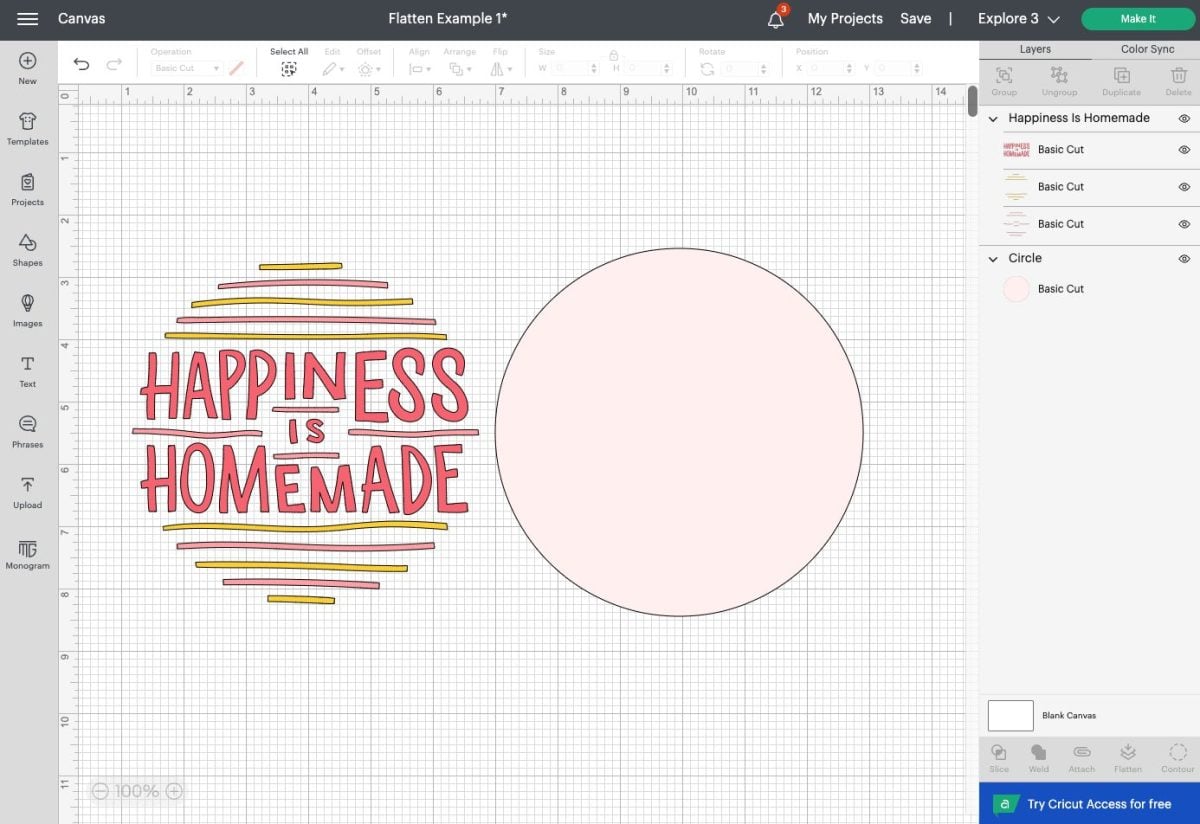
You should use Flatten when you have more than one object or more than one layer on top of the other and you only want your Cricut to cut the

Unflatten a Printable Image from the Cricut library so it can be cut One really cool way to use the Cricut Flatten tool is actually to not use

What Does Flatten Mean On Cricut Select the layers you would like to flatten together by clicking select all or by holding down ctrl while
The flatten tool is available in the layers panel and allows you to turn any image into a printable image to use with the Print Then Cut feature Select All and click Flatten at the bottom of the Layers panel Click Make It button to print your image on your home printer and cut out on your machine
You can convert any image into a printable image by changing the Linetype If you want to convert multiple layers to print together you can use the Flatten