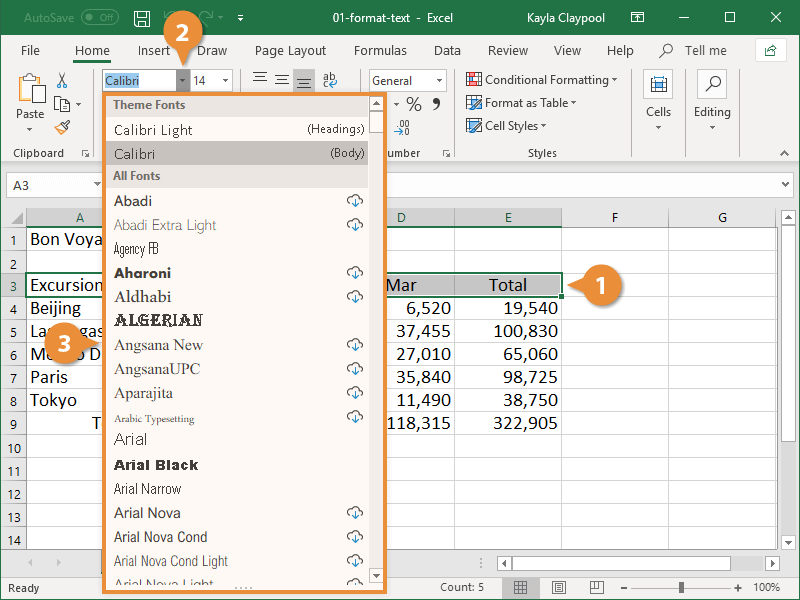
Excel Text Formats How To Format Text In Excel CustomGuide Excel Keyboard Shortcuts Tabellen Export Excel MS Excel How To Format Text In Excel CustomGuide Web Jul 1 2016 nbsp 0183 32 Press Ctrl 1 shortcut Right click the cell or press Shift F10 and select Format Cells from the pop up menu Click the Dialog Box Launcher arrow at the bottom right corner of the Number Alignment or
Web Mar 20 2023 nbsp 0183 32 Format text the format that you want to apply It is supplied in the form of a format code enclosed in the quotation marks e g quot mm dd yy quot The TEXT function is available in all versions of Excel 365 Web Our videos are quick clean and to the point so you can learn Excel in less time and easily review key topics when needed Each video comes with its own practice worksheet View Paid Training amp Bundles In this video we
How To Format Text In Excel CustomGuide 7 Amazing Things Excel Text To Columns Can Do For You Excel Tutorials How To Convert Text Files Into Excel Using Vba Step By Step Guide Riset I Am A Perfect Converter And I Will Convert PDF To Word Excel Text D couvrir 177 Imagen Formule Text Excel Fr thptnganamst edu vn Clicksla blogg se March 2023 Lucidchart Org Chart Excel Hontampa Leistungsverzeichnis Vorlage Word Sch n Einnahmen Ausgaben Rechnung Data Tables In Microsoft Excel Data Tables Youtube Riset
Excel Text Formats
 Excel Text Formats
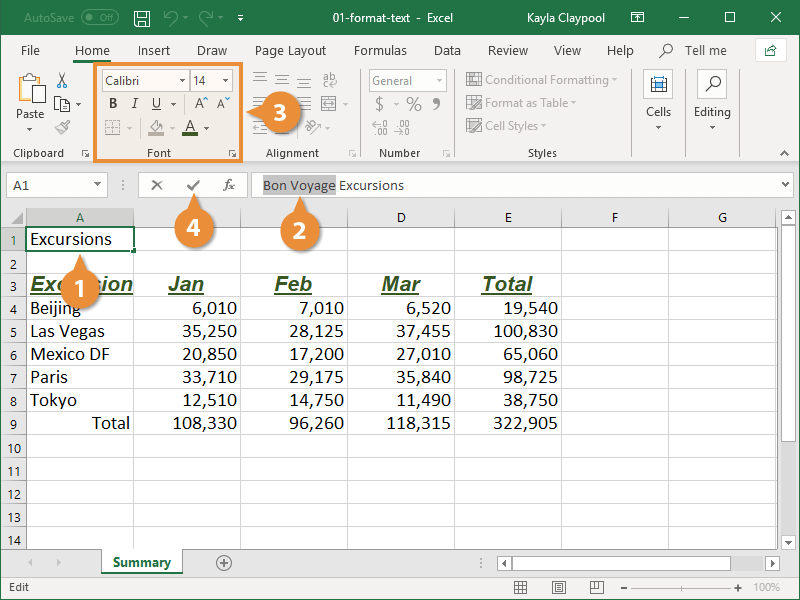
https://www.customguide.com/images/lessons/excel-2019/excel-2019--format-text--01.png
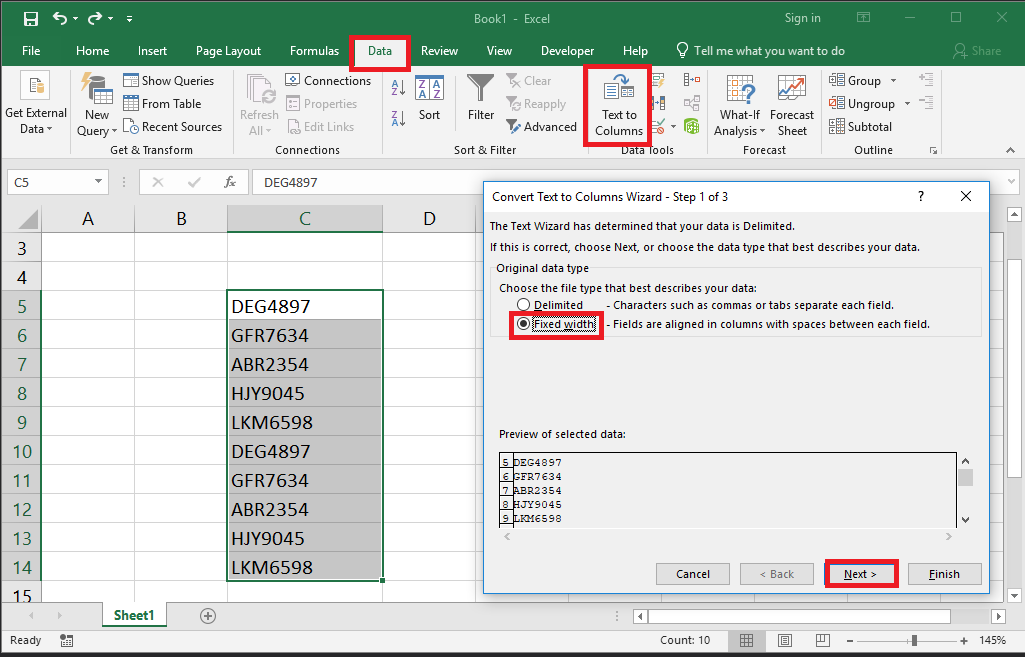
Web To export data from Excel to a text file use the Save As command and change the file type from the drop down menu There are two commonly used text file formats Delimited
Pre-crafted templates provide a time-saving option for developing a diverse range of files and files. These pre-designed formats and designs can be made use of for various individual and professional projects, including resumes, invites, flyers, newsletters, reports, discussions, and more, simplifying the content creation process.
Excel Text Formats

Mac Excel Text Import Wizard Column Data Format Hopdefiles

7 Amazing Things Excel Text To Columns Can Do For You Excel Tutorials
How To Convert Text Files Into Excel Using Vba Step By Step Guide Riset
I Am A Perfect Converter And I Will Convert PDF To Word Excel Text
Clicksla blogg se March 2023

Lucidchart Org Chart Excel Hontampa
Web The TEXT function takes two arguments value and format text Value is the number to be formatted as text and should be a numeric value If value is already text no formatting is applied Format text is a text string

Web Formatting text or numbers can make them appear more visible especially when you have a large worksheet Changing default formats includes things like changing the font color style size text alignment in a cell or apply

Web Jun 29 2021 nbsp 0183 32 This section discusses diverse uses of the TEXT function format codes e g combining the text with the number or date adding a leading zero and converting
Web 38 rows nbsp 0183 32 Formats a number and converts it to text TEXTAFTER function Returns text
Web If you want Excel to treat certain types of numbers as text you can use the text format instead of a number format For example If you are using credit card numbers or other number codes that contain 16 digits or
Web Formatting text in Excel includes color font name font size alignment font appearance in bold underline italic background color of the font cell etc Table of contents How to Web Jun 22 2023 nbsp 0183 32 The purpose of the TEXT function is to convert a number into text using a specific number format Syntax and arguments TEXT value format text value the
Web TEXT value format text A numeric value that you want to be converted into text A text string that defines the formatting that you want to be applied to the supplied value The