Excel Text Format Quarter Top 11 Excel Text Format Quotes Sayings How To Add Leading Zeros In Excel Text Format 10 Ways ExcelDemy How To Calculate Quarter And Year From Date In Excel TEXT Function In Excel Formula Examples How To Use TEXT Function Excel Text Functions English YouTube To calculate the quarter i e 1 2 3 4 for a given date you can use the ROUNDUP function together with the MONTH function In the example shown the formula in cell C5 is ROUNDUP MONTH B5 3 0 The result is 1 since January 31 is in the first quarter Generic formula ROUNDUP MONTH date 3 0 Explanation
6 Answers Sorted by 5 No quarters are not a customisable format The closest I think you could get would be to use a formula which has two potential limitations in place of the current value which would then no longer be a date INDEX Mar Jun Sep Dec ROUNDUP MONTH A1 3 0 TEXT A1 yyyy Here s a step by step guide on how to use the INT function to extract the quarter from a date Start by selecting the cell where you want the quarter to be displayed Enter the formula INT MONTH A1 1 3 1 where A1 is the cell containing the date Press Enter and the quarter corresponding to the date in cell A1 will be displayed
Excel Text Functions English YouTube SG 5322A By Pin On Ahsoka Tano How To Find Or Get Quarter From A Given Date In Excel Excel Convert String To Formula Format Dates As Yearly Quarters In Excel How To PakAccountants Tortugas Ninja Figura Ultimate Cartoon Metalhead 18 Cm Mastering TEXT Excel Formula Unlock Your Excel Potential How To Calculate Quarter End Date In Excel Haiper
Excel Text Format Quarter
 Excel Text Format Quarter
https://quotessayings.net/pics/excel-text-format-quote-by-john-owen-1579039.jpg
Excel might format it as 2 Feb If you change your date setting in Control Panel the default date format in Excel will change accordingly If you don t like the default date format you can choose another date format in Excel such as February 2 2012 or 2 2 12 You can also create your own custom format in Excel desktop
Templates are pre-designed files or files that can be used for numerous purposes. They can conserve time and effort by offering a ready-made format and layout for producing different sort of content. Templates can be used for individual or professional jobs, such as resumes, invites, flyers, newsletters, reports, discussions, and more.
Excel Text Format Quarter

What Is Datasheet View In Excel ExcelDemy

SG 5322A By

Pin On Ahsoka Tano
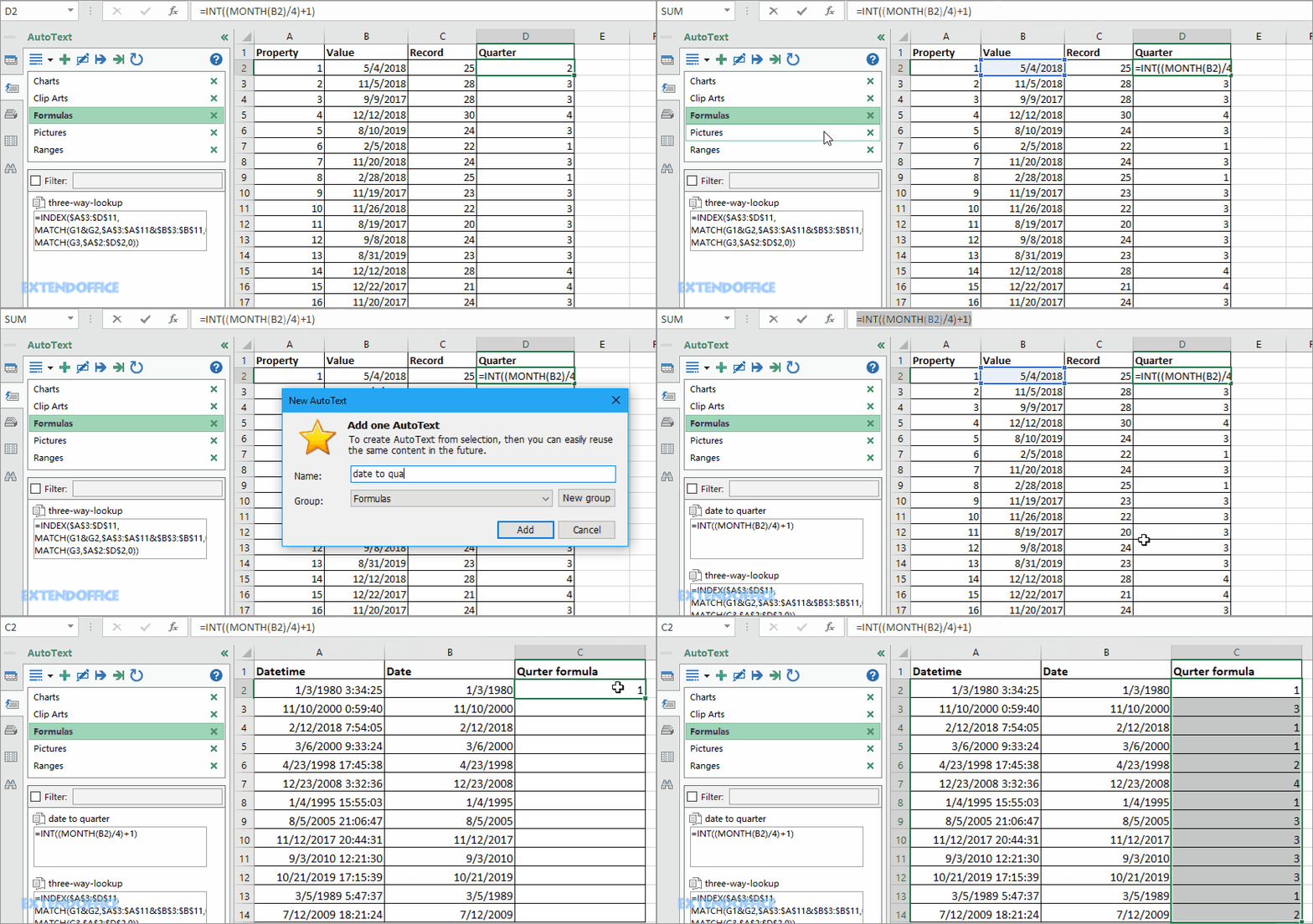
How To Find Or Get Quarter From A Given Date In Excel
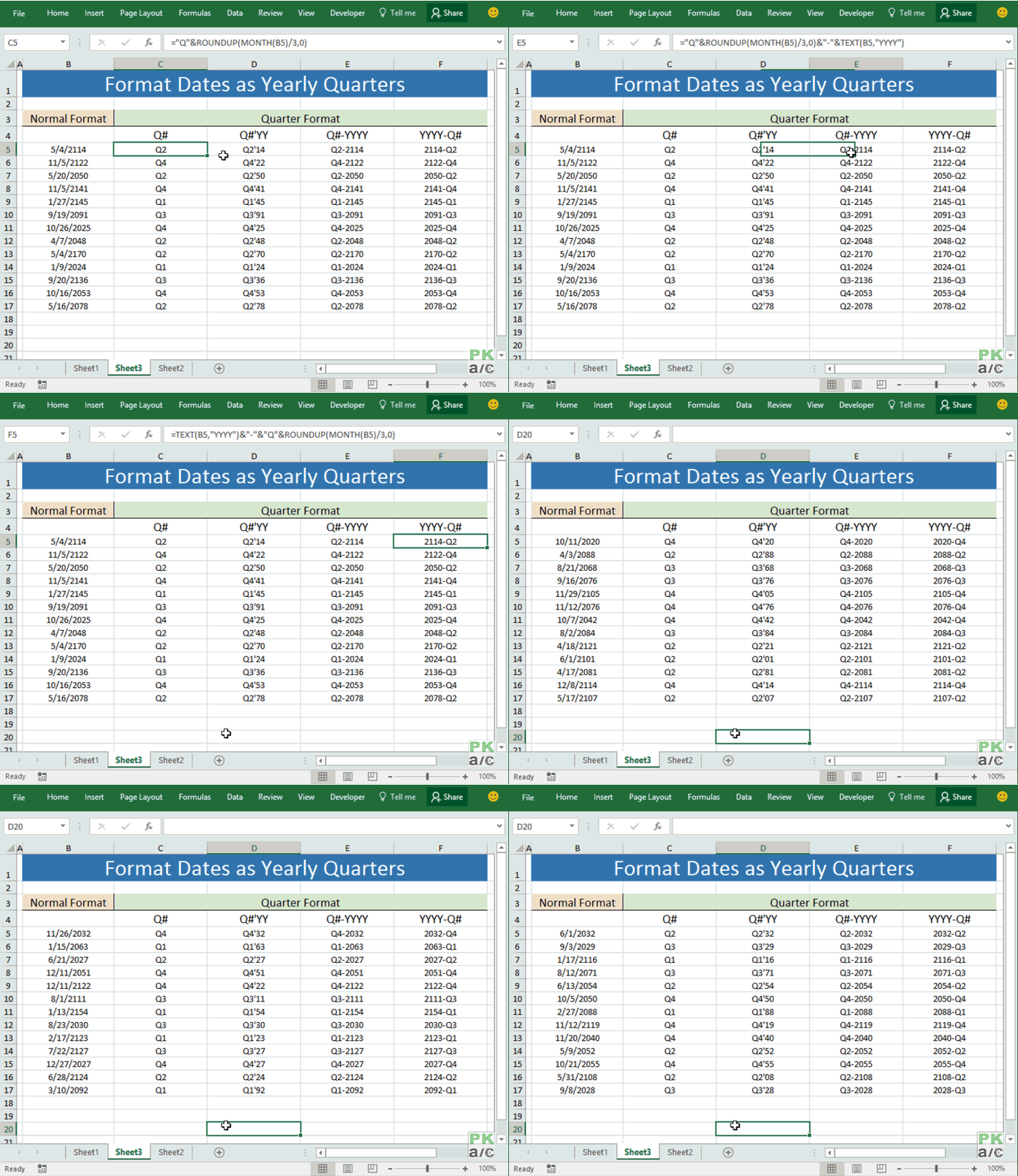
Format Dates As Yearly Quarters In Excel How To PakAccountants

Tortugas Ninja Figura Ultimate Cartoon Metalhead 18 Cm

How do you extract the quarter from an Excel date This blog post explains all the different ways to extract the quarter from an Excel date You can choose the method best suited to your situation whether it be formulas VBA Power Query Pivot Table Power Pivot or Office Scripts

Technical Details Overview In its simplest form the TEXT function says TEXT Value you want to format Format code you want to apply Here are some popular examples which you can copy directly into Excel to experiment with on your own Notice the format codes within quotation marks

How do you format dates as quarters I was looking to an answer to this question all over the internet this forum and some Excel expert forums and everything says 1 it can t be done or 2 it requires a reference cell formula or a lookup function basically data entered in a different cell s than the actual cell you want formatted
Formula 1 Convert Date to Quarter Only e g Q1 Q INT MONTH A1 2 3 Formula 2 Convert Date to Quarter and Year e g Q1 2022 Q INT MONTH A1 2 3 YEAR A1 Formula 3 Convert Date to Full Quarter Name and Year e g Quarter 1 2022 Quarter INT MONTH A1 2 3 YEAR A1
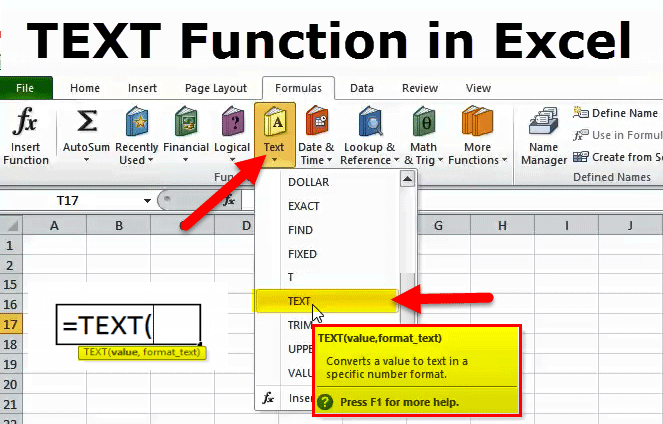
Here s a step by step guide on how to use the TEXT function to achieve this Select the cell where you want the quarter to appear Start typing TEXT in the formula bar Select the cell containing the date you want to convert Type a comma followed by the format code for quarters Q Press Enter to get the result
Here is a suggested formula for simple quarter analysis This will just give you the quarter number you can then use CONCATENATE to add text As stated by hyperslug a better way to do this is to use the following CONCATENATE Q ROUNDUP MONTH DATE YEAR A1 MONTH A1 3 DAY A1 3 0 Where Value the numeric value to be converted to text It can be a number date reference to a cell containing a numeric value or another function that returns a number or date Format text the format that you want to apply It is supplied in the form of a format code enclosed in the quotation marks e g mm dd yy The TEXT function is available in all versions of Excel 365 Excel 2021
The TEXT function returns a number formatted as text using the number format provided You can use the TEXT function to embed formatted numbers inside text The TEXT function takes two arguments value and format text Value is the number to be formatted as text and should be a numeric value If value is already text no formatting is applied Format text is a text string that contains the