Canva Adjust Image Size How To Use Canva To Resize Printables To Any Dimension Resizing In Canva Washongkong How To Use Canva Video Templates Printable Form Templates And Letter Can You Resize Frames In Canva WebsiteBuilderInsider Canva Un Outil Formidable M me Pour Les Photographes Web Dec 28 2021 nbsp 0183 32 1 Open your preferred web browser and navigate to Canva 2 Click on the Create a design button at the top and choose the Edit photo option from the menu 3 Upload the image from your PC and click on the Edit Photo option This will open your image in a project window 4
Web Launch the Canva app on your phone Tap on the Plus icon in the bottom right corner and select the Edit photo option Select your preferred size to start with and tap on Create Now tap on the three dot menu icon in the top right corner and select Resize from the list Web Oct 4 2023 nbsp 0183 32 Select the image Click on the image you want to resize Handles will appear on the edges of the image indicating that it s selected Resize proportionally To maintain the aspect ratio while resizing hold down the Shift key on your keyboard and click and drag any corner handle of the image
Canva Un Outil Formidable M me Pour Les Photographes How Do I Change The Aspect Ratio In Canva WebsiteBuilderInsider About Canva Company Archives Page 2 Of 9 Canva Templates How To Resize In Canva For Free 11 Steps with Pictures Video Resizer One click Video Resize Online Canva How To Change Size Of Text Box In Canva Bios Pics How Do I Reduce File Size In Canva WebsiteBuilderInsider How Do I Change The Width And Height Of An Image In Canva Web Design How Do I Change The Width And Height Of An Image In Canva
Canva Adjust Image Size
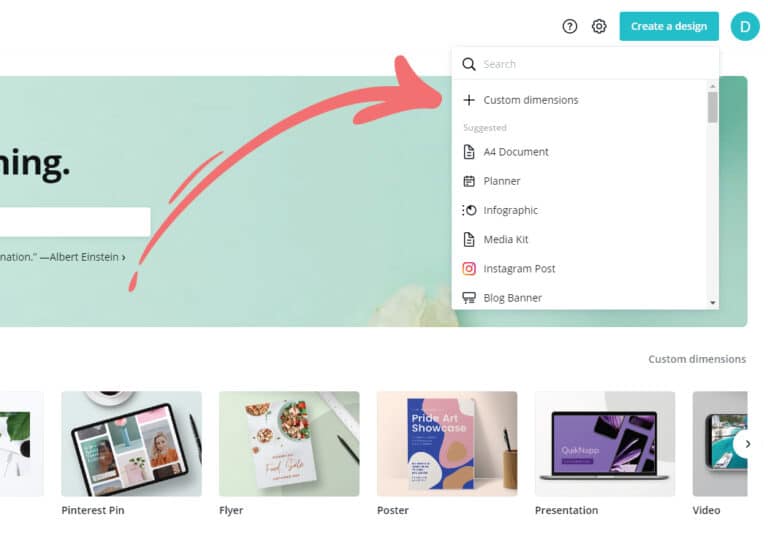 Canva Adjust Image Size
https://worldofprintables.com/wp-content/uploads/2020/07/canva-custom-dimensions-768x552.jpg
Web Aug 7 2023 nbsp 0183 32 How To Resize an Image in Canva Step by Step Instructions Canva now offers a dedicated image editor with BG Remover Blur and Duotone features all in one place However you still need to use the image in a design before resizing it Both Canva Pro and free users can customize the size of their pictures
Pre-crafted templates offer a time-saving option for producing a varied variety of files and files. These pre-designed formats and designs can be made use of for various individual and expert projects, consisting of resumes, invites, flyers, newsletters, reports, discussions, and more, improving the material production process.
Canva Adjust Image Size
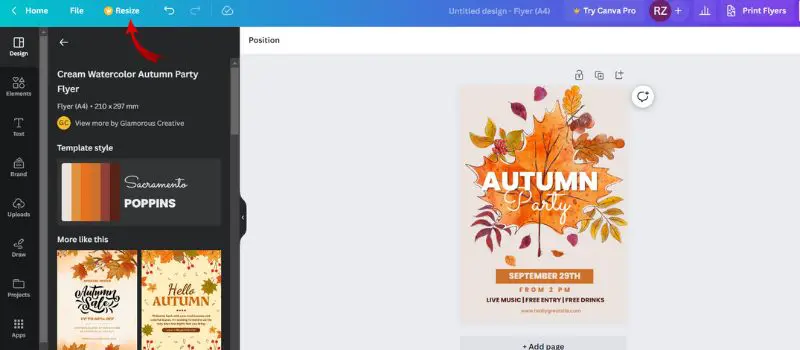
How To Change The Size Of A Design In Canva For Free Unlimited
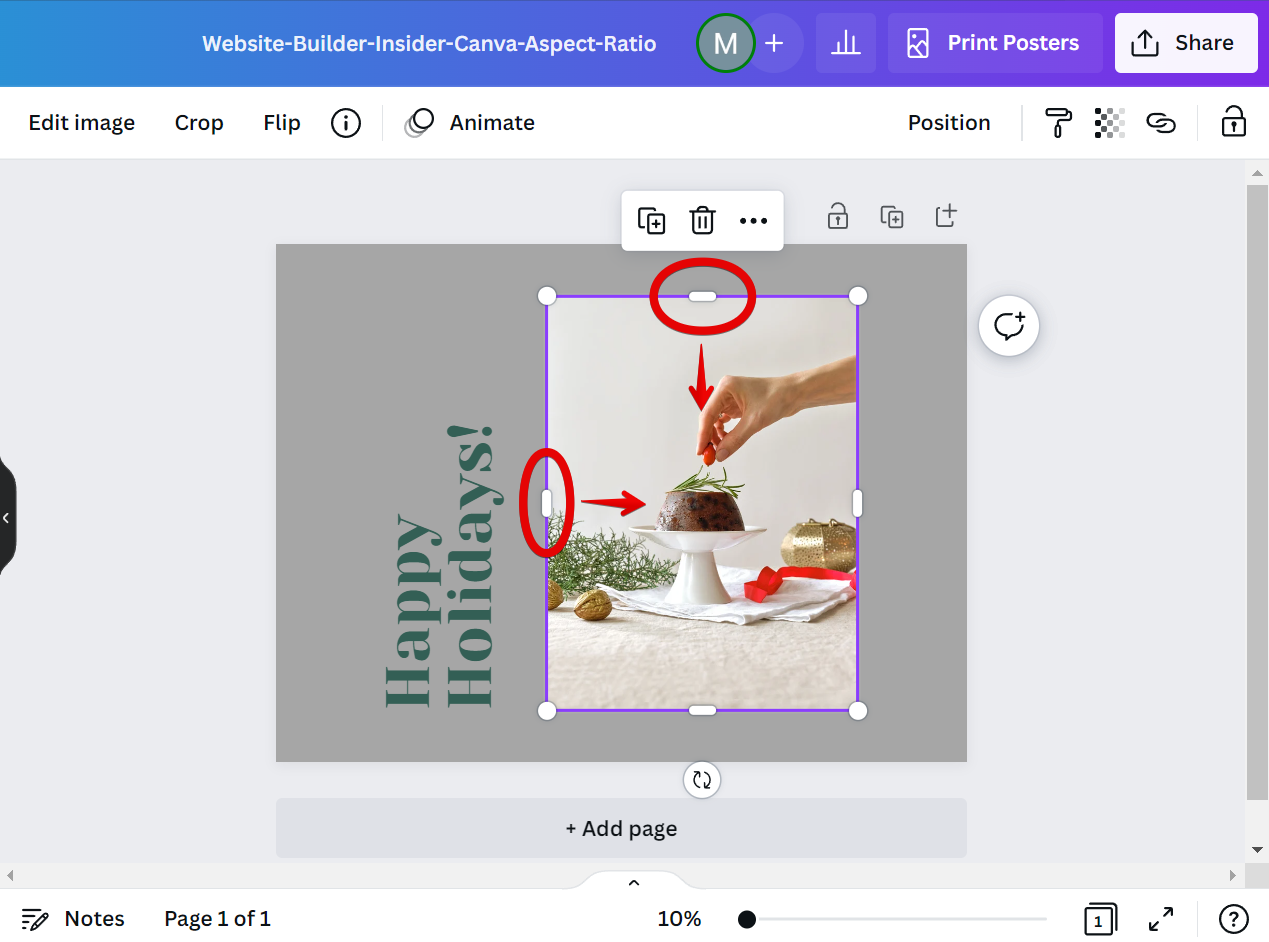
How Do I Change The Aspect Ratio In Canva WebsiteBuilderInsider

About Canva Company Archives Page 2 Of 9 Canva Templates
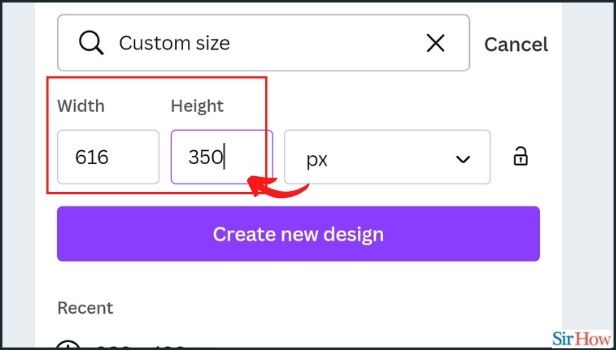
How To Resize In Canva For Free 11 Steps with Pictures
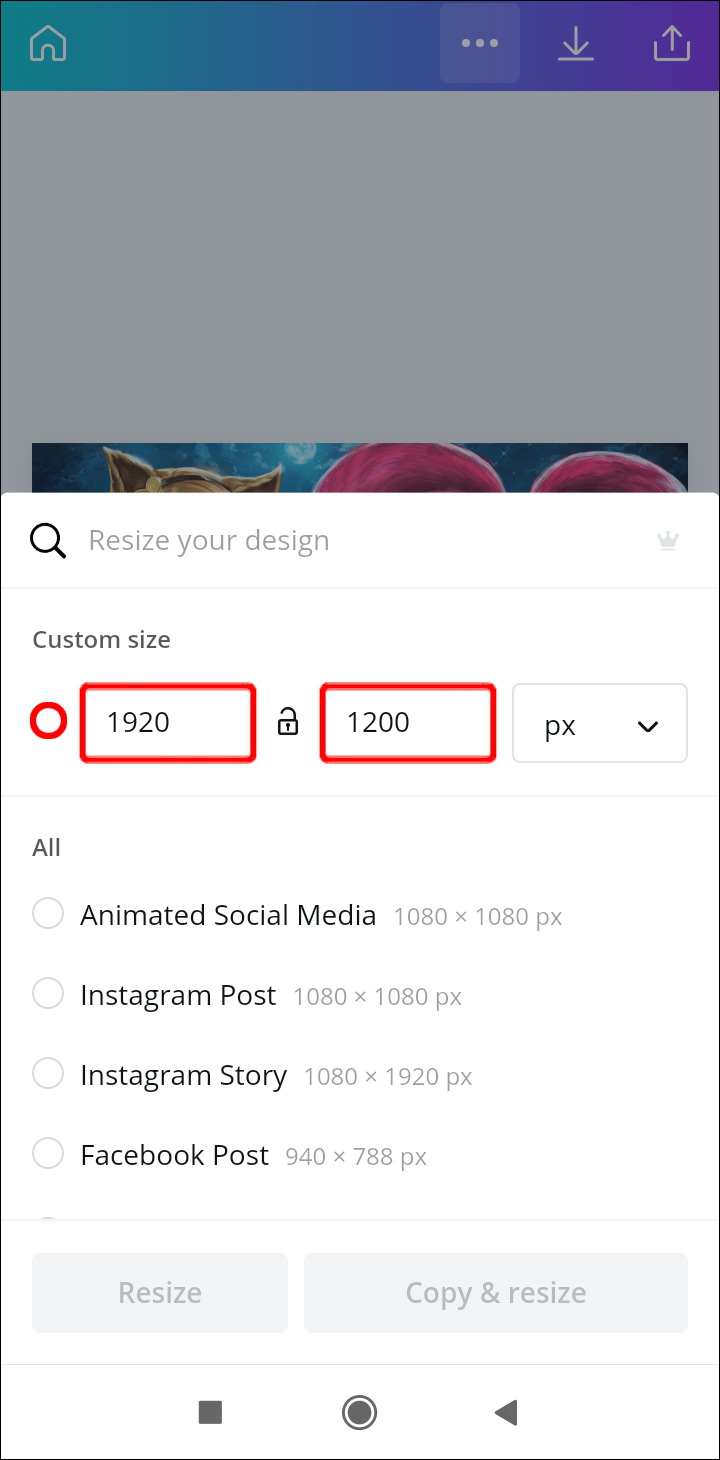
How To Change Size Of Text Box In Canva Bios Pics
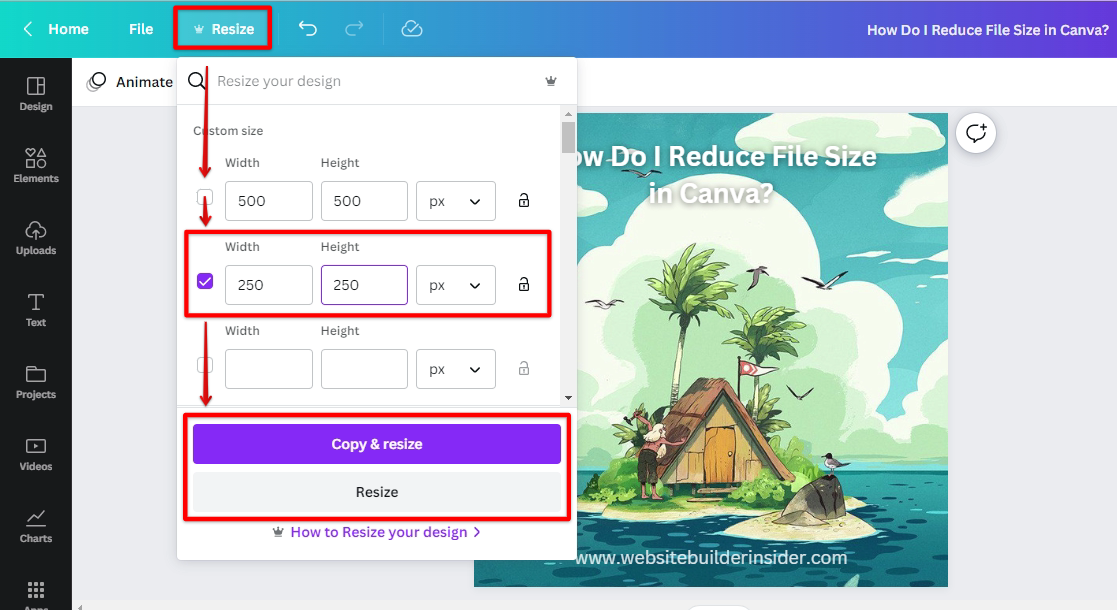
How Do I Reduce File Size In Canva WebsiteBuilderInsider
Web In this article we ll cover resizing designs the size limits for resizing and a workaround to dimensions outside the size limits Want to resize elements in your design instead Resize and crop elements Want a summary of your design in Canva Doc format Transform designs into Canva Docs

Web Magic Resize has had an upgrade Magic Switch uses the best AI tools to not only change the format but also transform it into something entirely new With Magic Switch you can Transform your design into any type of Doc like a blog post summary email or even a poem Resize one design into many for all channels

Web Mar 29 2020 nbsp 0183 32 In this Canva tutorial I ll show you how to use Magic Resize Image and Aspect Ratio allowing you to easily resize images with a single click to share them a
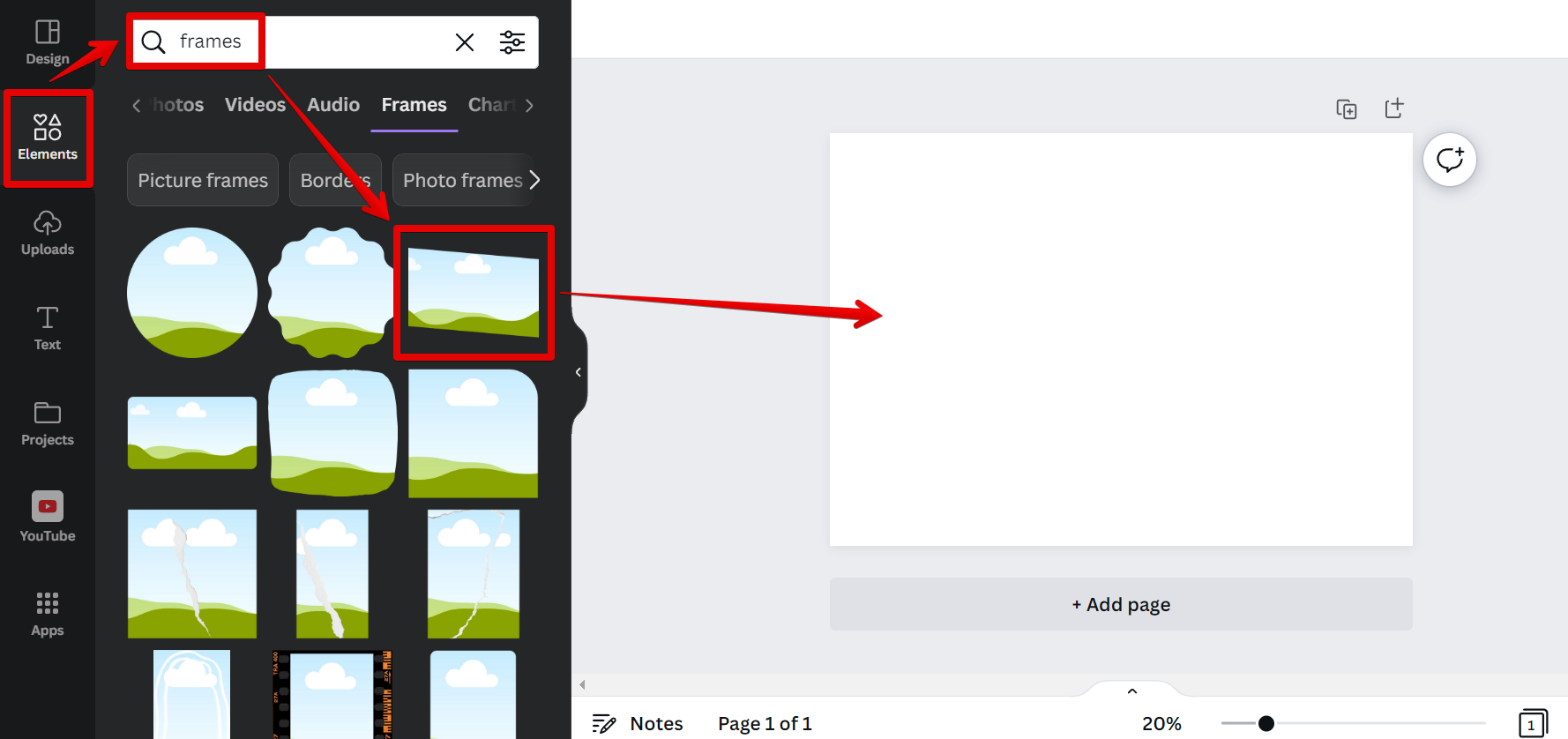
Web Mar 5 2024 nbsp 0183 32 How To Resize Images Or Graphics In Canva Step 1 Select Your Image In Canva By Clicking On It Step 2 Drag A Corner Handle Inward To Decrease The Image Size Step 3 Drag A Corner Handle Outward To Increase The Image Size Step 4 Select Multiple Images And Resize Together Optional

Web Jul 11 2023 nbsp 0183 32 Discover how to resize an image in Canva quickly and effortlessly We ll guide you through the step by step process demonstrating different methods to adjust image dimensions and
Web Adjust the brightness contrast saturation and other properties of the photos and videos in your designs You can also isolate photo adjustments to the background or foreground and color edit an object in your image To adjust your uploaded photos and videos use the adjust tab in the Canva photo editor and video editor respectively Web Dec 18 2023 nbsp 0183 32 Step 1 Log into the Canva platform using your normal sign in credentials You will be brought to the home page where you can choose the type of project that you want to begin Step 2 Open a new project canvas and insert the photo image that you want to resize on the platform
Web Lee Stanton May 13 2021 If you design visual content in Canva then you need to adjust the dimensions of each project to meet the requirements of different platforms Fortunately there are