Adobe Acrobat Compress Pdf C mo Comprimir Archivos PDF Y Reducir Su Tama o Compress PDF Using Adobe Acrobat Software RT Compress PDF Using Adobe Acrobat Software RT Compress Pdf Software RT Optimizing PDFs In Adobe Acrobat Pro Web Adobe Creative Cloud
Web Learn how to compress PDF files online or offline with Adobe Creative Cloud Discover the best ways to reduce file size optimize quality and scale or resize pages in Acrobat Follow simple steps and tips to make your PDFs smaller and easier to share Web Learn how to compress PDF files online with Adobe Creative Cloud Reduce the size of your PDFs without compromising quality or losing important information Follow the simple steps to upload compress and download your PDFs in minutes Try it for free today
Optimizing PDFs In Adobe Acrobat Pro 1 Open Your PDF Document You Want To Reduce Size In Adobe Acrobat How To Combine And Compress PDF Files Pinney Insurance Full Guide On How To Compress PDF In Adobe Acrobat Pro DC PDF IPentec Full Guide On How To Compress PDF In Adobe Acrobat Pro DC Full Guide On How To Compress PDF In Adobe Acrobat Pro DC How To Compress PDF File Without Adobe Acrobat How To Compress PDF File Without Adobe Acrobat
Adobe Acrobat Compress Pdf
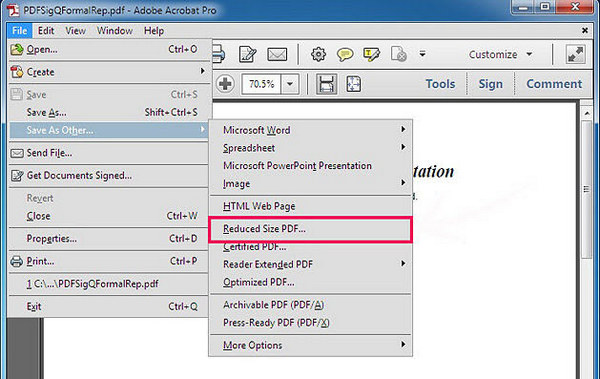 Adobe Acrobat Compress Pdf
https://www.aiseesoftware.es/wp-content/uploads/2017/03/como-comprimir-pdf-7.png
Web Oct 23 2023 nbsp 0183 32 Here s how to use Adobe Acrobat to compress PDF Step 1 Launch Adobe Acrobat Pro on your computer Access the quot Tools quot tab from the top menu bar and within this tab find and select the quot Optimize PDF quot option Step 2 Within the quot Optimize PDF quot tool click quot Open quot to access a file browser
Templates are pre-designed files or files that can be utilized for numerous purposes. They can conserve time and effort by supplying a ready-made format and layout for developing different type of material. Templates can be utilized for individual or professional projects, such as resumes, invites, flyers, newsletters, reports, presentations, and more.
Adobe Acrobat Compress Pdf
Comment Compresser Un PDF Dans Adobe Acrobat
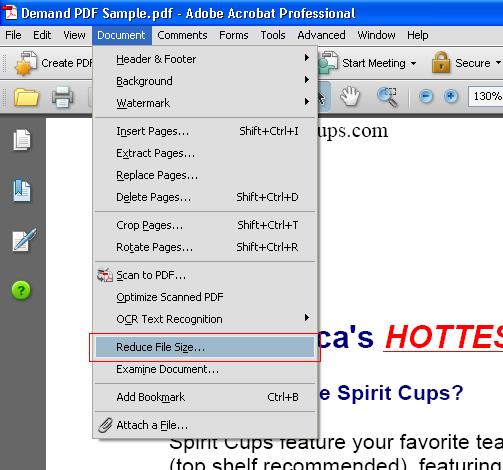
1 Open Your PDF Document You Want To Reduce Size In Adobe Acrobat

How To Combine And Compress PDF Files Pinney Insurance
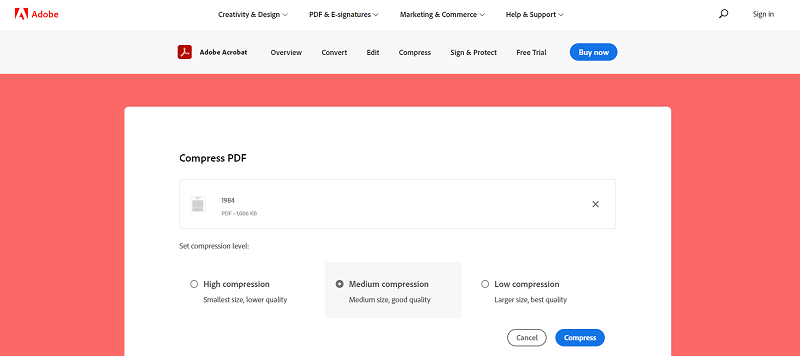
Full Guide On How To Compress PDF In Adobe Acrobat Pro DC

Full Guide On How To Compress PDF In Adobe Acrobat Pro DC
Full Guide On How To Compress PDF In Adobe Acrobat Pro DC
Web How to make a PDF file size smaller Visit Acrobat online services and navigate to the Compress page by clicking Compress in the menu Click or tap on the Select a file button Choose the file from your device or from a cloud service like Google Drive It must be no larger than 2GB Your file will

Web Do your best work online with Adobe Acrobat Convert files to PDF compress PDF documents and share and store your files with Adobe Acrobat Pro Start free trial

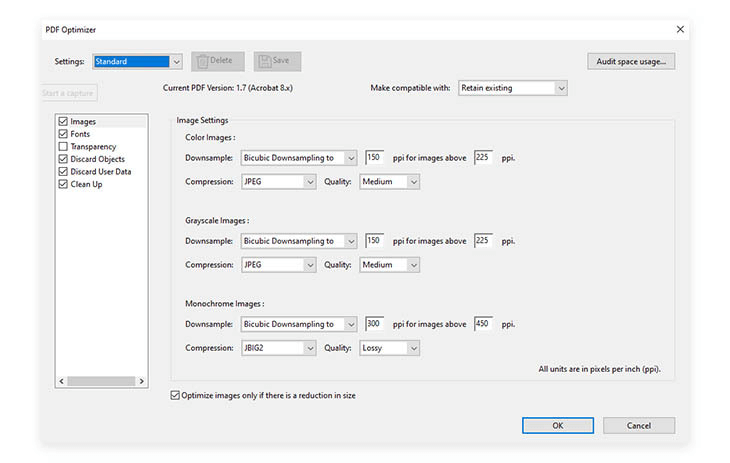
Web Oct 30 2023 nbsp 0183 32 The Acrobat PDF compression tool balances an optimized file size against the expected quality of images fonts and other file content Save using PDF optimizer Acrobat Pro PDF Optimizer provides many settings for reducing the size of PDF files

Web Feb 15 2022 nbsp 0183 32 Steps to compress PDF Sign in to Acrobat Web Document Cloud Home at https documentcloud adobe with your Adobe ID and password or with your social Facebook or Google account In the top navigation bar click Convert gt Compress PDF Do one of the following to select the PDF file that you want to compress and then click

Web Dec 28 2022 nbsp 0183 32 Click the Tools tab at the top left scroll down until you see the Optimize PDF tool then select Open from the drop down menu Select a file to compress In the Open dialog box select the Local Magazine Spring pdf sample file you downloaded or other PDF document you want to compress and click Open Select Reduce File Size in the top menu
[desc-11] [desc-12]
[desc-13]