Adobe Acrobat Xi Compress Pdf Full Guide On How To Compress PDF In Adobe Acrobat Pro DC Compress Pdf Using Adobe Reader Australia Guide Working Tutorials Full Guide On How To Compress PDF In Adobe Acrobat Pro DC How To Compress A PDF File How To Compress PDF In Adobe Acrobat DC 2019 Web Click the Tools tab at the top left scroll down until you see the Optimize PDF tool then select Open from the drop down menu Select a file to compress In the Open dialog box
Web Choose a file to compress 4 Click Reduce File Size in the top menu bar 5 Pick the file version compatibility 6 Rename and save your compressed PDF Depending on the original PDF size your new document size Web Jan 2 2015 nbsp 0183 32 4 Answers Sorted by 3 This is how I did it in Adobe Acrobat XI Standard no need for the Action Wizard no need for AutoIt The trick is to ensure no PDF files are open in Adobe Acrobat XI Standard Then the
How To Compress PDF In Adobe Acrobat DC 2019 Compress PDF Using Adobe Acrobat Software Review RT How To Compress A PDF Without Adobe Acrobat Free Methods How To Compress Optimize A PDF File Daves Computer Tips Compress PDF TrishTech Adobe Acrobat Pro Xi Compress Pdf Kasapmg Compress PDF Using Adobe Acrobat Software RT ADOBE ACROBAT XI PRO WITH CRACK SERIAL KEY Brainfy Download PDF Compress 3 02
Adobe Acrobat Xi Compress Pdf
 Adobe Acrobat Xi Compress Pdf
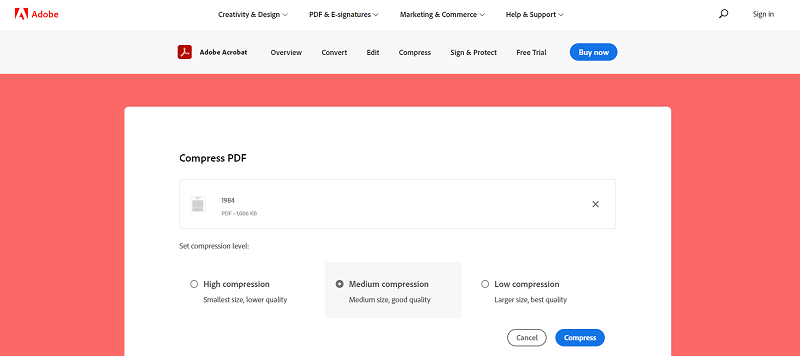
https://www.easepdf.com/images/pdf-tips/select-compression-level.png
Web Oct 22 2023 nbsp 0183 32 Way 2 How to Compress PDF File Size Using Adobe Adobe Acrobat a popular PDF software provides a variety of tools and features tailored for this very
Pre-crafted templates provide a time-saving option for producing a diverse series of documents and files. These pre-designed formats and designs can be used for numerous personal and expert jobs, including resumes, invitations, flyers, newsletters, reports, presentations, and more, simplifying the material creation process.
Adobe Acrobat Xi Compress Pdf

Compress Html Online Carstraight jp

Compress PDF Using Adobe Acrobat Software Review RT
How To Compress A PDF Without Adobe Acrobat Free Methods

How To Compress Optimize A PDF File Daves Computer Tips
Adobe Acrobat Pro Xi Compress Pdf Kasapmg

Compress PDF Using Adobe Acrobat Software RT

Web Visit Acrobat online services and navigate to the Compress page by clicking Compress in the menu Click or tap on the Select a file button Choose the file from your device or

Web Oct 3 2018 nbsp 0183 32 1 Answer Sorted by 0 Adobe Acrobat XI Pro actually has a feature to reduce pdf file size Go to File gt Save As Other gt Reduced Sized PDF I found out this feature

Web Oct 30 2023 nbsp 0183 32 The Acrobat PDF compression tool balances an optimized file size against the expected quality of images fonts and other file content Save using PDF optimizer Acrobat Pro PDF Optimizer provides many

Web Do your best work online with Adobe Acrobat Convert files to PDF compress PDF documents and share and store your files with Adobe Acrobat Pro Start free trial
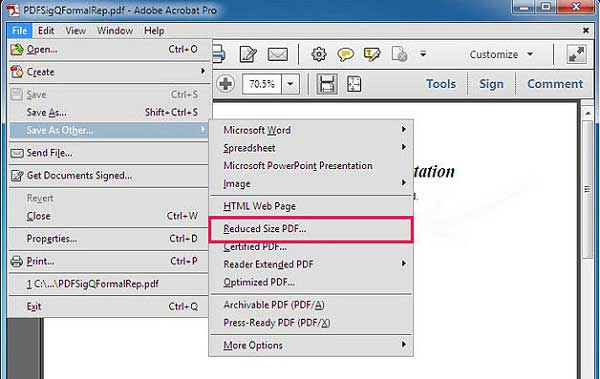
Web Apr 9 2019 nbsp 0183 32 Reduce PDF File Size Adobe Acrobat has a file compressor option to reduce the PDF file size within its Save functions In Adobe XI go to File and select Save
Web Aug 30 2023 nbsp 0183 32 First open the PDF file To open the file click quot File quot in the main menu and then click quot Open quot Now locate the desired file and open it You can also click the quot Open Web Learn how to compress PDF files online with Adobe Creative Cloud Reduce the size of your PDFs without compromising quality or losing important information Follow the
Web Adobe Creative Cloud