Windows 10 Remove Password Cmd How To Remove Login Password In Windows Techno Blender North Sulfur Bring How To Set Up Password On Windows 10 Worry Mottle Resume How To Find Wifi Password On Windows 10 Using CMD Step By Step Para Eliminar Una Contrase a De Inicio De Sesi n En Windows 10 How To Change Your Account Password Using Command Prompt On Windows 10 WEB Aug 19 2023 nbsp 0183 32 Remove Login Password From Local Account Disable Login Password During Windows Startup Disadvantages of Removing Password From Windows Say
WEB Apr 25 2024 nbsp 0183 32 The easiest way to remove Windows 10 is to use a password removal tool EaseUS Partition Master Professional which offers a quot Password Reset quot feature that allows you to erase your old password in one click even without logging into Windows 10 WEB Dec 20 2019 nbsp 0183 32 Sure you can remove your password from your Windows 10 PC as long as it s in a very safe place Here s how
How To Change Your Account Password Using Command Prompt On Windows 10 Remove Password Of Local Account In Windows 10 Tutorials Dictator Sympathetic Tense Premier Upper Hula Reset Lost Windows 10 Password With Sticky Keys Method Password Recovery Step By Step To Remove Login Password On Windows 10 The Ultimate Guide To Remove Password In Windows 10 How Do I Remove My Windows Password Remove PIN For A User Account In Windows 10 3 Tips To Help You Find Or View Wi Fi Password On Windows 10
Windows 10 Remove Password Cmd
 Windows 10 Remove Password Cmd
https://images.techadvisor.com/cmsdata/features/3637669/windows_10_sign_in_automatically.jpg
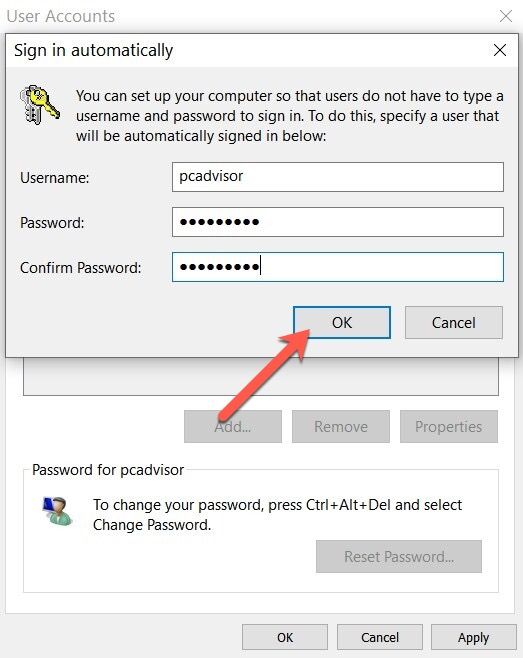
WEB Jul 3 2021 nbsp 0183 32 How to remove your login password from Windows 10 Step 1 To the right of the Start menu icon type netplwiz into the desktop s Search box Select the Netplwiz Run command that appears in the
Templates are pre-designed documents or files that can be utilized for various functions. They can save effort and time by offering a ready-made format and design for producing different type of content. Templates can be used for individual or expert projects, such as resumes, invitations, flyers, newsletters, reports, presentations, and more.
Windows 10 Remove Password Cmd
How To Reset Windows 10 Password With Command Promp UUkeys Tips
Remove Password Of Local Account In Windows 10 Tutorials

Dictator Sympathetic Tense Premier Upper Hula
Reset Lost Windows 10 Password With Sticky Keys Method Password Recovery
The Ultimate Guide To Remove Password In Windows 10

How Do I Remove My Windows Password
WEB Aug 23 2023 nbsp 0183 32 To remove a Windows 10 user account password go to the Sign in options page in Settings select quot Change quot under Password and enter a blank password Only local accounts can have their passwords removed not Microsoft accounts Removing the password is a security risk and we recommend against it

WEB Oct 3 2015 nbsp 0183 32 Generally there are two different methods to reset or remove password for a local windows account One is to edit the registry entry by booting into safe mode The representative of this kind is NTPasswd The other method is brute force the password with rainbow table and Ophcrack is the best tool for that

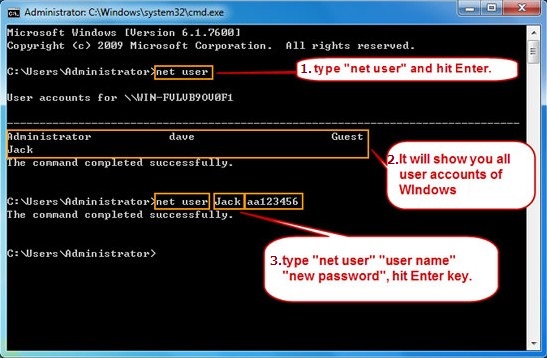
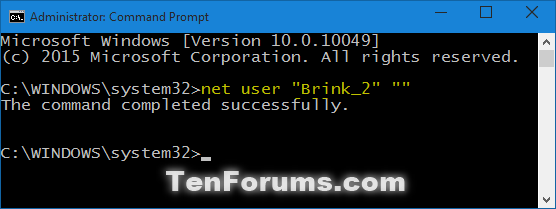
WEB Sep 27 2016 nbsp 0183 32 Option 3 Remove Windows 10 Administrator Password from Command Prompt Open up an elevated Command Prompt At the Command Prompt type the below command and press Enter net user Administrator When you re prompted to type new password just press Enter twice and it will remove your Windows administrator password

WEB Apr 25 2021 nbsp 0183 32 This tutorial will show you different ways to remove the password of your or any local account in Windows 10 and online If your PC is on a domain your system administrator must reset your password

WEB Dec 12 2023 nbsp 0183 32 In this guide I ll teach you the steps to sign in automatically or remove the login password from a Windows 10 device whether you use a local or Microsoft account
WEB Dec 26 2022 nbsp 0183 32 Learn how to disable or remove Login Password for Users in Windows 11 10 You will not need a password to sign in to your PC once you do this WEB Oct 4 2023 nbsp 0183 32 Remove the password from Settings Press Windows I key to open the Windows Settings app Click on Accounts and select Sign in options from the left pane Click on Change under the Password section
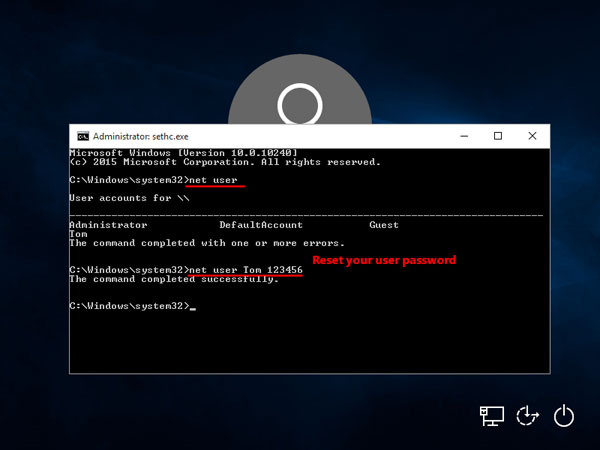
WEB Oct 6 2022 nbsp 0183 32 command you can change your PC s user account passwords right from your Command Prompt window This lets you set a new password for your chosen account without navigating any setting menus We ll show you how Related How to Reset Your Forgotten Password in Windows 10