Windows 10 Display Language Change How To Change The Display Language In Windows 10 Windows 10 Display Language Refusing To Change Super User How To Change The Display Language In Windows 10 How To Change The Display Language In Windows 10 Add Remove And Change Display Language In Windows 10 Tutorials Web Jan 18 2021 nbsp 0183 32 In Windows 10 change language to one that includes the features you want Display language The familiar icon featuring the letter A indicates that you can change the Windows display language to this one The language you select must have this symbol next to it
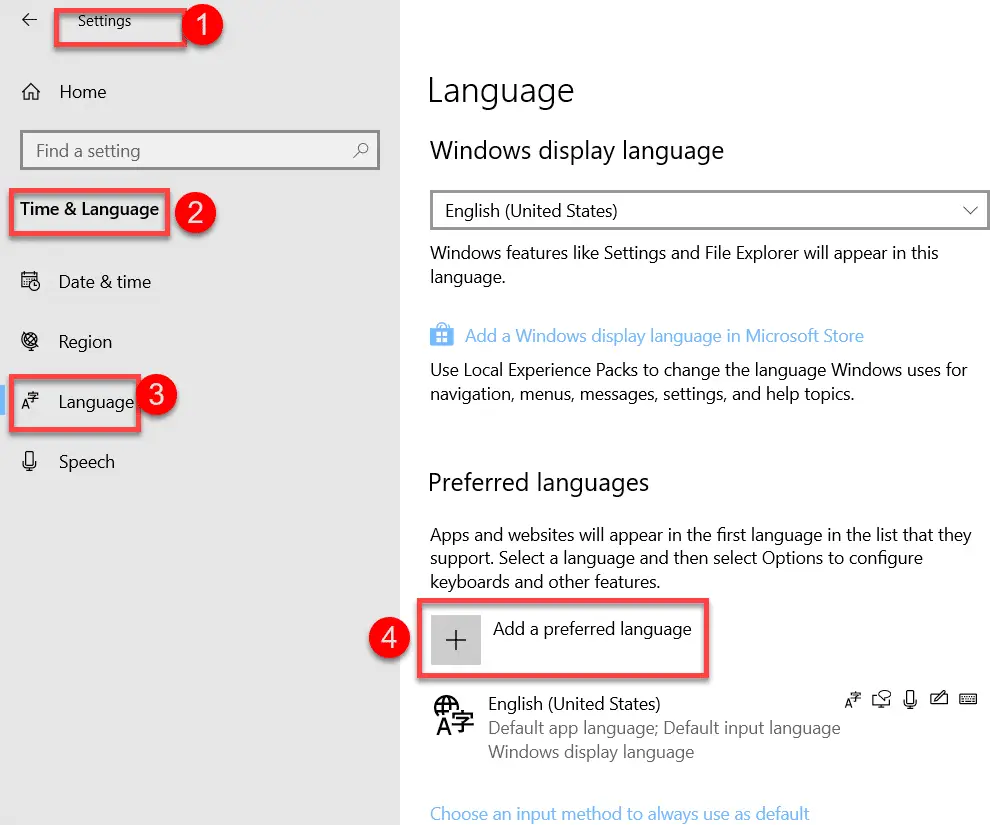
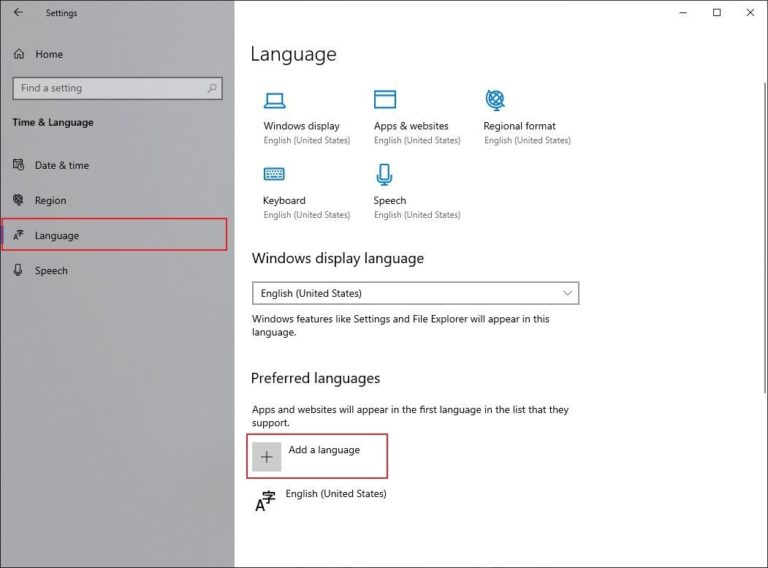
Web Sep 6 2021 nbsp 0183 32 What to Know Go to Settings gt Time amp Language gt Language gt Add a language gt search for and select language then follow the on screen prompts To stop syncing language settings across devices go to Settings gt Accounts gt Sync your settings and toggle off Language preferences Web Sep 1 2022 nbsp 0183 32 Type and search Language settings in the Windows search bar and then click Open In preferred languages click Add a language Choose a language you want to install from the list and then select Next The following takes Chinese Traditional Taiwan as a reference
Add Remove And Change Display Language In Windows 10 Tutorials 10 Windows 10 Display Windows 10 How To Change Computer System Language Changing Windows Display Vrogue How To Change Windows 10 Display Language From Chinese To English I Don t Have Install Display Language Windows 7 Forums How To Change Windows 10 System Display Language Windows 10 Windows 10
Windows 10 Display Language Change
 Windows 10 Display Language Change
https://www.itechtics.com/wp-content/uploads/2019/07/Add-a-preferred-language-to-Windows-10.png
Web Aug 9 2015 nbsp 0183 32 Change Windows Display language with a Langue Pack 1 Sign in to Windows 10 using an administrative account Go to Start Menu and click Settings 2 In Settings select Time amp Language then Region amp Language on the left pane click Add Language on the right pane 3 Browse to language you want to add
Pre-crafted templates offer a time-saving option for creating a diverse range of files and files. These pre-designed formats and layouts can be made use of for various individual and professional jobs, consisting of resumes, invitations, leaflets, newsletters, reports, presentations, and more, streamlining the content production process.
Windows 10 Display Language Change
Add Remove And Change Display Language In Windows 10 Tutorials

10 Windows 10 Display

Windows 10
How To Change Computer System Language Changing Windows Display Vrogue

I Don t Have Install Display Language Windows 7 Forums

How To Change Windows 10 System Display Language

Web Feb 9 2017 nbsp 0183 32 Alternatively you can hit Windows i to open Settings Click quot Time amp Language quot on the left hand side and then click quot Language amp Region quot Click quot Add Language quot to open the list of available languages You can scroll through the list or use the search function to find the language you want

Web The display language you select changes the default language used by Windows features like Settings and File Explorer Select Start gt Settings gt Time amp language gt Language amp region Choose a language from the Windows display language menu

Web Apr 12 2022 nbsp 0183 32 Change system language settings To change the system default language close your apps and use these steps Open Settings Click on Time amp Language Click on Language

Web Select Start gt Settings gt Time amp language gt Language amp region Open Language settings Go to

Web Jun 16 2021 nbsp 0183 32 How to Change Display Language in Windows 10 The display language you select changes the
[desc-11] [desc-12]
[desc-13]