Vs Code Tab Width VS Code Set Tab Size Dirask BUG Making Vs Code Tab Size To 4 By Default DEV Community Wrap Your Vs Code Tab Vs Code Tips And Tricks shorts YouTube VS Code How To Open File In New Tab 2023 Change The Indentation In VS Code 2 Or 4 Spaces Tab Size Bobbyhadz Web Oct 6 2022 nbsp 0183 32 visual studio code How can I use vscode to change the tab size on a file Super User How can I use vscode to change the tab size on a file Ask Question Asked 1 year 1 month ago Modified 1 year 1 month ago Viewed 2k times 0 NOT JUST THE APPEARANCE OF TAB SIZE THE ACTUAL TAB SIZE
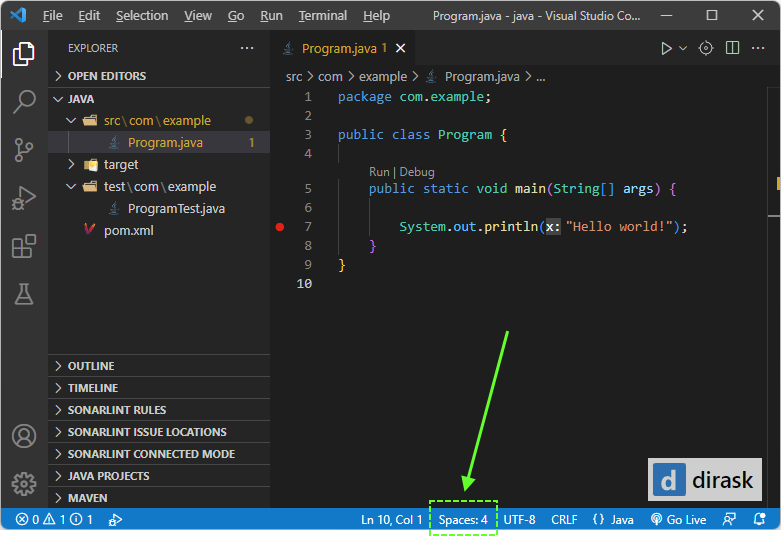
Web Jul 13 2022 nbsp 0183 32 How can I change tab width in vs code not indentation width of tab space Many results are about indentation but I couldn t find one for width of those tabs As filenames are pretty long and I can have 5 6 currently open I d like to resize them somehow on max width so I can read component name without ponent ts html part and have Web VS Code lets you control text indentation and whether you d like to use spaces or tab stops By default VS Code inserts spaces and uses 4 spaces per Tab key If you d like to use another default you can modify the editor insertSpaces and editor tabSize settings
Change The Indentation In VS Code 2 Or 4 Spaces Tab Size Bobbyhadz VS Code How To Open File In New Tab 2023 Adjust Code Tab Size To 4 In Markdown Preview Issue 77779 VSCode Tab Decorations Editorconfig Make Spaces Act And Look Like Tabs In VS Code Stack How To Always Open Files In A New Tab Vscode Otosection How To Change Size Of Window Tab Font In Visual Studio Code Secondary Actions Proposal GitHub QuickStart For The Code Sight Standard Edition
Vs Code Tab Width
 Vs Code Tab Width
https://dirask.com/static/bucket/1666608949748-WlYk5dxAN2--image.png
Web Dec 21 2020 nbsp 0183 32 1 I would like to know how do I adjust the tab lengths the same size in VSCode As you can see from the image depending on the tab name it either shrinks or stretches I want to know if I could fix the lengths to a certain scale I tried quot workbench editor tabSizing quot quot fit quot but it does not do much Thanks
Templates are pre-designed documents or files that can be used for different functions. They can save effort and time by supplying a ready-made format and layout for producing various kinds of content. Templates can be used for individual or professional jobs, such as resumes, invites, flyers, newsletters, reports, presentations, and more.
Vs Code Tab Width
Change The Indentation In VS Code 2 Or 4 Spaces Tab Size Bobbyhadz

VS Code How To Open File In New Tab 2023
Adjust Code Tab Size To 4 In Markdown Preview Issue 77779
VSCode Tab Decorations

How To Always Open Files In A New Tab Vscode Otosection
How To Change Size Of Window Tab Font In Visual Studio Code

Web Oct 15 2018 nbsp 0183 32 In VS Code you can access the editor s tab size settings by pressing Command Comma Mac or Ctrl Comma PC and typing tabsizing You can edit settings for regular and pinned tabs Currently there are two options for sizing editor tabs fit and shrink A handy shortcut is that the tab area recognizes a mouse scroll wheel

Web Apr 30 2015 nbsp 0183 32 When using TypeScript the default tab width is always two regardless of what it says in the toolbar You have to set quot prettier tabWidth quot in your user settings to change it Ctrl P Type user settings add quot prettier tabWidth quot 4

Web Jan 21 2021 nbsp 0183 32 4 How do you actually go about changing the quot editor tabSize quot and quot editor insertSpaces quot values for vscode I ve opened File gt Preferences gt User Settings and added Place your settings in this file to overwrite the default settings Controls the rendering size of tabs in characters

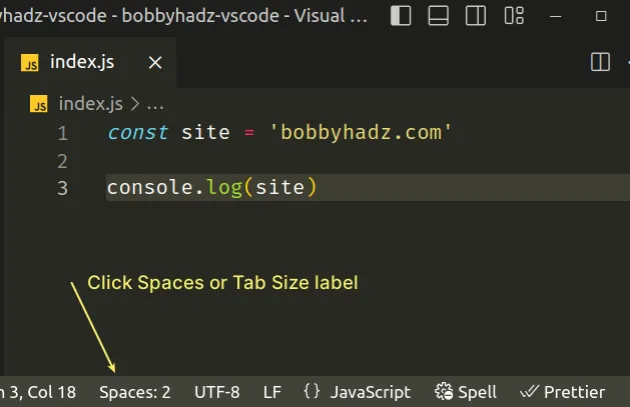
Web Mar 12 2023 nbsp 0183 32 Click on the Spaces or Tab Size label in the Status bar at the bottom Select Indent Using Spaces or Indent Using Tabs in the next menu Select your preferred indentation level e g 2 4 or 8 spaces I ve set my indentation level to 2 spaces in the example so each indent is 2 spaces
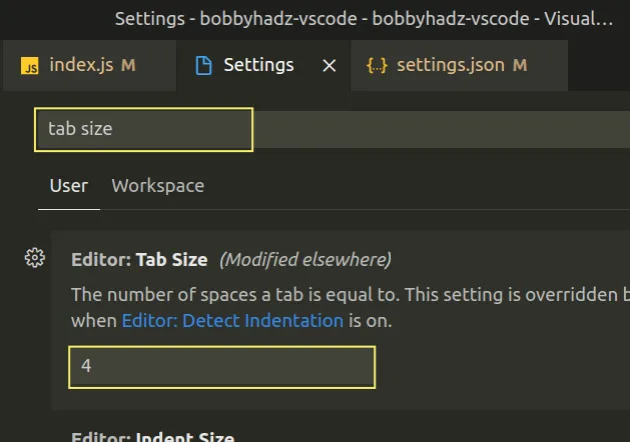
Web Nov 29 2017 nbsp 0183 32 first tab 7 spaces 2nd tab 1 space 3th tab 4 spaces 4th and ongoing 3 spaces I found how to set it to 3 spaces for all my tabs These are my current self set settings quot editor tabSize quot 3 quot editor detectIndentation quot false
Web Like many other code editors VS Code adopts a common user interface and layout of an explorer on the left showing all of the files and folders you have access to and an editor on the right showing the content of the files you have opened Basic Layout Web The best way of exploring VS Code hands on is to open the Welcome page You will get an overview of VS Code s customizations and features Help gt Welcome Pick a Walkthrough for a self guided tour through the setup steps features and deeper customizations that VS Code offers As you discover and learn the walkthroughs track your progress
Web Oct 15 2020 nbsp 0183 32 Wiki Security 11 Insights New issue Tab characters are the wrong width with proportional fonts 108755 Closed subhav opened this issue on Oct 15 2020 183 11 comments subhav commented on Oct 15 2020 VSCode Version 1 51 0 insider OS Version Test Playground on Chrome 85 Windows 10 1903