Vmware Wifi Not Working Fix VMware Bridged Network Not Working 2022 vmware wifi Repara Windows Bits Nocturnos wifi VMware How To Connect To A WiFi Network On Kali Linux VMware Systran Box Your virtual machine cannot access the network using bridged networking You are using a wireless network interface card Solution Bridged networking with a wireless Ethernet adapter is supported in VMware Workstation 4 and later VMware Player 3 VMware Server and GSX Server 3 on Windows hosts
In Windows 8 10 Click Start Control Panel Network and Sharing Center Change adapter settings In Windows Vista 7 Click Start Control Panel Network and Internet View Network status and tasks Change adapter settings Right click any network adapter icon and click Properties The WiFi on the host is not actually directly accessible to the VMware guests or any VM guests using other technologies such as KVM VirtualBox etc The hardware that s present in the physical host is interacted through virtual hardware that s presented to the guest VMs through the software BIOS that the various virtualization technologies
How To Connect To A WiFi Network On Kali Linux VMware Systran Box Connect WIFI In VMWare Kali Linux Wlan0 YouTube Portable Penetrator How To Connect Wifi Antenna To VMware Workstation VMware Player Bridged Network Not Working YouTube 15 Ways To Fix Samsung Smart TV Not Connecting To Wi Fi TechWiser VMware ubuntu wifi Manual Download Samsung Galaxy S2 I9100 Wifi Not Working Problem Solution How To Fix Wifi Not Working In Ubuntu Linux Vmware YouTube After Windows 10 Update VMware Doesn t Detect Network Adapter Super User
Vmware Wifi Not Working
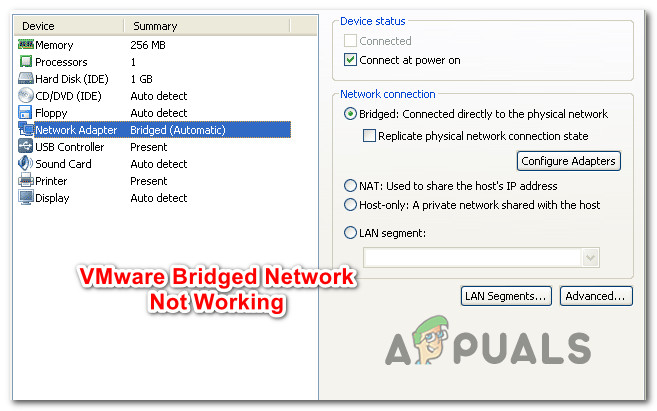 Vmware Wifi Not Working
https://cdn.appuals.com/wp-content/uploads/2019/04/error-message.jpg
Click Start right click Computer and click Manage Select Device Manager from the left pane Click the arrow to expand the Network Adapters section Right click your Ethernet Controller in that list name may vary and click Update Driver Software
Pre-crafted templates offer a time-saving service for producing a diverse range of files and files. These pre-designed formats and layouts can be utilized for different personal and expert projects, consisting of resumes, invitations, leaflets, newsletters, reports, presentations, and more, streamlining the material production process.
Vmware Wifi Not Working

Wi Fi Not Working After A System Restore Here Are Some Fixes QuickTech

Connect WIFI In VMWare Kali Linux Wlan0 YouTube

Portable Penetrator How To Connect Wifi Antenna To VMware Workstation

VMware Player Bridged Network Not Working YouTube

VMware ubuntu wifi

Manual Download Samsung Galaxy S2 I9100 Wifi Not Working Problem Solution

7 Answers Sorted by 30 Workstation doesn t have a wireless NIC type so direct wireless hardware access is out If you just want to access through the extant host wireless connection bridging is your answer I think the only way to get a wireless NIC dedicated to the VM would be using a USB wireless NIC as a USB passthrough device on the VM
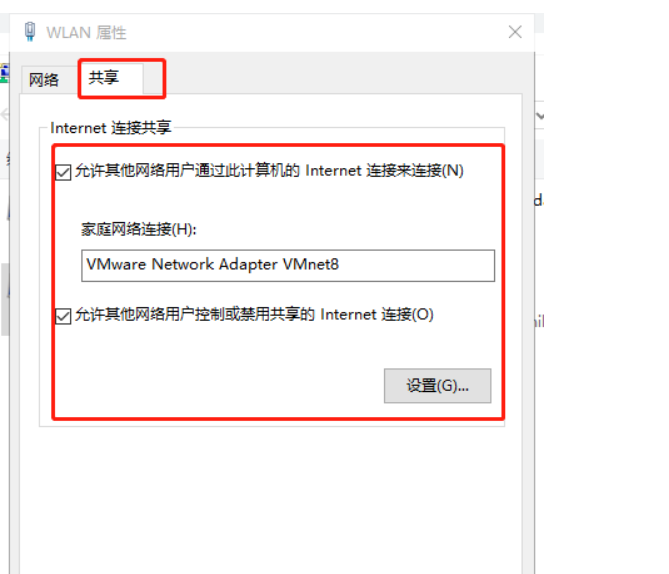
Why VMware internet not working possible causes There are many reasons may cause VMware internet connection not working for example Firewall blocks Internet access The virtual machine does not have an IP address Bridge host only or NAT network connection failed The Ethernet controller driver is not installed

Internet not working in virtual machines problem set 1 of experiments I am trying to play with various kind of scenarios and configurations to understand VMware Workstation networking So here is one setting of virtual network editor Virtual machine network adapter configuration Windows IP Configuration in Virtual Machine

38 I m facing this strange problem from yesterday where if I select NAT as the network adapter in VMWare I m not getting any internet connection in the VM I have a requirement where I have to have the network adapter as NAT Internet is working properly in my host machine but not working in my VM It shows that the internet cable is unplugged

Process to troubleshooting virtual machine network connection issues Important Note Validate that each troubleshooting step below is true for your environment The steps provide instructions or a link to a document for validating the step and taking corrective action as necessary
I have followed the VMWare guide which instructed me to disable everything on the wireless NIC except VMWare Bridge Protocol I even tried assigning a static IP and pinging the gateway which also does not work I tried uninstalling the wireless NIC drivers reinstalling them resetting the winsock catalog and ip stack uninstalled and 1 Solution louyo Virtuoso 02 21 2010 03 00 PM What can be done You should be able to use bridged with wireless Run the Virtual Network Editor and make sure the bridged adapter VMNet0 is set for automatic and has your wireless and wired adapters checked in automatic settings
Some users also reported that disabling the network adapters and then running diagnose could fix the issue It looks like the solution 6 Solution 9 Virtual Network Editor In the VMware software click Edit select Virtual Network Adaptor click Restore Defaults click OK Solution 10 Reinstall VM