Vmware Bridged Network Not Working Fix VMware Bridged Network Not Working 2022 Er Gep rd Lef rdik Vmware Can Not See Lan Network S r s dik Haj k z s Innov ci Vmware Workstation Player 15 Bridged Network Not Working Amadad Worksheets For Vmware Fusion Bridged Network Not Working Dhcp SOLVED Vmware Bridged Network Not Working MiniTool Click Start Control Panel Networking Connection Right click Local Area Network Connection and select Enable Ensure that your Host machine has a working network connection Confirm that your virtual machine s firewall is not blocking the Internet access For information on turning off your firewall see
1 I recently updated my PC and found out that the bridged mode of VMware Workstation Player 17 stopped working however NAT mode works fine Host OS is Windows 11 and guest OS is Ubuntu 18 04 I ve tried Restored defaults using Virtual Network Editor Checked network adapter setting Enabled VMware Bridge Protocol When you use the bridged adapter the VMware workstation bridges the network between your local interface connected to the network and the VMnet0 adapter on the VMware workstation So it is vital that you choose the right interface when
SOLVED Vmware Bridged Network Not Working MiniTool SOLVED Vmware Bridged Network Not Working SOLVED Vmware Bridged Network Not Working MiniTool SOLVED Vmware Bridged Network Not Working SOLVED Vmware Bridged Network Not Working MiniTool Fix VMware Bridged Network Not Working On Windows 10 Host Fix VMware Bridged Network Not VMware Bridged Mre a Ne Radi Ili Se Ne Otkriva U Sustavu Windows 10 Windows SOLVED Vmware Bridged Network Not Working MiniTool Zneu vanie Nekompetentnos Po i iavate Vmware Linux Router Bridged Network Not Working Zvy ok
Vmware Bridged Network Not Working
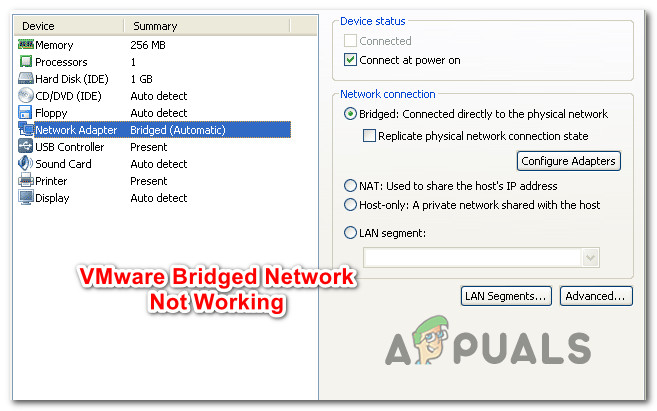 Vmware Bridged Network Not Working
https://cdn.appuals.com/wp-content/uploads/2019/04/error-message.jpg
Updated on 05 31 2019 When you install Workstation Pro on a Windows or Linux host system a bridged network VMnet0 is set up for you Bridged networking connects a virtual machine to a network by using the network adapter on the host system
Templates are pre-designed documents or files that can be used for various functions. They can conserve time and effort by providing a ready-made format and design for producing different sort of content. Templates can be used for individual or professional tasks, such as resumes, invites, leaflets, newsletters, reports, presentations, and more.
Vmware Bridged Network Not Working
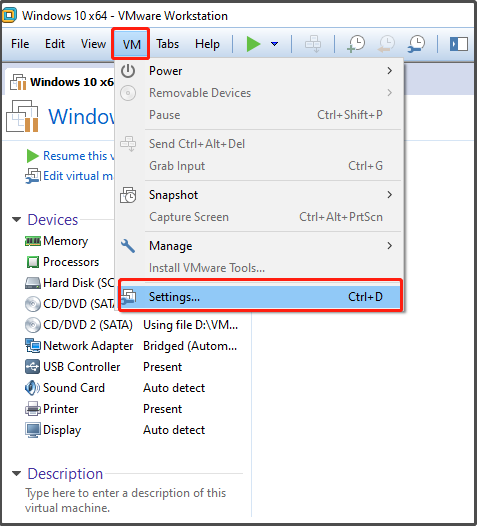
SOLVED Vmware Bridged Network Not Working MiniTool

SOLVED Vmware Bridged Network Not Working

SOLVED Vmware Bridged Network Not Working MiniTool

SOLVED Vmware Bridged Network Not Working

Fix VMware Bridged Network Not Working On Windows 10 Host Fix VMware Bridged Network Not
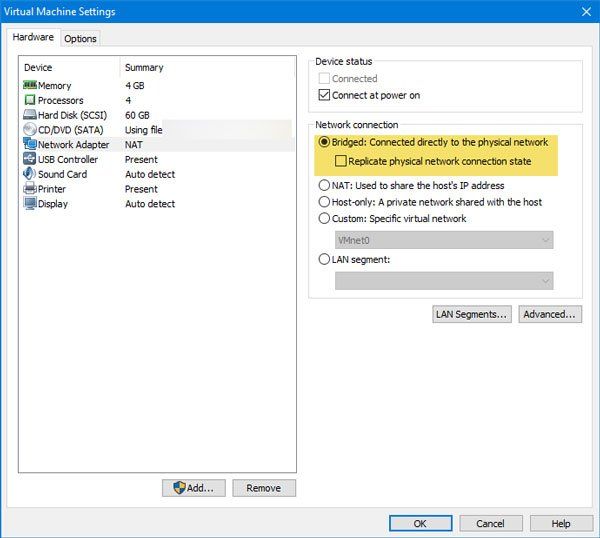
VMware Bridged Mre a Ne Radi Ili Se Ne Otkriva U Sustavu Windows 10 Windows

Go into the network editor Pick Restore Defaults vmnet0 sets it self up to autobridged changed autobridged to the ethernet interface I know is working

Fix VMware Bridged Network not Working Method 1 Rebooting Vmnetbridge sys via admin CMD VMnetbridge sys VMware Bridge Control can also cause this Method 2 Using a specific virtual network VMnet0 Several affected users have reported that for them the issue was Method 3 Deselecting

To troubleshoot a lack of network connectivity in a virtual machine Verify that your virtual machine is using the right type of virtual networking either Bridged Host only or Network If automatic bridging is enabled in a bridged network virtual network adapters may be binding to the wrong

VMware Bridged network not working If the Bridged network is not working in VMware Guest OS on Windows 11 10 then the following different ways will help you fix the Bridged network
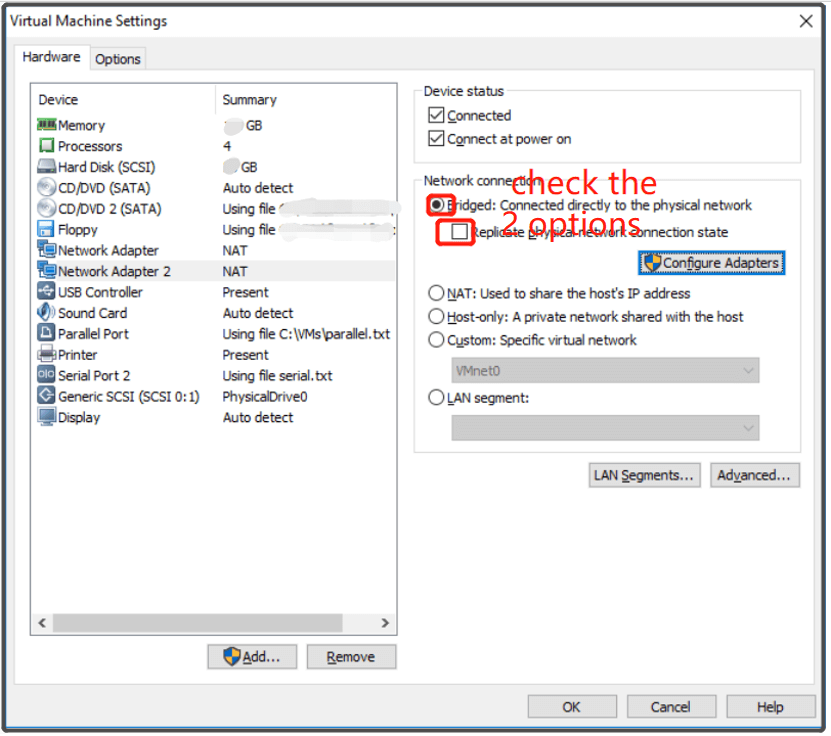
If I plug in an Ethernet adapter dongle and use a wired connection I can get the bridged networking to work again by specifying the VMnet device associated with the wired connection configured using vmnetcfg exe and selected by using the Custom Specific virtual network in the Network Adapter settings of the Virtual Machine
[desc-11] [desc-12]
[desc-13]