Vmware Bridged Network Not Working Linux Zneu vanie Nekompetentnos Po i iavate Vmware Linux Router Bridged Network Not Working Zvy ok Fix VMware Bridged Network Not Working 2022 Zneu vanie Nekompetentnos Po i iavate Vmware Linux Router Bridged Network Not Working Zvy ok SOLVED Vmware Bridged Network Not Working SOLVED Vmware Bridged Network Not Working MiniTool Configuring Bridged Networking When you install Workstation Player on a Windows or Linux host system a bridged network VMnet0 is set up for you Bridged
Updated on 05 31 2019 When you install Workstation Pro on a Windows or Linux host system a bridged network VMnet0 is set up for you Bridged networking connects a Procedure Select the virtual machine and select Virtual Machine Virtual Machine Settings On the Hardware tab select Network Adapter Select Bridged
SOLVED Vmware Bridged Network Not Working MiniTool SOLVED Vmware Bridged Network Not Working MiniTool Er Gep rd Lef rdik Vmware Can Not See Lan Network S r s dik Haj k z s Innov ci VMware Bridged Mre a Ne Radi Ili Se Ne Otkriva U Sustavu Windows 10 Windows Zneu vanie Nekompetentnos Po i iavate Vmware Linux Router Bridged Network Not Working Zvy ok SOLVED Vmware Bridged Network Not Working MiniTool Zneu vanie Nekompetentnos Po i iavate Vmware Linux Router Bridged Network Not Working Zvy ok How To Fix Vmware Bridged Network Not Working Complete Guide News SOLVED Vmware Bridged Network Not Working
Vmware Bridged Network Not Working Linux
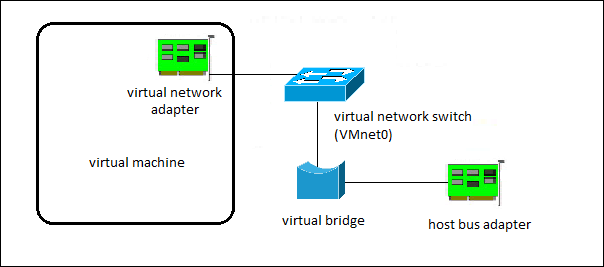 Vmware Bridged Network Not Working Linux
https://geek-university.com/wp-content/uploads/2022/03/vmware_bridge_networking.png
Problem What I can not do Ping my host machine from inside any VM either shows me Destination Host Unreachable or will just timeout What I CAN do right after power up
Pre-crafted templates provide a time-saving solution for producing a diverse range of documents and files. These pre-designed formats and layouts can be used for numerous individual and expert projects, consisting of resumes, invitations, flyers, newsletters, reports, discussions, and more, streamlining the content development process.
Vmware Bridged Network Not Working Linux

Fix VMware Bridged Network Not Working On Windows 10 Host Fix VMware Bridged Network Not

SOLVED Vmware Bridged Network Not Working MiniTool
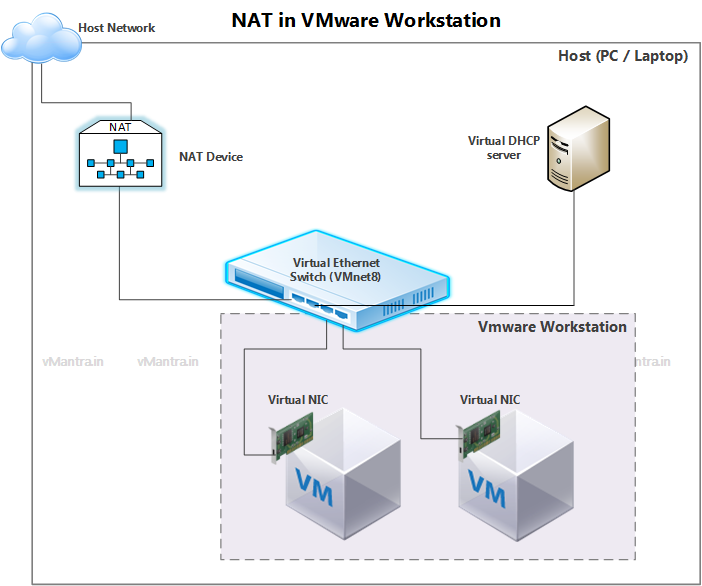
Er Gep rd Lef rdik Vmware Can Not See Lan Network S r s dik Haj k z s Innov ci
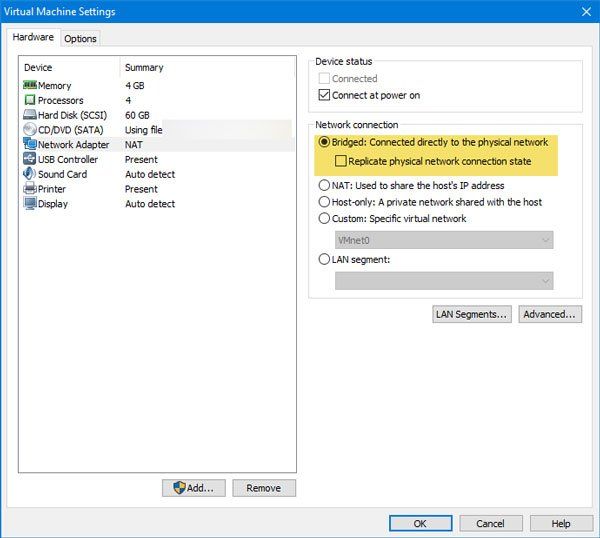
VMware Bridged Mre a Ne Radi Ili Se Ne Otkriva U Sustavu Windows 10 Windows
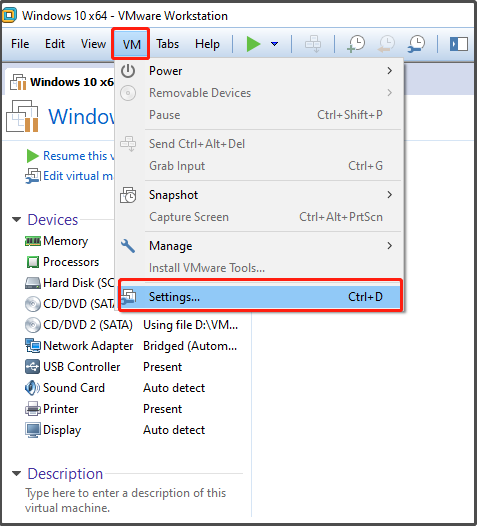
SOLVED Vmware Bridged Network Not Working MiniTool

Zneu vanie Nekompetentnos Po i iavate Vmware Linux Router Bridged Network Not Working Zvy ok
Up to4 cash backBridged Network not Working I used to use VMware Workstation 16 Player with Bridged network Ubuntu 20 04 VM After updating to VMware

What helped me In the VMWare open Edit Virtual Network Editor On the bottom Change Settings Allow root privileges In the top list select VMNet0 It s type

Symptoms You are experiencing these issues No network connectivity for a virtual machine Cannot connect to the Internet from the guest operating system Bridged

4 Answers Sorted by 5 Selecting NAT option under Network Connection in Network Adapter setting has done the trick for me Share Improve this answer Follow

If your host has a wireless network adapter you cannot use bridged networking on Linux hosts in VMware Workstation 5 or lower VMware Server 1 x any
I am having trouble with VMware Player 4 0 3 for Linux I am trying to run a Linux virtual machine guest from the Linux host but am unable to successfully get an IP address on VMware Player Bridged networking no longer works host win8 1 guest Mint 17 Linux In the past earlier versions of Linux Mint and earlier versions of VMWare Player I could switch networking
1 Open VMware Workstation PRO and use the ribbon bar at the top to go to Edit Virtual Network Editor2 Inside the Virtual Network Editor click the Chang