Setup Linux Virtual Machine On Windows 10 How To Download And Install Virtual Machine On Windows 10 YouTube How To Install Hadoop On A Linux Virtual Machine On Windows 10 Advantages Of Using Linux Virtual Machine Or Linux Server Hosting How To Set Up A Linux Virtual Machine YouTube How To Install A Virtual Machine On Windows 10 Using Hyper V Now Even Web Jun 9 2023 nbsp 0183 32 In this article we ll explore a few ways to use Linux on a Windows machine Some of them are browser based or cloud based that do not need any installation prior to using them Here are the methods we ll be discussing Dual boot Windows Subsystem for Linux WSL Virtual Machines VM Browser based solutions Cloud based solutions
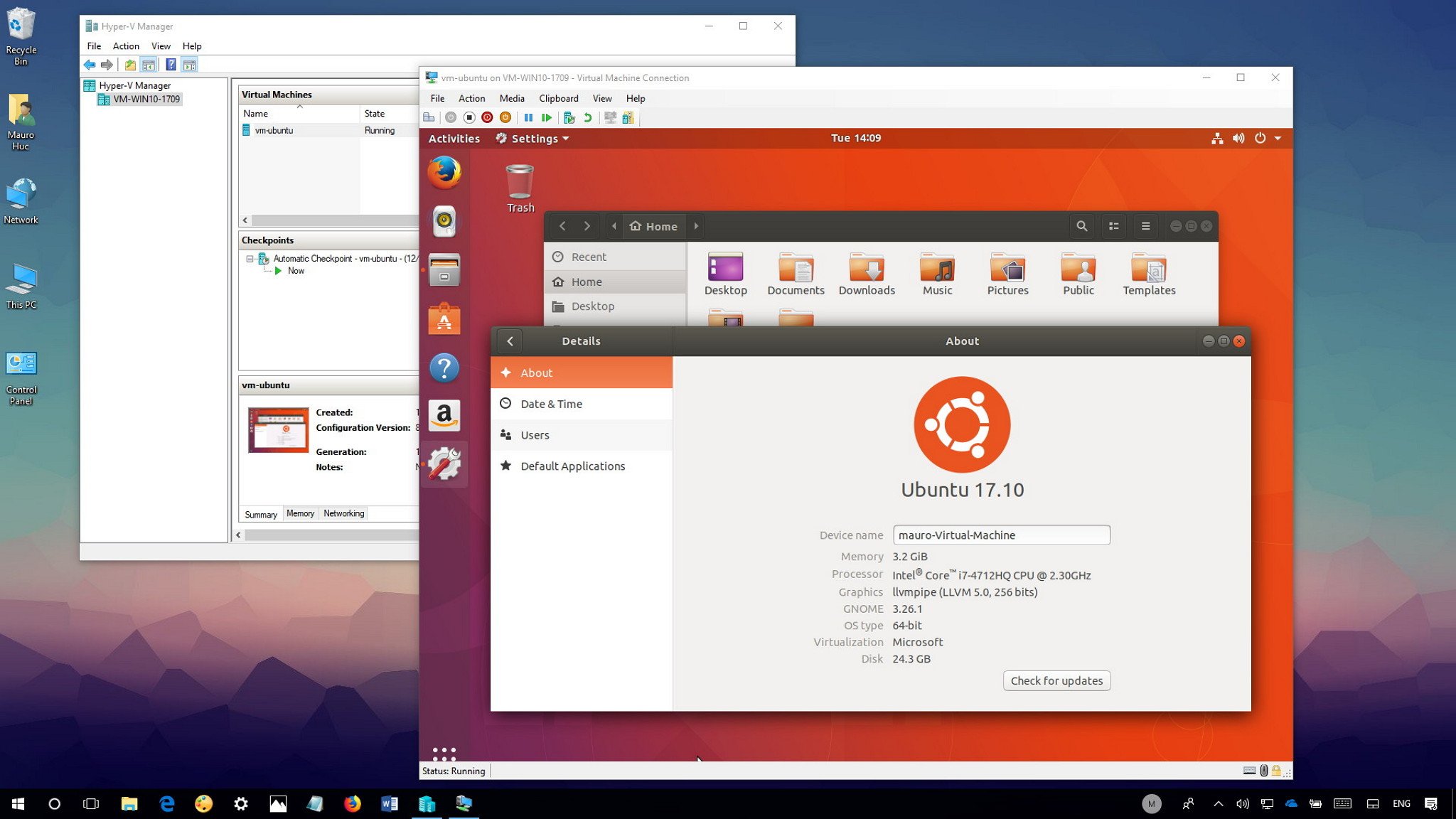
Web Apr 26 2022 nbsp 0183 32 Open Hyper V Manager by either pressing the Window s key and typing quot Hyper V Manager quot or by finding Hyper V Manager in your applications In Hyper V Manager click Action gt New gt Virtual Machine to bring up the New Virtual Machine Wizard Review the Before You Begin content and click Next Give the virtual machine Web Aug 6 2021 nbsp 0183 32 Click on New to begin the configuration process A dialog box should pop up Next follow these steps Give your Virtual Machine a Name for instance Ubuntu v20 04 2 LTS Click on the drop down menu besides Type and select Linux Choose the Version as Ubuntu 64 bit or Ubuntu 32 bit
How To Install A Virtual Machine On Windows 10 Using Hyper V Now Even How To Set Up A Windows Virtual Machine In Linux Medical Technology How To Install A Virtual Machine On Windows 10 Using Hyper V Now Even How To Enable Windows SandBox Virtual Machine In Windows 10 YouTube How To Install A Virtual Machine On Windows 10 Using Hyper V Now Even How To Create A Windows 10 Virtual Machine YouTube Linux Virtual Machine Vm For Windows 10 Vegasbinger How To Set Up A Windows 10 And 11 Virtual Machine On Linux Windows
Setup Linux Virtual Machine On Windows 10
 Setup Linux Virtual Machine On Windows 10
https://i.ytimg.com/vi/2HneusZarMU/maxresdefault.jpg
Web Dec 19 2019 nbsp 0183 32 We ll show you how to set up a virtual machine using VirtualBox Setting up a Virtual Machine VirtualBox VirtualBox is an open source Virtual Machine program from Oracle It allows users to virtually install many operating systems on virtual drives including Windows BSD Linux Solaris and more
Pre-crafted templates offer a time-saving option for developing a varied series of files and files. These pre-designed formats and layouts can be made use of for different personal and expert jobs, consisting of resumes, invitations, leaflets, newsletters, reports, presentations, and more, simplifying the content creation procedure.
Setup Linux Virtual Machine On Windows 10
How To Create A Linux Virtual Machine On Windows 10 Using Hyper V

How To Set Up A Windows Virtual Machine In Linux Medical Technology

How To Install A Virtual Machine On Windows 10 Using Hyper V Now Even
How To Enable Windows SandBox Virtual Machine In Windows 10 YouTube

How To Create A Windows 10 Virtual Machine YouTube
Linux Virtual Machine

Web Jul 27 2023 nbsp 0183 32 Using Linux in a virtual machine allows you to try Linux within Windows This step by step guide shows you how to install Linux inside Windows using VirtualBox Abhishek Prakash 27 Jul 2023 6 min read There are several ways to install Linux You can clean everything from your system and install Linux

Web Aug 28 2023 nbsp 0183 32 Install Windows Subsystem for Linux with the command wsl install Use a Bash terminal on your Windows machine run by your preferred Linux distribution Ubuntu Debian SUSE Kali Fedora Pengwin Alpine and more are available

Web Mar 8 2023 nbsp 0183 32 In this Windows 10 guide I will offer the steps to install Linux on virtual machines using Microsoft s Hyper V virtualization feature Make sure your PC is capable of running a Linux VM To run a Linux virtual machine on Windows 10 you ll need the following The OS with support for Hyper V

Web May 6 2021 nbsp 0183 32 If you are curious about and want to try using Linux but are concerned with the risks of dual booting then a virtual machine is the way to go We ll walk you through the entire process of setting your own virtual machine in a

Web Jun 7 2022 nbsp 0183 32 There are two ways to install Ubuntu on Hyper V in Windows 11 10 PC downloading the image by Hyper V using Quick Create and setting up the virtual machine manually
Web Nov 11 2022 nbsp 0183 32 How To Install Linux On Virtualbox To install Linux on VirtualBox first download the Linux ISO of your choice Then create a new virtual machine in VirtualBox and select the Linux ISO as the virtual machine s boot disk Next follow the prompts to complete the installation Once the installation is complete you will be able to boot into Web Dec 28 2022 nbsp 0183 32 I m running Linux mint and I m trying to use virtual box to set up a virtual machine with windows 10 installed Using a Laptop running windows 10 I tried to set up a bootable usb but the VM simply doesn t detect it at all Then you go to Settings in your Windows 10 virtualbox guest click on the Storage tab select the CD DVD icon
Web Oct 16 2023 nbsp 0183 32 Sign in to Azure Sign in to the Azure portal Create virtual machine Enter virtual machines in the search Under Services select Virtual machines In the Virtual machines page select Create and then Virtual machine The Create a