Restart Dns Client Windows 10 FiXED NET ERR INSECURE RESPONSE Chrome Browser Error Issue How To Restart DNS Client Service YouTube Jak W czy Lub Wy czy Us ug Klienta DNS W Systemie Windows 11 Lub DNS Client Disabled Windows 10 Computer Won t Domain Name System Windows SBS 2012 DNS Client Have To Constantly To flush the DNS Cache in Windows 11 10 you need to when you restart the computer the DNC caching will in any case be turned on Here locate the DNS Client service The DNS Client
Enable the Microsoft LLDP Protocol Driver When your PC suffers from DNS issues consider enabling Microsoft s LLDP protocol driver This driver comes with both Windows 10 and Windows 11 PCs Access the Start menu search for Control Panel and select Control Panel in the search results Choose Network and Internet on the Control Panel window With either Command Prompt or Windows PowerShell opened enter the following command ipconfig flushdns If the DNS cache was flushed you should see the Successfully flushed the DNS Resolver Cache message You can now close the window If you re using PowerShell 5 which is still default on Windows 10 your Window will be blue instead of black
Domain Name System Windows SBS 2012 DNS Client Have To Constantly Repair This Site Can t Be Reached In Google Chrome Window 10 8 Quick Ways To Fix DNS PROBE FINISHED NXDOMAIN Rovity DNS 3 Ways To Enable Or Disable DNS Client Service In Windows 10 El Paso County Courthouse Marriage 3 Ways To Enable Or Disable DNS Client Service In Windows 10 So Behebt Man Den Fehler Server DNS Adresse Konnte Nicht Gefunden Werden Dynamic DNS Client For Windows Alternatives And Similar Software
Restart Dns Client Windows 10
 Restart Dns Client Windows 10
https://i0.wp.com/www.techinpost.com/wp-content/uploads/2016/02/Restart-DNS-Client.jpg?resize=640%2C462&ssl=1
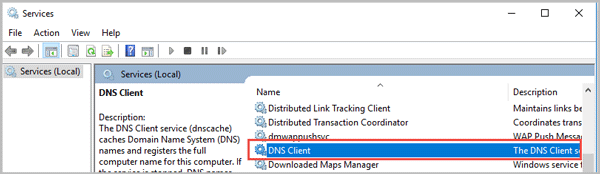
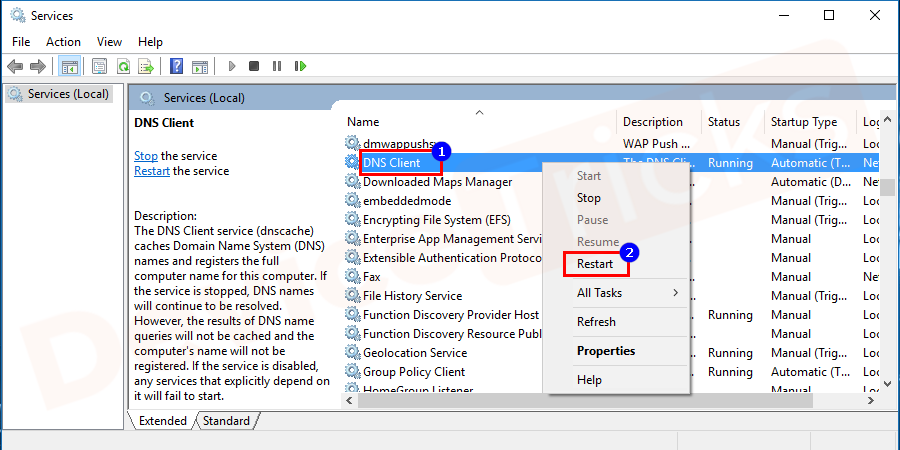
To start or stop the DNS service in Windows the first thing we have to do is press the Windows R key combination Then we have to run services msc Once we are inside we have to look for a DNS Client When we are here we simply have to click with the second button of the mouse on top of DNS Client and we will see the option to Pause or
Pre-crafted templates offer a time-saving service for creating a varied range of files and files. These pre-designed formats and designs can be made use of for various personal and professional projects, consisting of resumes, invites, flyers, newsletters, reports, discussions, and more, simplifying the content development process.
Restart Dns Client Windows 10

Jak W Czy Lub Wy Czy Us Ug Klienta Dns W Systemie Windows Lub Hot Sex
Repair This Site Can t Be Reached In Google Chrome Window 10

8 Quick Ways To Fix DNS PROBE FINISHED NXDOMAIN Rovity
DNS

El Paso County Courthouse Marriage

3 Ways To Enable Or Disable DNS Client Service In Windows 10

Type servcies msc and ok to open Windows services console scroll down and locate the DNS client service Right click and select start or stop to enable Disable the service To make DNS client service to start automatically at windows startup Right click and DNS client service select properties Here change the startup type Automatic

Microsoft says To disable the DNS cache permanently in Windows use the Service Controller tool or the Services tool to set the DNS Client service startup type to Disabled Note that the name of the Windows DNS Client service may also appear as Dnscache I think you need to Run as administrator Then discover the administrator account is
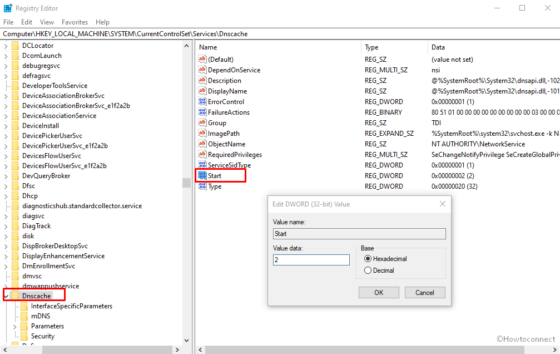
Change the value data to 4 Hit the OK button to save this setting NOTE Changing the value data to 4 means that you re disabling the service To set it to start the service automatically

Check IP configuration Open a Command Prompt window as an administrator on the client computer Run the following command Windows Command Prompt Copy ipconfig all Verify that the client has a valid IP address subnet mask and default gateway for the network to which it is attached and being used Check the DNS servers that are listed in

1 Open Windows PowerShell For that either use Start menu search or use Run window To open PowerShell from Run window press WIN R keys together When Run window opens up type in powershell and hit E nter key 2 Once Windows PowerShell opens up type in Clear DnsClientCache and hit Enter key
Clear the DNS Cache Open a Command Prompt window as Administrator To do so open the Start menu type Command Prompt into the search box right click the Command Prompt shortcut in the results and then select the Run as Administrator command At the prompt type the following command and then press Enter ipconfig flushdns Use regedit to navigate to HKEY LOCAL MACHINE SYSTEM CurrentControlSet services Dnscache Locate the Start registry key and change its value from 2 Automatic to 4 Disabled Reboot Another method is Start a Command prompt cmd as SYSTEM psexec sid cmd exe Launch services msc from it The Startup type drop down now becomes enabled
Domain Name Servers DNS translate domain names to IP addresses When you create a DNS server on a Windows machine DNS runs as a service on the computer You can restart the DNS server to troubleshoot issues or restart the service after it stops running The DNS service can be restarted using the Windows command line