Reset Root Password Rhel 7 Reset Root Password In RHEL 8 CentOS 8 Rocky Linux 8 How To Reset Root Password On RHEL 9 How To Recover Root Password Rhel 8 Centos 8 YouTube Reset Forgotten Root Password In RHEL 9 Reset Root Password In RHEL 9 How To Reset Forgotten Root Password In RHEL 8 Web Sep 9 2016 nbsp 0183 32 Things have changed in the RHEL7 world and so has the preferred way of resetting the root password Although the old way of interrupting the boot process init bin bash still works it is no longer bulletproof and recommended Systemd uses rd break to interrupt the boot
Web Mar 20 2015 nbsp 0183 32 Enable Shell Once done editing press ctrl x and it will start booting with specified parameter And you will get bash prompt Booting System Now check the status of root partition by running following command on the single user mode mount grep root Check Root Mount Status You may notice that root partition is reported to be ro Read Web Dec 2 2021 nbsp 0183 32 Next mount the root file system in read and write mode using the following command chroot sysroot Next use the passwd command to reset the root password with the new password and confirm it passwd Reset Root Password At this point you have successfully reset your root user password
How To Reset Forgotten Root Password In RHEL 8 CentOS RHEL 7 How To Reset Root Password The Geek Diary How To Reset Root Password On CentOS 7 RHEL 7 ComputingForGeeks Recovering The Root Password In RHEL 8 YouTube How To Reset Lost Root Password In CentOS 8 RHEL 8 ITzGeek How To Hack Linux Password Reset The Root Password On RHEL 7 How To Reset Break Root User Password In RHEL 7 IT IMS CYBER Reset Root Password In RHEL 7 And CentOS 7 YouTube How To Reset Forgotten Root Password In RHEL CentOS 7 8 Edumotivation
Reset Root Password Rhel 7
 Reset Root Password Rhel 7
https://computingforgeeks.com/wp-content/uploads/2019/01/reset-rhel-8-root-password-from-grub-05.png
Web Jul 1 2017 nbsp 0183 32 Both RHEL CentOS 6 x and 7 x is covered The basic is editing the kernel before booting to force the system to start in single user mode Then system will provide you with shell access as root After that it s really easy to reset root password Difficulty Easy Time Require Less than 5 minutes
Templates are pre-designed documents or files that can be utilized for various functions. They can save effort and time by supplying a ready-made format and design for developing different kinds of material. Templates can be used for individual or expert jobs, such as resumes, invitations, leaflets, newsletters, reports, discussions, and more.
Reset Root Password Rhel 7
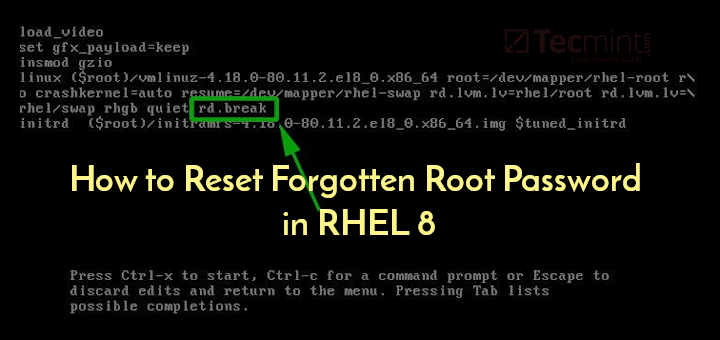
How To Reset Forgotten Root Password In RHEL 8

CentOS RHEL 7 How To Reset Root Password The Geek Diary

How To Reset Root Password On CentOS 7 RHEL 7 ComputingForGeeks

Recovering The Root Password In RHEL 8 YouTube

How To Hack Linux Password Reset The Root Password On RHEL 7
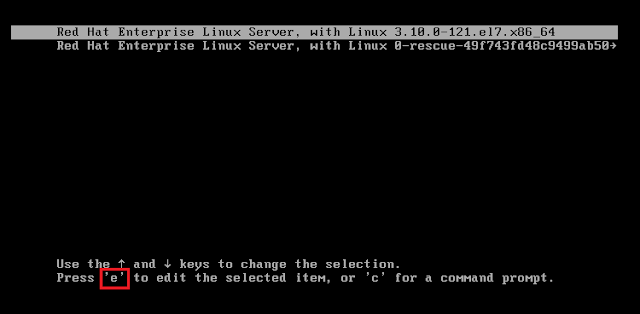
How To Reset Break Root User Password In RHEL 7 IT IMS CYBER
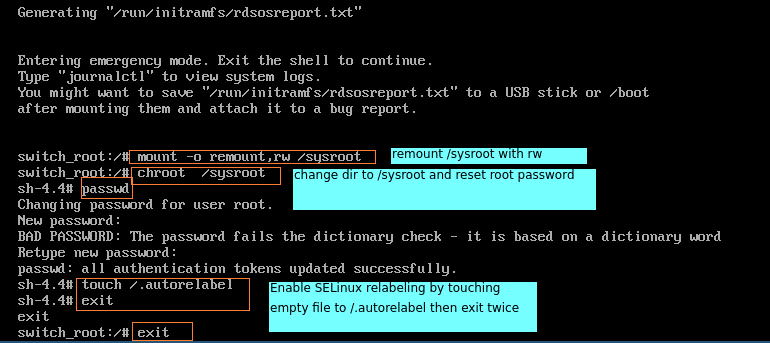
Web As shown we can reset the root password in Linux CentOS RHEL 7 by booting with the rd break option remounting the file system with read write privileges creating a chroot jail executing the passwd command and then finally fixing up SELinux contexts
Web Log In New to Red Hat Learn more about Red Hat subscriptions Using a Red Hat product through a public cloud How to access this content

Web Feb 25 2020 nbsp 0183 32 Great Linux resources Advanced Linux commands cheat sheet Download RHEL 9 at no charge through the Red Hat Developer program A guide to installing applications on Linux Linux system administration skills assessment How well do you know Linux Take a quiz and get a badge We ve all inherited systems we didn t have any part

Web Resetting root password in CentOS RHEL 7 is slightly different than the older versions The post describes the procedure to reset the lost root password Reboot and edit grub2 Reboot the system and press any key to stop the auto boot from the default kernel Press e after selecting the kernel line Append rd break to kernel
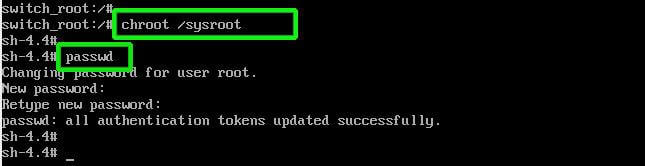
Web Sep 1 2021 nbsp 0183 32 Final Thoughts In this guide we ve shown you how to reset or recover a forgotten root password on Red Hat Linux 7 and CentOS Linux 7 using single user mode with rd break parameters If you have any questions or feedback feel free to comment below About Prakash Subramanian
Web Steps to Reset Forgotten Root Password on Linux RHEL 7 CentOS 7 1 Reboot your system and interrupt the countdown in the boot loader menu See also How to Configure Static IP Address on CentOS 6 4 In order to interrupt the countdown you need to press any key when the boot loader menu appears 2 Web Apr 14 2018 nbsp 0183 32 Press quot Ctrl x quot to boot your box with the new changes As you see now you have a shell and you were not prompted for root password Next you must remount your filesystem with read write permission as currently you have logged in with read only mode for root filesystem switch root mount o remount rw sysroot
Web Jul 20 2018 nbsp 0183 32 To reset root password we must have physical access to the Server machine Because we have to login into Emergency target Once successfully reach at emergency target follow the steps below to reset root password By default filesystem is mounted at sysroot with ro read only option in emergency target