Reset Root Password Centos 7 Reset Root Password Centos 6 10 Fasrblaster How To Reset Root Password CentOS 7 Interrupt The Boot Process How To Reset Forgotten Root Password In RHEL 8 How To Reset Root Password In CentOS 7 How To Reset Root User Password On CentOS 8 Resetting A Forgotten Web How to reset the root password on CentOS 6 and CentOS 7 Password reset algorithm at a glance 1 Accessing VNC console 2 Restarting the server and editing kernel boot parameters 2 1 CentOS 6 Dedicated server 2 2 CentOS 6 Cloud server 2 3 CentOS 7 Dedicated server 2 3 CentOS 7 Cloud server 3 Setting a new root password 3 1
Web Sep 1 2021 nbsp 0183 32 Have you forgot your root password for RHEL 7 and CentOS 7 systems Want to reset a forgotten root password If so don t worry we are here to help you You can recover a forgotten root password from either single user mode or rescue mode Web Jul 15 2020 nbsp 0183 32 First log in to the CentOS Linux server using ssh or console Open a shell prompt and type the passwd command to change root password in CentOS Linux The actual command to change the password for root on CentOS Linux is sudo passwd root NOTE Please note that vivek centos7 is my shell prompt
How To Reset Root User Password On CentOS 8 Resetting A Forgotten How To Reset Root Password On CentOS 7 Unixmen Cara Reset Password Root Pada CentOS 7 Via Single Mode How To Reset Root Password On CentOS 7 Unixmen How To Reset Lost Root Password In CentOS 8 RHEL 8 ITzGeek How To Reset A Lost Forgotten Or Unknown Root User Password CentOS 7 How To Reset Forgotten Root Password On CentOS 7 CentOS 8 SysOpsPro Reset Root Password In RHEL 8 CentOS 8 Rocky Linux 8 Reset Lost Root Password CentOS 7 Jordansphere
Reset Root Password Centos 7
 Reset Root Password Centos 7
https://fasrblaster433.weebly.com/uploads/1/2/5/8/125851042/292110435.jpg
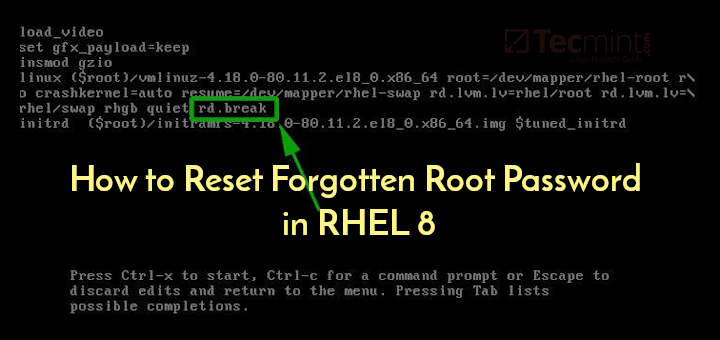
Web Resetting root password in CentOS RHEL 7 is slightly different than the older versions The post describes the procedure to reset the lost root password Reboot and edit grub2 Reboot the system and press any key to stop the auto boot from the default kernel Press e after selecting the kernel line Append rd break to kernel
Pre-crafted templates use a time-saving option for producing a diverse range of files and files. These pre-designed formats and designs can be used for numerous personal and expert tasks, including resumes, invites, leaflets, newsletters, reports, discussions, and more, simplifying the content creation process.
Reset Root Password Centos 7
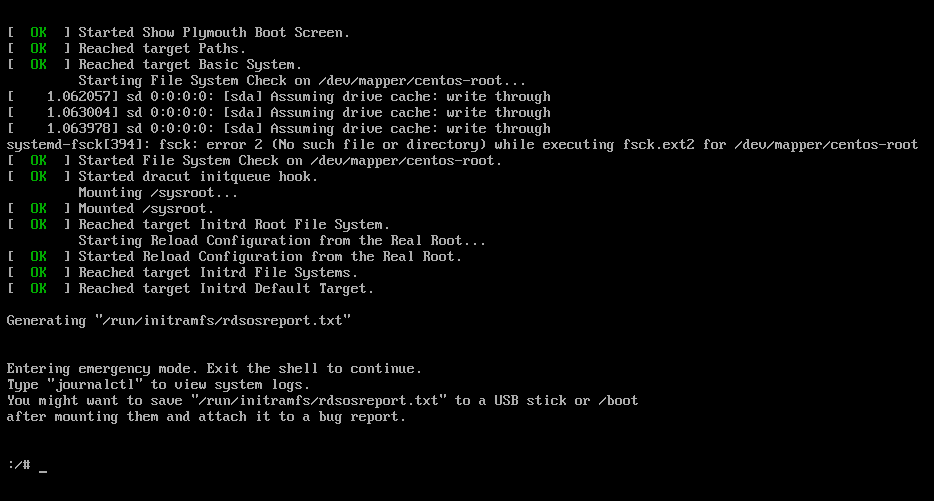
How To Reset Root Password On CentOS 7 Unixmen
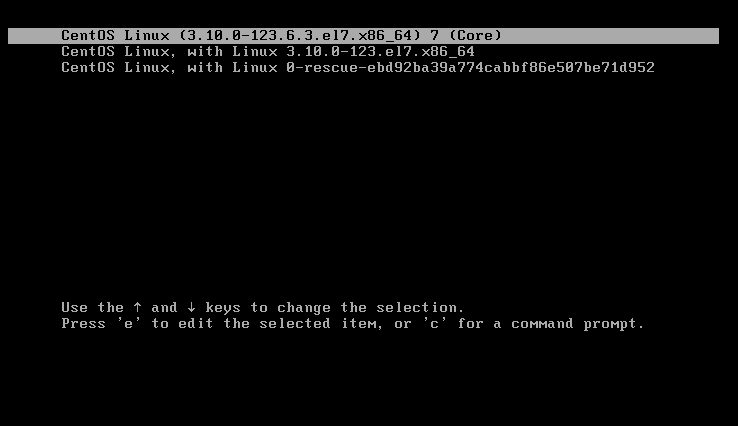
How To Reset Root Password On CentOS 7 Unixmen
Cara Reset Password Root Pada CentOS 7 Via Single Mode
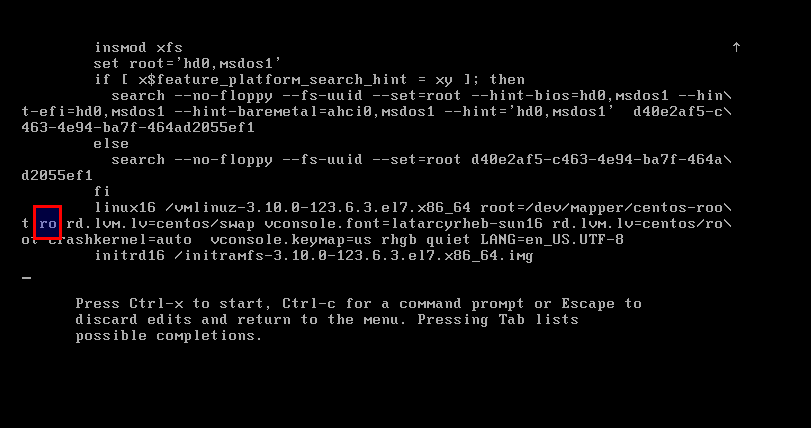
How To Reset Root Password On CentOS 7 Unixmen

How To Reset A Lost Forgotten Or Unknown Root User Password CentOS 7
How To Reset Forgotten Root Password On CentOS 7 CentOS 8 SysOpsPro

Web As shown we can reset the root password in Linux CentOS RHEL 7 by booting with the rd break option remounting the file system with read write privileges creating a chroot jail executing the passwd command and then finally fixing up SELinux contexts
Web Roy s The way to reset the root password on centos7 is totally different from Centos 6 Let me show you how to reset the root password in CentOS 7 1 In the Boot Grub Menu Select Option to Edit 2 Select Option to edit e 3 Go to the line of Linux 16 and change ro with rw init sysroot bin sh
Web Feb 5 2020 nbsp 0183 32 You can t reset your root account password using a regular user account as a user account can t perform such tasks in general In this article we ll be covering how to recover your CentOS root password So let s see how to do it How to recover your root password step by step

Web May 30 2017 nbsp 0183 32 Resetting root password in CentOS 7 duplicate Ask Question Asked 6 years 7 months ago Modified 6 years 7 months ago Viewed 3k times 3 This question already has an answer here How to change the forgotten root password 1 answer Closed 6 years ago

Web Apr 5 2021 nbsp 0183 32 The first step to reset the root password is to boot the CentOS machine in emergency mode and for this process we ll use rd break Start the system and on the GRUB 2 boot screen press the e key for edit
Web Jul 29 2020 nbsp 0183 32 How to reset forgotten root password in centos 7 8 First reboot or power on your CentOS 8 system Select the kernel that you want to boot into Next press e to interrupt the boot process and make changes Replace the kernel parameter ro with rw and append an extra kernel parameter init sysroot bin sh Web Aug 19 2020 nbsp 0183 32 Learn to reset your root password in CentOS 7 This guide showcases entering single user mode and resetting the forgotten password
Web Now press F10 to get to the switch root prompt In the terminal mount o remount rw sysroot Now access the system with the following chroot sysroot Now you will get a different prompt born shell prompt In the terminal passwd Set your root password exit mount o remount ro sysroot exit the system will reboot