Reset Keychain Iphone Macos Reset Keychain Unable To Obtain Authorization For This Operation Macos Excel Keeps Asking For Keychain Password Heavyplate I Do Not Know And Cannot Reset My Keychain Password I Have Changed My Forgot Keychain Password How To Reset Keychain Password Front Back Full Hydrogel Film For Iphone 13 Pro Max Nano Screen WEB Feb 8 2024 nbsp 0183 32 Tap your Apple ID Tap iCloud Scroll down and tap Keychain Toggle the i Cloud Keychain switch on Enter your Apple ID password if prompted If you ve set up an iCloud Keychain password before you will be asked to enter your existing password after enabling iCloud Keychain
WEB Dec 2 2020 nbsp 0183 32 Tap Edit to reset the keychain password change the user name or delete the information entirely If you don t see the website you want on this list it s possible you manually selected not to save the login info when first visiting the site WEB Nov 14 2023 nbsp 0183 32 Tap on iCloud Tap Passwords and Keychain Tap the toggle next to Sync this iPhone to enable or disable it Once you take these steps on your iPhone iCloud Keychain will be ready to go You can go ahead and start creating strong passwords manually add your passwords view security recommendations and more
Front Back Full Hydrogel Film For Iphone 13 Pro Max Nano Screen Keychain IPhone Charger Personalized Leather Keychain Custom Monogram Reset Mac Keychain Access Stashokpanda Who Is Sammie Bush Jr Gf Transferpsado How To Delete All Your Keychain Passwords In MacOS Reset Keychain Password Issues You May Need To Reset Your Keychain CNET Pin Auf Personalized Keychains Spare Needle JC 16 needle pistonneedle For AliExpress
Reset Keychain Iphone
 Reset Keychain Iphone
https://logisticsrenew.weebly.com/uploads/1/2/6/5/126550644/923357965.jpg
WEB Jul 6 2017 nbsp 0183 32 How to By Lory Gil published 6 July 2017 Your passwords and login credentials are safely stored in iCloud Keychain for you to use at your disposal any time anywhere on your iPhone iPad or Mac But what if something goes wrong and you can t access iCloud Keychain
Templates are pre-designed documents or files that can be used for different purposes. They can save time and effort by supplying a ready-made format and layout for developing different kinds of material. Templates can be used for personal or professional tasks, such as resumes, invites, leaflets, newsletters, reports, discussions, and more.
Reset Keychain Iphone
How To Update And Reset ICloud Keychain Password On A Mac

Keychain IPhone Charger

Personalized Leather Keychain Custom Monogram

Reset Mac Keychain Access Stashokpanda

How To Delete All Your Keychain Passwords In MacOS Reset Keychain

Password Issues You May Need To Reset Your Keychain CNET

WEB Sep 6 2015 nbsp 0183 32 1 Launch Keychain Access located in Applications Utilities 2 Click quot Show Keychains quot in the lower left corner of the window 3 Select the problematic keychain from the left hand pane 4 Navigate to the quot File quot menu and select quot Delete Keychain name of keychain quot 5 Check all options for deletion and press quot OK quot 6

WEB May 13 2022 nbsp 0183 32 iCloud Keychain escrows users keychain data with Apple without allowing Apple to read the passwords and other data it contains Even if the user has only a single device keychain recovery provides a safety net against data loss

WEB Feb 2 2024 nbsp 0183 32 How to turn on iCloud Keychain Before you turn on iCloud Keychain update your device to the latest iOS or iPadOS or the latest version of macOS and make sure that two factor authentication is turned on for your Apple ID Turn on iCloud Keychain on your iPhone iPad or Apple Vision Pro Tap Settings tap your name then choose

WEB Feb 11 2018 nbsp 0183 32 Choose Apple menu gt System Preferences Click iCloud then select Keychain You might be asked to enter your Apple ID password Click Use Code then choose Forgot Code when you re asked to enter your iCloud Security Code Click Reset Keychain to replace your keychain in iCloud with the iCloud Keychain from your device
WEB Jan 14 2017 nbsp 0183 32 Click Change Security Code to set a new iCloud Security Code Tap Settings gt iCloud gt Keychain gt Advanced Tap Approve with Security Code When asked to enter your iCloud Security Code tap Forgot Code Tap Reset iCloud Keychain to replace your iCloud Keychain in the cloud with the iCloud Keychain items on your device
WEB Dec 5 2019 nbsp 0183 32 You can change a password through Keychain and delete accounts you no longer need SEE Apple iOS 13 A cheat sheet TechRepublic download To enable Keychain on your iPhone or iPad go to Settings WEB Apr 12 2023 nbsp 0183 32 1 During device setup 2 Turn on iCloud Keychain later 2 1 On iPhone or iPad 2 2 On Mac 3 What happens next 4 See your saved passwords 5 Fill passwords from iCloud Keychain 5 1 On iPhone and iPad 5 2 On Mac 6 Stop using iCloud Keychain 6 1 Go deeper During device setup
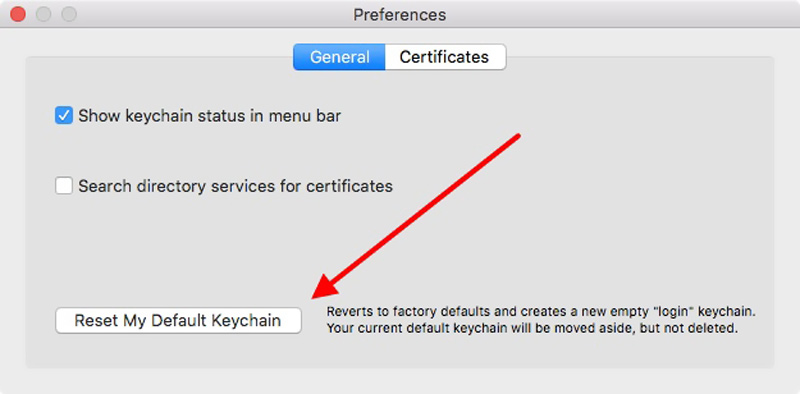
WEB Click Reset Default Keychains Choose Apple menu gt Log Out When you log in again save your current login password in a keychain