Reset Adapter Settings Windows 10 How To Manually Reset Your Wireless Adapter In Windows 6 Steps Adapter Settings Windows 7 Adapter 1 Jest b Hrdlo Kloktadlo Metalowy wiecznik Kaganek Hr t Na Pi no Sekce How To Fix Slow WiFi Internet Connection On Windows 10 Laptop Tech Windows 7 Network Adapter Settings YouTube In the Windows Settings window press Network Internet Status Click the Network Reset option in the Status menu to begin the network reset process In the Network Reset menu an explanation of the process will appear explaining that Windows will reset your devices and network configuration Press Reset now to begin resetting your devices
1 Share To Reset the Wi Fi Adapter in Windows 10 use Settings network troubleshooter or Command Prompt You can disable and enable the Wi Fi Adapter or restart the Wi Fi Adapter via Device Manager If you encounter network connectivity issues you might want to reset the Wi Fi adapter on Windows 10 What to Know Disable enable Wi Fi Adapter Go to Settings Network Internet Change adapter options Click Disable After 60 seconds click Enable Reset all Wi Fi network adapters Go to Settings Network Internet and choose Network reset Reset Now
Windows 7 Network Adapter Settings YouTube Give Ethernet Higher Priority Over WiFi Connection In Windows 10 Adapter Settings Windows 7 Adapter 1 Enable And Disable Network Adapters In Windows 7 Reset Network Adapter Settings In Windows 7 Reset Adapter Settings Wi Fi Windows 10 Network Adapter Settings Windows 10 Archives WinBuzzer How To Reset Network Adapter In Windows 10 Using Network Reset How To Enable Or Disable Your WiFi Or Ethernet Adapter In Windows 10
Reset Adapter Settings Windows 10
 Reset Adapter Settings Windows 10
http://www.wikihow.com/images/d/d1/Manually-Reset-Your-Wireless-Adapter-in-Windows-Step-6.jpg
Choose Device Manager Double click Network Adapters and then right click on the network adapter to reinstall The exact name will vary from computer to computer Choose Uninstall If a checkbox appears to also delete the driver software leave this checkbox unchecked Click OK Restart the computer The adapter will be reinstalled on startup
Pre-crafted templates offer a time-saving option for producing a diverse range of files and files. These pre-designed formats and layouts can be utilized for various personal and professional projects, including resumes, invites, flyers, newsletters, reports, presentations, and more, enhancing the content development procedure.
Reset Adapter Settings Windows 10

Disable Internet Connection Sharing In Windows 10
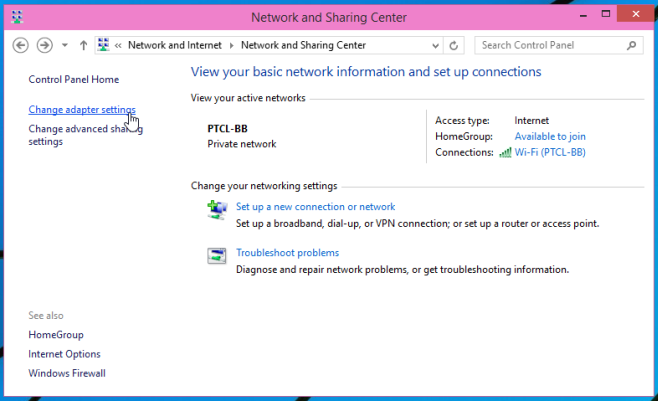
Give Ethernet Higher Priority Over WiFi Connection In Windows 10

Adapter Settings Windows 7 Adapter 1
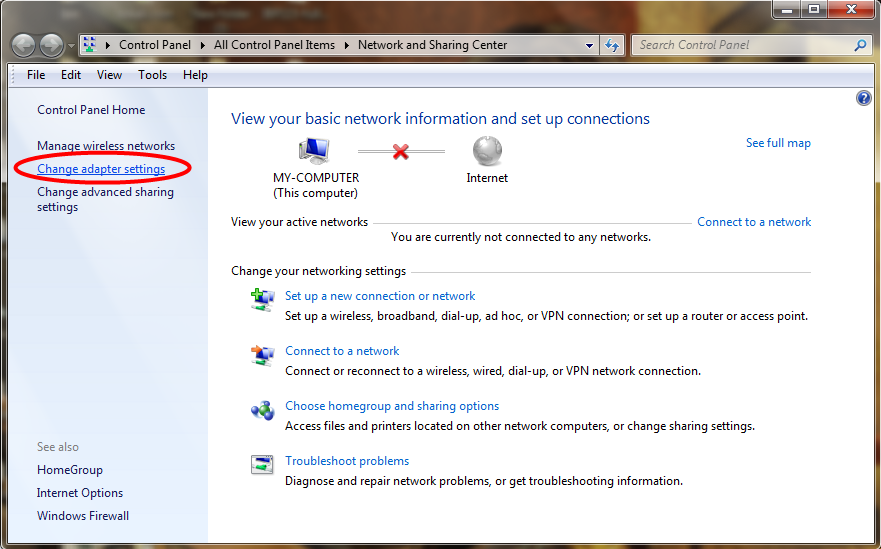
Enable And Disable Network Adapters In Windows 7

Wi Fi Windows 10

Network Adapter Settings Windows 10 Archives WinBuzzer

1 Make sure Wi Fi is enabled first If you re resetting your wireless adapter because you can t access your wireless network first make sure you haven t accidentally disabled Wi Fi To check open your Windows Settings click Network and Internet and toggle on the Wi Fi switch

Restart your modem and wireless router This helps create a new connection to your internet service provider ISP When you do this everyone that is connected to your Wi Fi network will be temporarily disconnected The steps you take to restart your modem and router can vary but here are the general steps

Step 1 Select the Start button then select Settings Network Internet Status Network reset Step 2 On the Network reset screen select Reset now Yes to confirm Then Windows will give you 5 minutes to close all documents and programs before it automatically restart You can do the restart yourself to save time

1 Open Settings and click tap on the Network Internet icon 2 Click tap on Status on the left side and click tap on the Network reset link on the right side see screenshot below 3 Click tap on the Reset now button see screenshot below 4 Click tap on Yes to confirm see screenshot below

To reset network settings go to Start menu Settings Network and Internet Status Network Reset If you have a VPN or a proxy server it may need to be reconfigured following the reset Resetting network settings removes and reinstalls every network adapter installed on your system
The primary way of resetting the network adapters in Windows 10 Left click on the Start button to bring up the Start menu Left click on Settings gear icon Left click on Network Internet In the left hand column left click on Status In the right hand column left click on Network reset On the Network reset page left click on Reset now What Resetting the Network Adapter Implies If you re determined to go through with it remember that when you reset the network adapter your computer will forget all the Wi Fi passwords and networks you have ever added It will also forget VPN connectors and virtual switches
Click Network reset Making sure you re in the Status tab in the left sidebar scroll until you see the Network reset text Click it to begin the process Press Reset now