Remove Password From Adobe Pdf Document Unlock A Signed PDF File Remove Password Protection From PDF Files Simple Guide How To Remove Password Protect From A PDF File Using Adobe Acrobat Pro DC Freelancer Insights How To Remove A PDF Password Unlock A PDF Adobe Acrobat How To Reduce Pdf File Size Using Python ObizTools Web Jul 7 2022 nbsp 0183 32 1 Open the password protected PDF in Adobe Acrobat Enter the password when directed 2 Click File in the menu bar then choose Properties 3 In the Document Properties window click
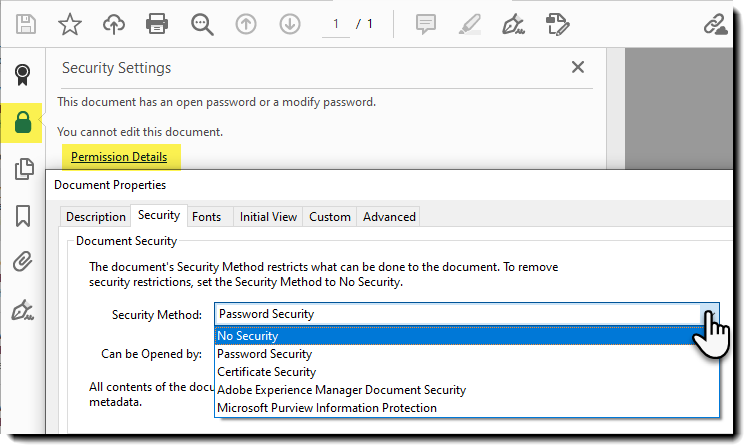
Web Jan 17 2021 nbsp 0183 32 In Adobe Acrobat DC open the PDF gt Enter the password gt OK gt File gt Properties gt Security gt Security Method gt No Security gt OK gt OK This article covers how to remove password protection from a PDF file using a free PDF viewer and Adobe Acrobat DC a paid tool How to Use a PDF Viewer To Remove Password Protection From a PDF Web Sep 21 2018 nbsp 0183 32 How do I remove password protection from a pdf WilmaSchroeder Community Beginner Sep 20 2018 I have been retained to edit an educational program but the original Word files have been lost All I have is
How To Reduce Pdf File Size Using Python ObizTools How To Remove Password From PDF Files In Adobe Acrobat Reader YouTube How To Remove Document Password Pdf How To Remove Password From PDF Files With Google Chrome Digital Inspiration Coolmuster PDF Password Remover 10 4 Crack With Key Latest How To Manually Add Name And Password In Chrome How To Disable Ads On YouTube Remove YouTube Ads From Android Chrome FireFox Mind Blowing Tricks To Remove PST Password Complete Guide Vse Najbolj e Pi anca Izvirnik Adobe Acrobat Remove Page Quagga Zvest Advent
Remove Password From Adobe Pdf Document
 Remove Password From Adobe Pdf Document
https://helpx.adobe.com/content/dam/help/en/sign/kb-articles/unlock-sealed-pdf/PDF Security Document Properties.png.img.png
Web Oct 30 2023 nbsp 0183 32 Follow these steps to use their online password removal tool for your file First go to the Unlock PDF page on their official website
Pre-crafted templates provide a time-saving solution for producing a varied variety of documents and files. These pre-designed formats and designs can be made use of for various personal and professional projects, including resumes, invites, flyers, newsletters, reports, presentations, and more, improving the material creation procedure.
Remove Password From Adobe Pdf Document

Adobe PDF File Download T l chargement Fichier PDF Biblebase

How To Remove Password From PDF Files In Adobe Acrobat Reader YouTube

How To Remove Document Password Pdf
How To Remove Password From PDF Files With Google Chrome Digital Inspiration

How To Manually Add Name And Password In Chrome

How To Disable Ads On YouTube Remove YouTube Ads From Android Chrome FireFox

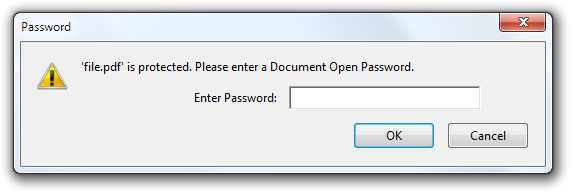
Web 1 Open the PDF in Acrobat Pro on Windows or Mac 2 Choose Tools Encrypt Remove Security 3 If the document has a Document Open password click OK to remove it 4 If the document has a permissions password type the correct password in the Enter Password box and then click OK After those steps congratulations you ll have an unlocked PDF

Web Oct 25 2022 nbsp 0183 32 Open the PDF file in Adobe Acrobat Pro and provide its password to view it Click the lock icon at the left side of the window and click quot Permission Details quot You can also click File gt Properties and click the quot Security quot tab Click the quot Security Method quot box select quot No Security quot and click quot OK quot to remove the password

Web Choose File or drop PDF here Remove passwords from PDFs online easily for free No size limits and no ad watermarks Unlock PDFs without sign up or installation Remove the password from your PDF in seconds TLS encryption for secure document processing

Web Choose Tools gt Protect gt Advanced Options gt Remove Security If the document has a Document Open password click OK to remove it If the document has a permissions password type the correct password in the Enter Password box and then click OK Once you ve done these steps your PDF will be unlocked and no longer require a

Web Discover how to remove a password from a PDF with Adobe Acrobat Use this guide to learn how to unlock PDF security to read edit or share the file
Web May 15 2024 nbsp 0183 32 Open the PDF in Acrobat From the All tools menu select Protect a PDF From the left panel select Remove security Depending on the type of password For Document Open password select OK to remove it For permissions password enter it in the Enter Password box then select OK Confirm the action by selecting OK again You can Web 16 Answers Sorted by 66 Contrary to the other solutions you do not need additional software Anyone with Windows can do it with no extra software in 4 simple steps Open the PDF Go to File gt Print From your print options choose Microsoft XPS Document Writer
Web Open the PDF in Acrobat Use the Unlock tool Choose Tools gt Protect gt Encrypt gt Remove Security Remove Security The options vary depending on the type of password security attached to the document If the document has a Document Open password click OK to remove it from the document