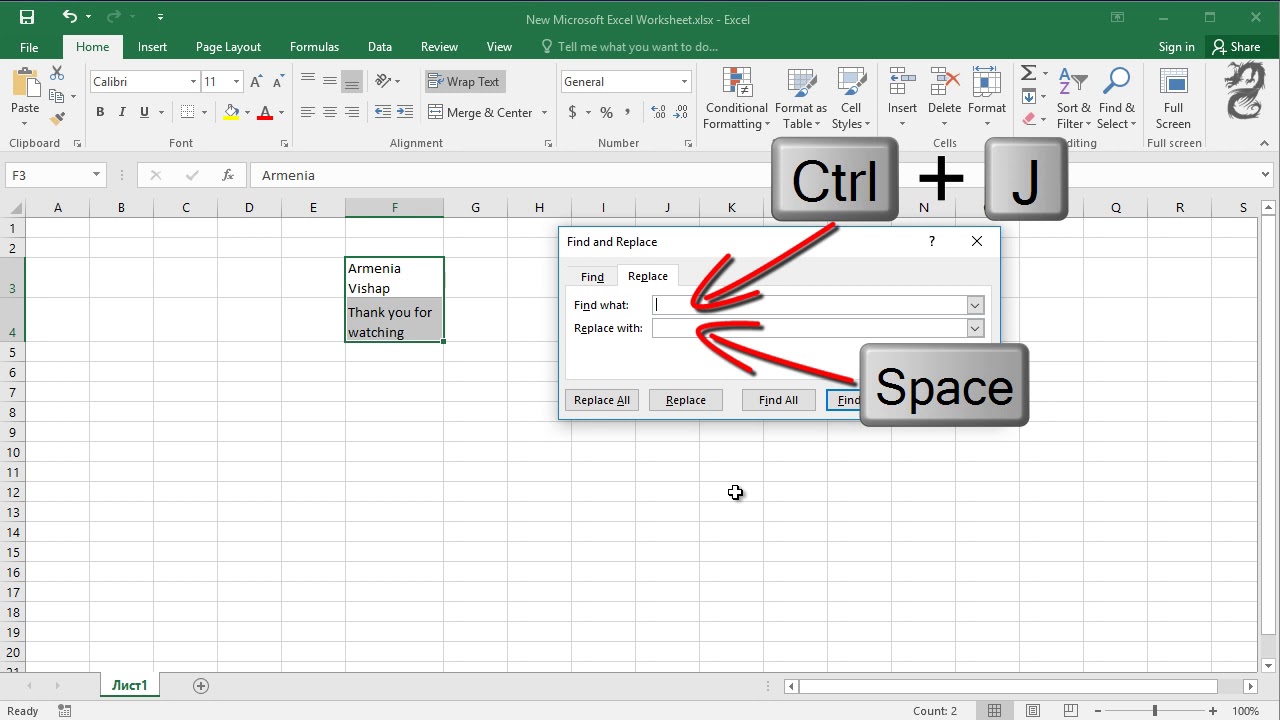
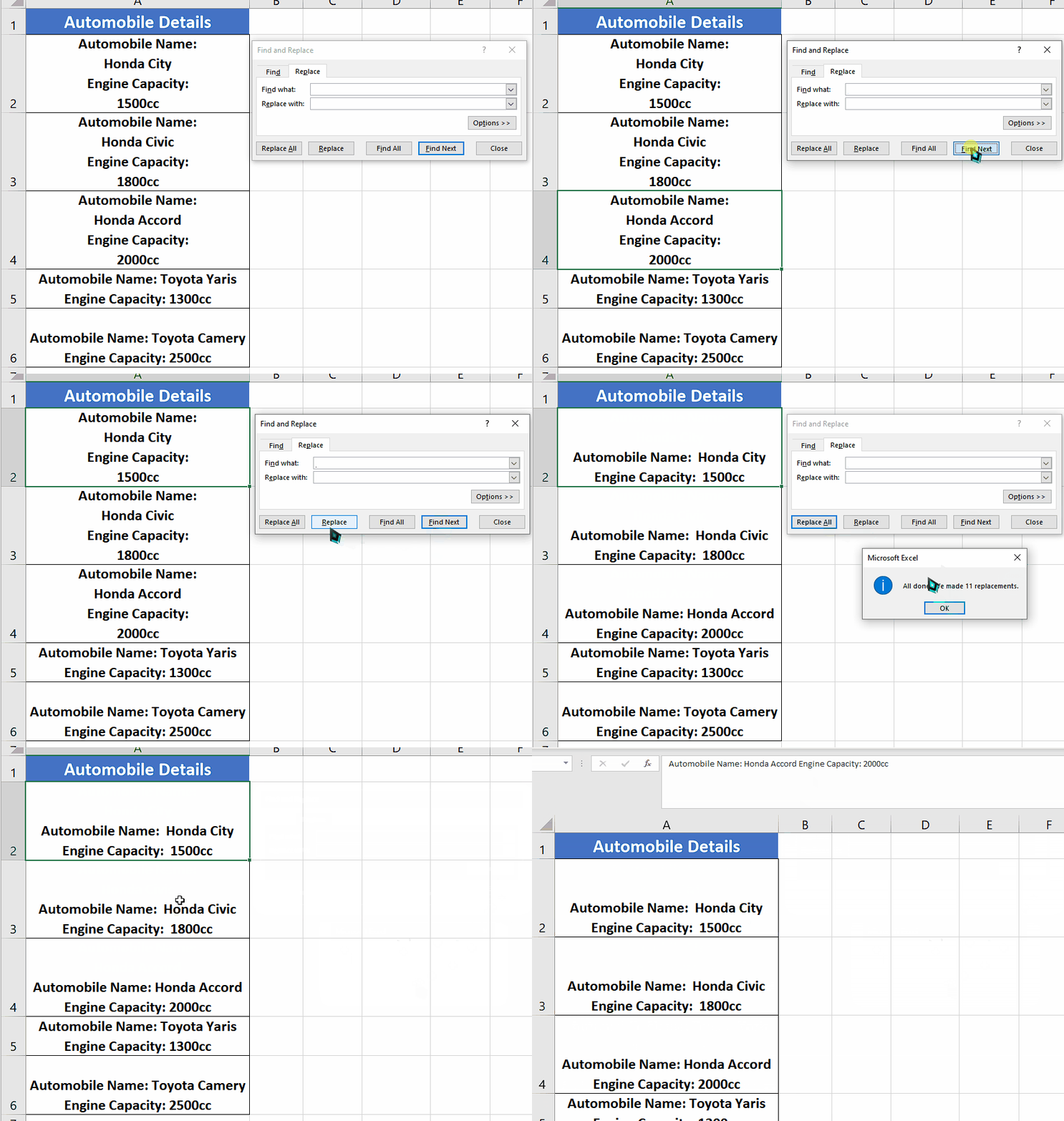
Remove Line Breaks In Excel Short Break Line Examples Excel How To Remove Line Breaks In Excel Find And Replace Line Breaks Earn Excel Remove Line Breaks In Excel MS Excel VBA How To Remove A Line Break In Excel How To Remove Line Breaks In Excel SpreadCheaters Remove line breaks in Excel Very similar to search for line breaks you can also remove or replace them Instead of Find use the Replace tab of the search window and replace them with a blank space Open the search window by pressing Ctrl f on the keyboard Type Ctrl j into the search field and press Enter
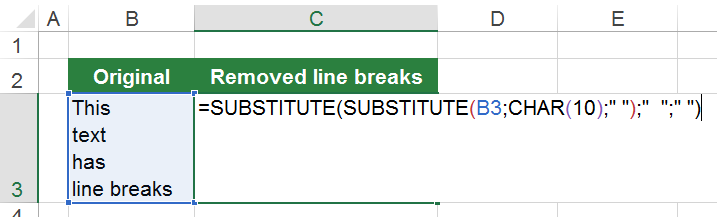
You can use Excel s Find and Replace feature to remove line breaks The tricky part is entering the line break character into the Find what box You have 2 options to do this Type in Ctrl J Type in Alt 010 not 10 exact characters of 010 Both combinations can produce a new line character Remove Line Breaks in Excel Figure 1 of Remove Line Breaks in Excel In order to remove any all Line Breaks from text located within a cell of our worksheet we are going to utilize a formula syntax based on the CHAR and SUBSTITUTE Functions in Excel Generic Formula SUBSTITUTE A1 CHAR 10 How to Remove Line Breaks in Excel
How To Remove Line Breaks In Excel SpreadCheaters How To Remove Line Breaks In Excel 5 Ways ExcelDemy How To Remove A Line Break In Excel How To Remove Line Breaks In Excel 3 Ways YouTube How To Insert Page Breaks In Excel 2007 Dadllc Line Breaks In Excel How To Enter Find Remove Them How To Remove Line Breaks In Excel 5 Ways ExcelDemy Add And Remove Line Breaks In Excel Video Tutorial How To Remove Line Breaks In Excel takes Less Than 10 Seconds YouTube
Remove Line Breaks In Excel
 Remove Line Breaks In Excel
https://i.ytimg.com/vi/boqLlDWGVlo/maxresdefault.jpg
To remove the line break press the Backspace key If necessary type a space character to separate the words in the cell Press Enter to complete the formula change Find and Replace Multiple Line Breaks To find specific text in Excel you can use Ctrl F to open the Find and Replace dialog box
Pre-crafted templates use a time-saving option for developing a diverse variety of files and files. These pre-designed formats and layouts can be utilized for numerous personal and professional projects, consisting of resumes, invitations, leaflets, newsletters, reports, presentations, and more, enhancing the material development procedure.
Remove Line Breaks In Excel
How To Remove Underline In Excel 2007 Hooliwe

How To Remove Line Breaks In Excel 5 Ways ExcelDemy

How To Remove A Line Break In Excel
How To Remove Line Breaks In Excel 3 Ways YouTube
Line Breaks In Excel How To Enter Find Remove Them

How To Remove Line Breaks In Excel 5 Ways ExcelDemy
Delete line breaks using Excel formulas Add the helper column to the end of your data You can name it 1 line In the first cell of the helper column C2 enter the formula to remove replace line breaks Here you can see Handle both Windows and UNIX carriage return line feeds

Summary To remove line breaks from a cell or from text inside a formula you can use a formula based on the SUBSTITUTE and CHAR functions In the example shown the formula in C5 is SUBSTITUTE B5 CHAR 10

How to Remove Line Breaks in Excel 5 Ways 1 Using Find Replace Tool to Remove Line Breaks in Excel Firstly the easiest method to remove line breaks in Excel 2 Inserting Excel CLEAN Function to Remove Line Breaks Secondly you can remove line breaks by using the CLEAN 3 Applying TRIM

1 Using Find Replace Command to Replace Line Breaks in Excel 2 Utilizing SUBSTITUTE Function to Find and Replace Line Breaks 3 Inserting Excel TRIM Function to Find and Replace Line Breaks 4 Inserting CLEAN Function to Remove Line Breaks in Excel 5 Applying Wrap Text Command to Delete Line Breaks 6
There are several functions that can be used to remove line breaks from the text SUBSTITUTE CLEAN and TRIM Using SUBSTITUTE Function The SUBSTITUTE function finds and replaces text in a cell By combining it with the CHAR Function we can find and replace line breaks with a single space SUBSTITUTE B3 CHAR 10 Also
[desc-11] [desc-12]
[desc-13]