Print Path Mac Terminal What Is Terminal For Mac But To Windows Lasopaiheart Python Selenium Mac 5 Mac Terminal Tips You ll Want To Use Computerworld Quickly Copy A File Or Folder Path To The Clipboard In Mac OS X Terminal Commands Mac Cheat Sheet Print Out Lawpcvisa Riset How do I print current path settings under BASH or sh or ksh shell In Linux or Unix like file systems the human readable address of a resource is defined by PATH shell variable On Unix Linux like operating systems as well as on DOS Windows and its descendants PATH is an environment variable listing a set of paths to directories where
How to Get Path on Mac Terminal Lucia September 26 2023 Mac Lucia The Challenge of Getting the Path on Mac Terminal Video Tutorial Method 1 Using the pwd Command Method 2 Using the find Command Method 3 Using the ls Command Method 4 Using the Tab Completion Feature Alternatives What to Do If You Can t Get the Path Bonus Tips Here are some methods to find things that aren t in your path statement find sudo find name FILE This will find anything that exists on the file system you give as the first argument It need to run as root to search private directories It also supports wildcards if you re not completely sure of the name
Terminal Commands Mac Cheat Sheet Print Out Lawpcvisa Riset How To Copy A File Path On A Mac Program Path For Mac Add App To Path Mac Potentie Ipconfig Mac OS X Egeek How To Open Mac Terminal Application Passlwed Terminal Commands Mac Cheat Sheet Print Out Lawpcvisa Mac Terminal Commands Cheat Sheet Free Cheat Sheet Terminal Emulator Android Tutorial Tutorial Iki Rek
Print Path Mac Terminal
 Print Path Mac Terminal
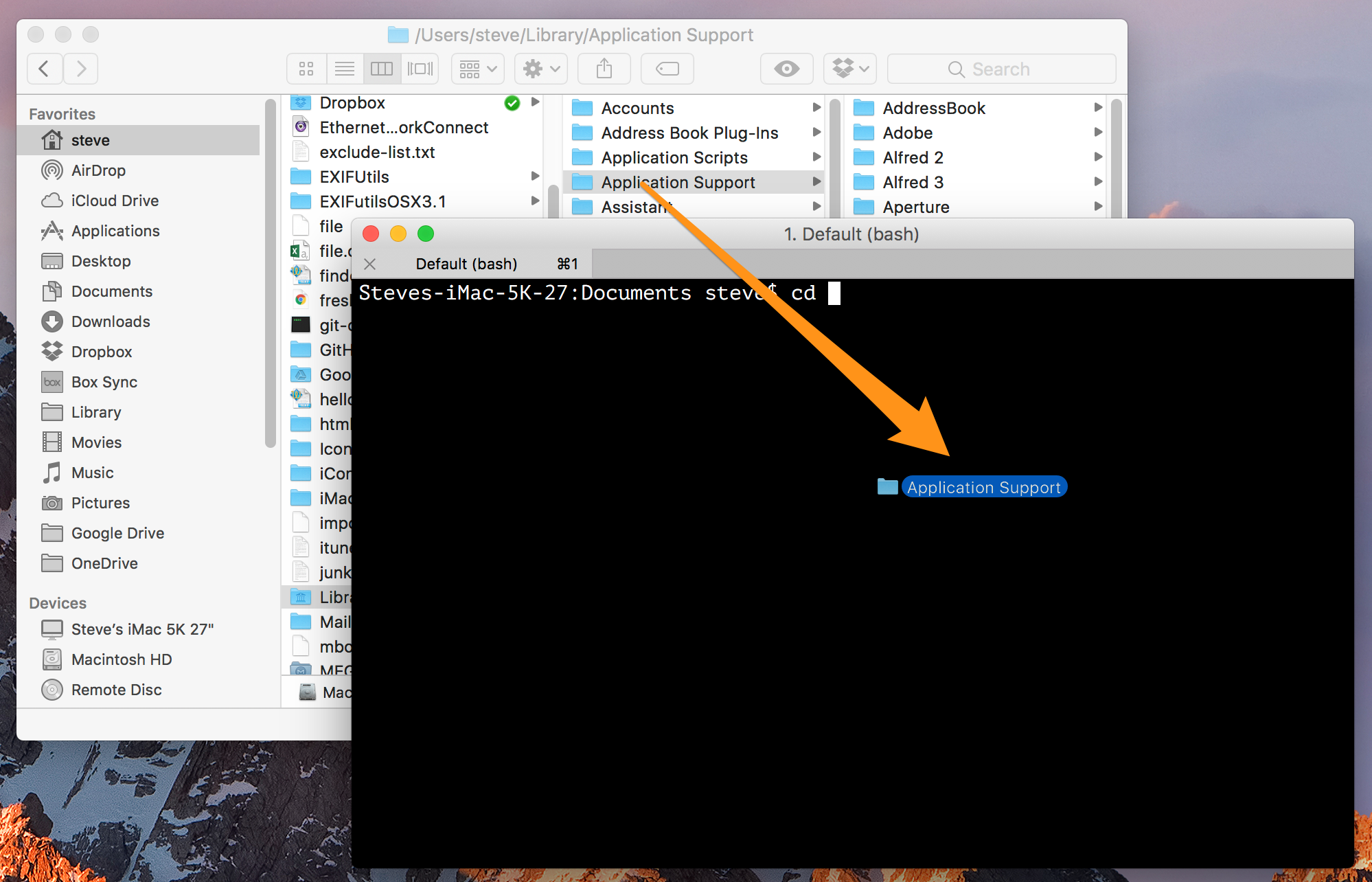
http://www.tech-otaku.com/wp-content/uploads/0940-03-dragging-an-item-from-the-finder-to-a-terminal-window.png
You can use pwd command in MAC OS to print the current directory path in terminal pwd Contribute to this Snippet Was this helpful Created by Devsheet Write your Comment Comments Similar code snippets Access desktop from terminal in MAC Print to the log file project name testsuite name test case name Groovy
Templates are pre-designed documents or files that can be used for various functions. They can save time and effort by offering a ready-made format and design for producing various kinds of content. Templates can be utilized for personal or professional projects, such as resumes, invites, flyers, newsletters, reports, presentations, and more.
Print Path Mac Terminal

How To Use Find Command Mac Terminal Hotlinedamer

How To Copy A File Path On A Mac
Program Path For Mac
Add App To Path Mac Potentie

How To Open Mac Terminal Application Passlwed
Terminal Commands Mac Cheat Sheet Print Out Lawpcvisa
41 This answer is not useful Save this answer Show activity on this post Use realpath E g realpath README md Users joe my long directory structure README md Answered here on stackoverflow https stackoverflow a 3915075 441960 Make sure you download the coreutils on Homebrew as it isn t installed by default on all macs

The shell uses environment variables to store information such as the name of the current user the name of the host computer and the default paths to any commands Environment variables are inherited by all commands executed in the shell s context and some commands depend on environment variables

1 Answer Sorted by 6 Here s a function pwdr pwd sed s HOME Add this function to a profile file and use pwdr In bash you can also use parameter expansion and avoid the call to sed by using the rather magically looking echo PWD

5 Answers Sorted by 211 You need to use the command echo PATH to display the PATH variable or you can just execute set or env to display all of your environment variables By typing PATH you tried to run your PATH variable contents as a command name Bash displayed the contents of your path any way

April 7th 2020 Mac To see what current folder or directory you re in simply type the following inside the Mac Terminal pwd
Method 2 How to get a file path from Mac context menu Here s how to surface and copy the file path for any file or folder in your Mac s Finder app Open Finder on your Mac In the menu choose View Choose Show Path Bar This surfaces the path for any file selected at the bottom of the Finder window If you try to copy the text at the How Mac Terminal Shows Paths Mac Terminal uses a system similar to UNIX or LINUX This means paths are written using the names of folders separated by slashes For example if you have a folder named oldprojects and inside it another folder named changerequests the path looks like this
Get Info can also be accessed by the control click and right click menus For most use cases and for occasional complete path access the Get Info trick is simple fast efficient and should fit the bill for most people Print Path through the Mac Terminal Dragging and dropping anything into the OS X Terminal outputs the full path to that item