Prevent Excel From Converting To Date How To Remove Hyperlinks In Microsoft Excel Memesita How To Stop Excel From Changing Numbers To Dates TESTED Prevent Excel From Converting Text To Columns 2 Solutions YouTube How To Stop Numbers Converting To Date In MS Excel How To Open Two Instances Of Same Workbook Prevent Excel From Web Excel relies on the time and regional settings preferences of your operating system to analyze data Thus if you have quot European times quot as preferences it will consider your set of data format as being quot European quot no matter that it is a US format Excel does not know it
Web Prevent Excel from automatically converting to date When I try to paste in certain values Excel automatically converts it to a date There are solutions to this the most common appearing to either paste as an image or to make sure the worksheet is formatted as text in advance Web May 20 2023 nbsp 0183 32 No there s no way to turn off all automatic formatting in Excel However you can prevent Excel from changing numbers to dates by formatting cells as text using an apostrophe before the value or using the TEXT function How do I convert dates to numbers in Excel
How To Open Two Instances Of Same Workbook Prevent Excel From Prevent Excel From Converting Values To Dates When Opening HTML Files How To Prevent Excel From Removing Formula From Cells Stack Overflow Stopping Excel From Converting Unc Paths To Mapped Drives In Excel Converting CSV To Excel Solutions For Common Issues Prevent Excel From Converting To Legacy Array Microsoft Community Hub Prevent Excel From Converting To Scientific Notation In CSV Data Complete Guide On How To Stop Excel From Converting Certain Text Values C How Can I Prevent Excel From Converting Values To Date Format
Prevent Excel From Converting To Date
 Prevent Excel From Converting To Date
https://www.howtogeek.com/wp-content/uploads/2021/10/8-excel-options.png?trim=1,1&bg-color=000&pad=1,1
Web May 23 2017 nbsp 0183 32 Use the scroll bar to locate the column you wish to protect and click on it Select Text from the Column data format Click Finish Click OK The data will now have been imported without the date conversion
Pre-crafted templates offer a time-saving option for producing a varied series of files and files. These pre-designed formats and layouts can be utilized for numerous personal and expert tasks, including resumes, invitations, leaflets, newsletters, reports, discussions, and more, simplifying the material creation process.
Prevent Excel From Converting To Date
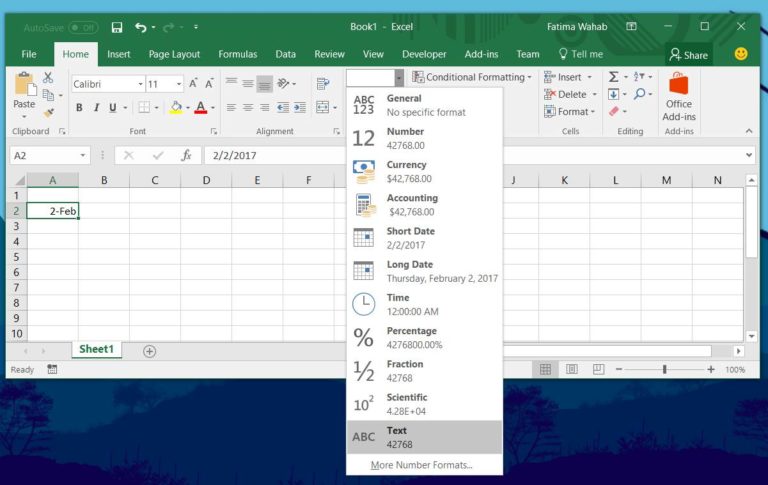
How To Stop Numbers Converting To Date In MS Excel

Prevent Excel From Converting Values To Dates When Opening HTML Files

How To Prevent Excel From Removing Formula From Cells Stack Overflow

Stopping Excel From Converting Unc Paths To Mapped Drives In Excel

Prevent Excel From Converting To Legacy Array Microsoft Community Hub
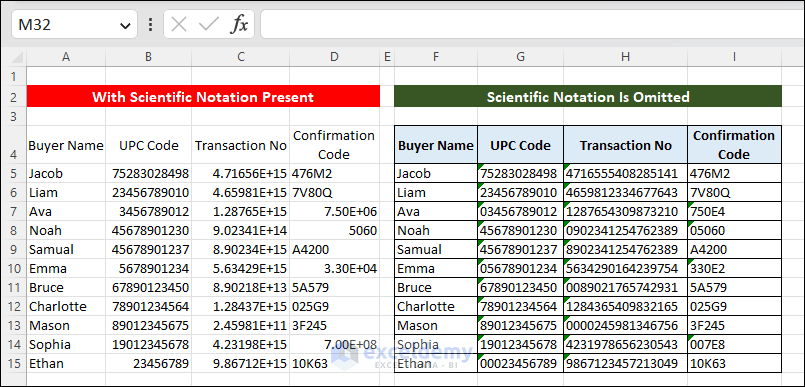
Prevent Excel From Converting To Scientific Notation In CSV Data

Web If you only have a few numbers to enter you can stop Excel from changing them into dates by entering A space before you enter a number The space remains in the cell after you press Enter See Notes An apostrophe before you enter a

Web Oct 8 2023 nbsp 0183 32 1 Utilizing Format Cells Feature to Prevent Excel from Converting Numbers to Dates The format cells feature allows us to change the appearance of cell numbers without changing the original number We know that the fraction number of 0 2307 is 3 13 So we enter the number into the selected cell

Web Jun 5 2023 nbsp 0183 32 There are two ways to prevent Excel from changing numbers to dates Method 1 Specify Text as the Format Method 2 Use an Apostrophe Before the Number The following examples show how to use each method in practice Example 1 Specify Text as the Format Suppose I attempt to enter the values 1 6 1 16 1 19 2 20 into Excel
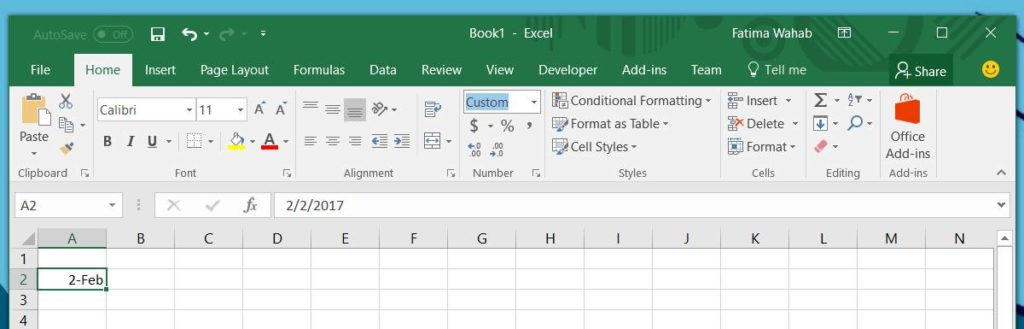
Web Apr 18 2017 nbsp 0183 32 While typing 3 12 will prevent Excel from converting the fraction into a date it does this by storing the value as plain text meaning you can t do something like 3 12 Stevoisiak Apr 18 2017 at 16 51

Web Oct 20 2023 nbsp 0183 32 Microsoft Microsoft Excel can notify you when it detects data that needs to be converted when opening a CSV file or other non native spreadsheet format That option is also available from File gt Options gt Data gt Automatic Data Conversion
Web May 20 2023 nbsp 0183 32 The easiest way to stop Excel from converting numbers into dates is to change the format of the cell Follow these steps Right click on the cell containing the number you want to change Select Format Cells from the context menu Select the Number tab in the Format Cells dialog box Select General as the Category and click Web Aug 31 2021 nbsp 0183 32 Steps to avoid conversion of numbers to dates But we can perform a bit of tweaking to avoid this automatic conversion of numbers to dates in Excel and that is by using formatting options Follow the below step by step guide to performing that easily
Web May 20 2023 nbsp 0183 32 Step 1 Select the Cells with Date Formats If you already have data in Excel that has been converted into dates you can change the cell format to prevent Excel from automatically converting it again in the future First select the cells with the date formats that you want to change Step 2 Right click and Select Format Cells