Powershell Create Scheduled Task To Run At Startup Disable Programs Running On Startup Dirtypassl Use PowerShell To Show Results Of Scheduled Tasks Scripting Blog Learn How To Create A Scheduled Task With PowerShell TechTarget Task Scheduler How To Run Powershell Script Mobile Legends Create Scheduled Tasks Web May 10 2023 nbsp 0183 32 In modern versions of PowerShell starting with PowerShell 3 0 on Windows Server 2012 Windows 8 you can use the New ScheduledTaskTrigger and Register ScheduledTask cmdlets to create scheduled tasks Suppose we need to create a scheduled task that should run during startup or at a specific time and execute
Web A trigger is a set of criteria that starts a scheduled task when the criteria are met You can use a time based trigger or an event based trigger to start a task and one or more triggers can start a task Web May 17 2022 nbsp 0183 32 Type the following command to create a variable that stores the schedule information for the task and press Enter trigger New ScheduledTaskTrigger SETTING At TIME In the command make
Create Scheduled Tasks Create Scheduled Task With PowerShell ALI TAJRAN 4 Ways To Run Powershell WikiHow Using Task Scheduler To Run A Powershell Script Mobile Legends Running Powershell Startup logon Script Using Gpo Ranjan Info Run How To Run The Powershell Script In Scheduled Task With As Easy Fix Powershell Script With Arguments As A Scheduled Task Tips From A PowerShell Write To File 17 SysAdmin Examples Itechguides Running PowerShell Scripts As Scheduled Tasks In Windows MSSQL DBA Blog
Powershell Create Scheduled Task To Run At Startup
 Powershell Create Scheduled Task To Run At Startup
https://i.pcmag.com/imagery/articles/03enxu9DEbwluJGMQVOnTMq-18.fit_lim.size_1050x.png
Web Description The Register ScheduledJob cmdlet creates scheduled jobs on the local computer A scheduled job is a Windows PowerShell background job that can be started automatically on a one time or recurring schedule Scheduled jobs are stored on disk and registered in Task Scheduler
Templates are pre-designed files or files that can be used for different purposes. They can conserve time and effort by offering a ready-made format and layout for developing various type of material. Templates can be utilized for individual or expert projects, such as resumes, invites, leaflets, newsletters, reports, presentations, and more.
Powershell Create Scheduled Task To Run At Startup

How To Run The Powershell Script In Scheduled Task With As Powershell
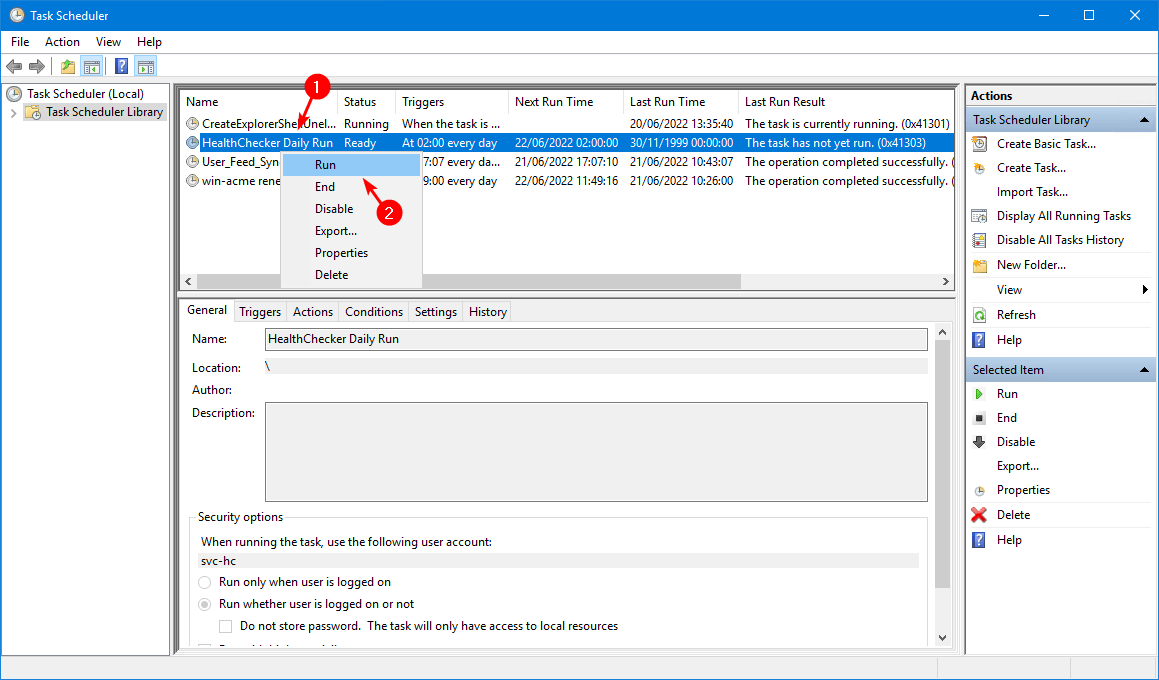
Create Scheduled Task With PowerShell ALI TAJRAN

4 Ways To Run Powershell WikiHow

Using Task Scheduler To Run A Powershell Script Mobile Legends
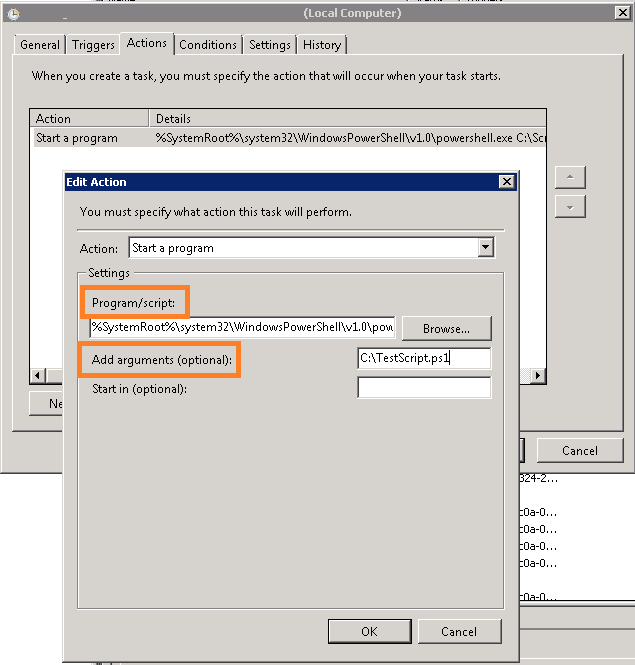
How To Run The Powershell Script In Scheduled Task With As Easy Fix

Powershell Script With Arguments As A Scheduled Task Tips From A

Web Example 1 Start a registered scheduled task PowerShell PS C gt Start ScheduledTask TaskName quot ScanSoftware quot This command starts a task named ScanSoftware in the root folder Example 2 Start all tasks in a folder PowerShell PS C gt Get ScheduledTask TaskPath quot UpdateTasks UpdateVirus quot Start ScheduledTask

Web Oct 10 2023 nbsp 0183 32 Open Task Scheduler Click on Start and type Task scheduler to open it Or select it in the Start Menu under Windows Administrative Tools or Windows Tools when using Win 11 Create a new basic task Click on Create Basic Tasks in the action bar on the right side and give your task a name
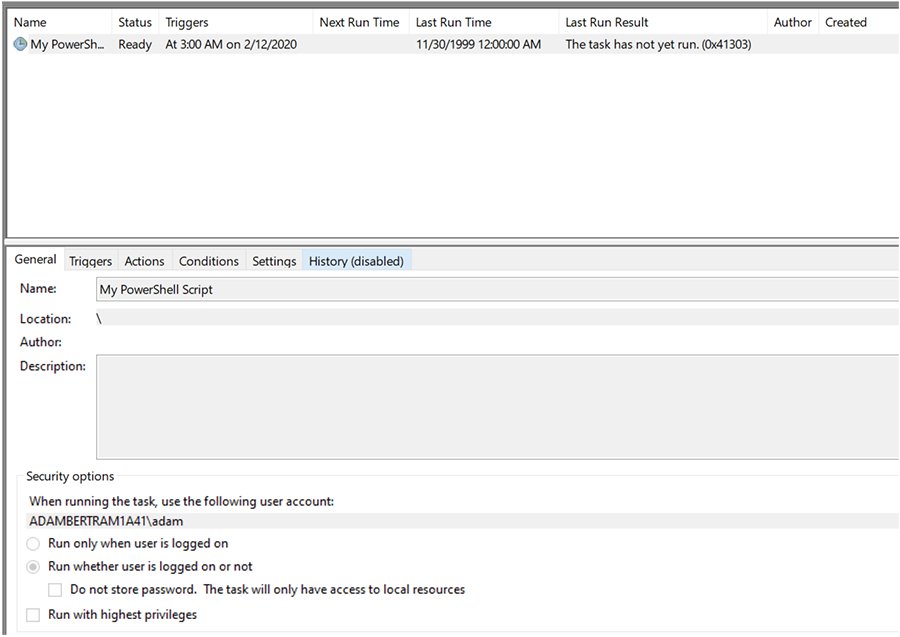
Web I m trying to create a Scheduled Task with the following Trigger Startup Run every 5 minutes Run indefinitely In the GUI I can do this easily by selecting Begin the task at startup And in the Advanced tab Repeat task every 5 minutes

Web Mar 28 2019 nbsp 0183 32 0 Since it is windows server you can also schedule task in Windows Task Scheduler EXAMPLE destination quot C Windows Tasks InstallSoftware ps1 quot action New ScheduledTaskAction Execute Powershell exe Argument destination trigger New ScheduledTaskTrigger AtStartup principal New ScheduledTaskPrincipal
Web Apr 26 2016 nbsp 0183 32 function MakeStartupService Write Host quot Adding script as a startup service quot trigger New JobTrigger AtStartup RandomDelay 00 00 15 Try Register ScheduledJob Trigger trigger FilePath quot absolute path quot Name quot Job name quot EA Stop Catch system exception Write Host quot Looks like an existing startup service exists for
Web Oct 20 2020 nbsp 0183 32 Trigger controls when the scheduled task runs Triggers can be time based like setting a schedule for daily or hourly recurrence Triggers can also be activity based which runs a task based on detected activities like computer startup a user logs in or logged events Web Create a shortcut and drop it to startup folder No luck SystemRoot SysWOW64 WindowsPowerShell v1 0 powershell exe File quot C Doc Files FileMonitor ps1 quot or SystemRoot system32 WindowsPowerShell v1 0 powershell exe File
Web May 27 2020 nbsp 0183 32 Build a scheduled task action At a minimum a scheduled task has an action a trigger and a group of associated settings Once you create the task you also need to register it on the system You need to perform each action separately to create a single scheduled task