Powershell Application Pool Status Monitor Iis Application Pool Status Philippon walker Using PowerShell To Find The Process Id PID Of An Application Pool Monitor Iis Application Pool Status Sibrel faruolo 99 Replacing A Failed Disk In Windows Server 2012 R2 Storage Spaces With Monitor Iis Application Pool Status Sandenroegner 99 Dec 6 2019 nbsp 0183 32 How to Install or Uninstall Windows PowerShell ISE in Windows 10 The Windows PowerShell Integrated Scripting Environment ISE is a host application for Windows
Sep 23 2020 nbsp 0183 32 Enable quot Windows Subsystem for Linux quot WSL in PowerShell 1 Open an elevated PowerShell 2 Copy and paste the command below into the elevated PowerShell and press Steam
Monitor Iis Application Pool Status Sandenroegner 99 Monitor Iis Application Pool Status Philippon walker Powershell Iis Set Application Pool United States Guidelines Monitor Iis Application Pool Status Sibrel faruolo 99 Powershell Iis Set Application Pool United States Guidelines Application Pool API Response Code Is Invalid In Powershell Script WS Management Cannot Process The Request Powershell Insufficient Permissions To Start An IIS App Pool Even How To Get The IIS Application Pool Queue Length Using PowerShell
Powershell Application Pool Status
 Powershell Application Pool Status
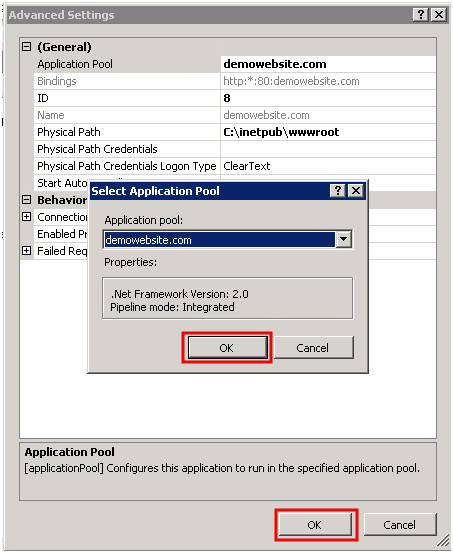
https://cdn.hostadvice.com/2018/09/how-to-change-an-application-pool-for-an-application-in-iis-7--4.png
Nov 7 2017 nbsp 0183 32 One of many PowerShell security features is that you can t run a script simply by double clicking it s icon on desktop or in a folder Doing so will by default open script in
Templates are pre-designed files or files that can be utilized for various functions. They can save effort and time by offering a ready-made format and layout for developing different kinds of material. Templates can be used for individual or expert tasks, such as resumes, invites, flyers, newsletters, reports, presentations, and more.
Powershell Application Pool Status

Monitor Iis Application Pool Status Philippon walker

Monitor Iis Application Pool Status Philippon walker

Powershell Iis Set Application Pool United States Guidelines

Monitor Iis Application Pool Status Sibrel faruolo 99

Application Pool API Response Code Is Invalid In Powershell Script
WS Management Cannot Process The Request
Jul 29 2022 nbsp 0183 32 How to See Full Details about a Windows 10 ISO file B Type the command below you want to use into the elevated PowerShell press Enter and go to step 8 below see

PowerShell Load C C dll COM PowerShell cmd

Windows PowerShell Windows PowerShell Windows PowerShell Windows PowerShell Windows PowerShell

Dec 28 2024 nbsp 0183 32 3 To Reinstall and Re Register All Windows Apps for All Accounts A Open an elevated Windows PowerShell B Copy and paste the command below in PowerShell and
May 4 2023 nbsp 0183 32 How to Install PowerShell 7 0 in Windows 7 Windows 8 and Windows 10 Microsoft has announced the Generally Available GA release of PowerShell 7 0 on March 4 2020
[desc-11] [desc-12]
[desc-13]