Page Sizes In Coreldraw How To Quickly Change Page Size In Microsoft Word Or How To Make Solved Publish Different Page Sizes In One PDF Autodesk Community How To Set Multiple Page Sizes In MS Word 2022 Challenge Notebook Sizes Fasasian How To Set Multiple Page Sizes In MS Word 2022 Challenge WEB Do you need to draw a rectangle that matches the page size or the size of a selected object in CorelDRAW It s easy with these simple tips about the Rectangle tool Double click the Rectangle tool in the toolbox to create a
WEB CorelDRAW provides multiple ways to change the width and height of a page When working in single page view you can resize a page by specifying new dimensions or choosing a different preset When working in multipage view you can also resize pages interactively in the drawing window as you resize rectangles WEB Nov 25 2016 nbsp 0183 32 How to Change Page Height and Width in CorelDRAW Computer World 10 5K subscribers Subscribed 7 3 4K views 7 years ago more
How To Set Multiple Page Sizes In MS Word 2022 Challenge Work With Different Page Sizes In One Document Page Sizes Tutorial Coreldraw Banner Templates Download 3 TEMPLATES EXAMPLE TEMPLATES How To Set Multiple Page Sizes In MS Word 2022 Challenge How To Set Multiple Page Sizes In MS Word 2022 Challenge Pin Su Laser Cutting Standard Paper Sizes For Printed Materials Page Sizes Printstore How To Set Multiple Page Sizes In MS Word 2022 Challenge
Page Sizes In Coreldraw
 Page Sizes In Coreldraw
https://i.ytimg.com/vi/i9bA0MoPAWY/maxresdefault.jpg
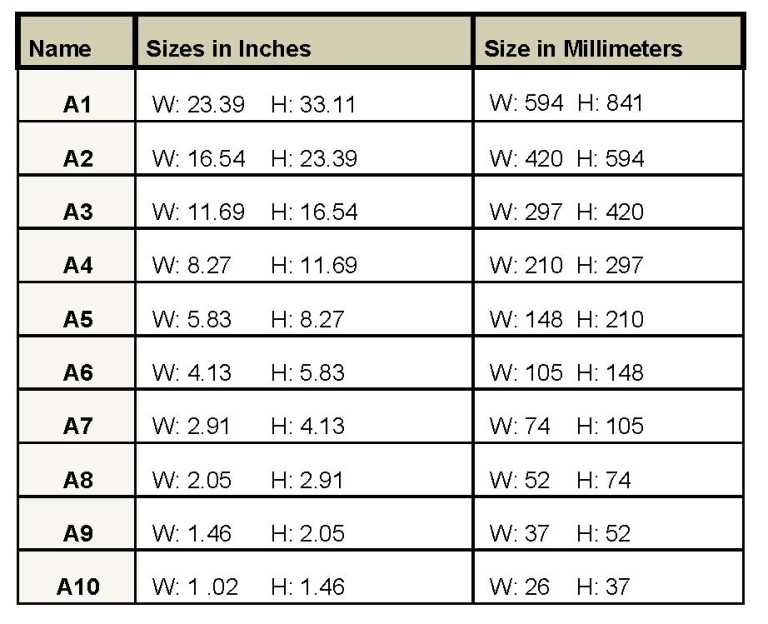
WEB There are two options for specifying a page size choosing a preset page size and creating your own You can choose from many preset page sizes ranging from legal size paper and envelopes to posters and web pages
Pre-crafted templates provide a time-saving solution for developing a varied variety of documents and files. These pre-designed formats and layouts can be utilized for various individual and expert jobs, including resumes, invites, leaflets, newsletters, reports, discussions, and more, streamlining the content development procedure.
Page Sizes In Coreldraw

How To Set Multiple Page Sizes In MS Word 2022 Challenge

Work With Different Page Sizes In One Document Page Sizes Tutorial

Coreldraw Banner Templates Download 3 TEMPLATES EXAMPLE TEMPLATES
How To Set Multiple Page Sizes In MS Word 2022 Challenge

Pin Su Laser Cutting
Standard Paper Sizes For Printed Materials
WEB Feb 22 2013 nbsp 0183 32 Conde s Tech Support Vicky Waldrop presents the procedures to create a default page size size in CorelDRAW THis should work with most versions of Corel

WEB How to Change Page Size amp Units In any CorelDRAW Page Size In CorelDRAW Units In CorelDRAW MM to Inches In CorelDRAW more

WEB In this video I have explained How To Change Paper Size In CorelDraw Thanks for watching Please Subscribe Like and Share

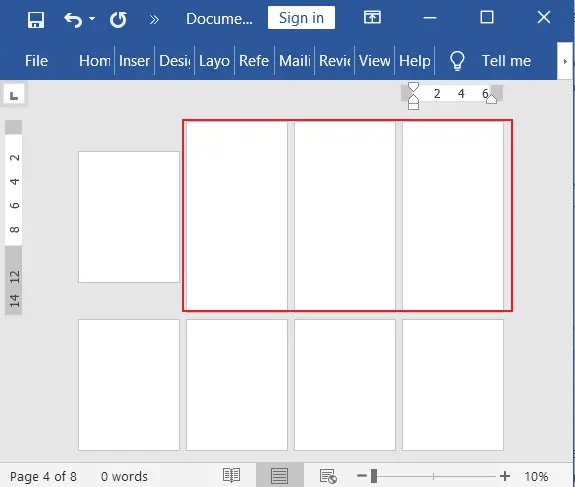
WEB Did you know that a CorelDRAW document can contain multiple pages that are different sizes and orientations The sample exercise file has 3 pages the first page is 8 5 x 11 for a sign the second page is a business card and the third page is 13 x 19 for t shirt artwork

WEB Setting Page Size and Orientation When creating a drawing it s important to design with a particular paper size and orientation in mind You can use either of the following procedures to specify these settings To set a page size and orientation using the property bar
WEB CorelDRAW Graphics Suite 2019 CorelDRAW Graphics Suite 2019 for Windows Custom page sizes Forums Tags More Cancel New Threads in this forum WEB You ll have to edit the page sizes when you click that It will use the last page of the document as a default Changing the sizes of each individual page will work once this option is enabled Try it Page 1 gt Letter Add new Page gt Change this to Tabloid Navigate between both pages and you ll see the difference in page sizes
WEB CorelDRAW provides multiple ways to change the width and height of a page When working in single page view you can resize a page by specifying new dimensions or choosing a different preset When working in multipage view you can also resize pages interactively in the drawing window as you resize rectangles