Different Page Sizes In Coreldraw Solved Publish Different Page Sizes In One PDF Autodesk Community How To Quickly Change Page Size In Microsoft Word Or How To Make Different Page Sizes In Google Docs When To Use Which MadelinekruwGlass Work With Different Page Sizes In One Document Page Sizes Tutorial Footer Issue When Having Different Page Sizes In One Report Web CorelDRAW provides multiple ways to change the width and height of a page When working in single page view you can resize a page by specifying new dimensions or choosing a different preset When working in multipage view you can also resize pages interactively in the drawing window as you resize rectangles
Web CorelDRAW provides multiple ways to change the width and height of a page When working in single page view you can resize a page by specifying new dimensions or choosing a different preset When working in multipage view you can also resize pages interactively in the drawing window Web Page size There are two options for specifying a page size choosing a preset page size and creating your own You can choose from many preset page sizes ranging from legal size paper and envelopes to posters and web pages If a preset page size does not meet your needs you can create a custom page size by specifying a drawing s dimensions
Footer Issue When Having Different Page Sizes In One Report Footer Issue When Having Different Page Sizes In One Report Notebook Sizes Fasasian Page Sizes Printstore Measurement Of Paper How To Set Multiple Page Sizes In MS Word 2022 Challenge How To Set Multiple Page Sizes In MS Word 2022 Challenge A4 Paper Width Origami Paper Sizes
Different Page Sizes In Coreldraw

https://forums.autodesk.com/t5/image/serverpage/image-id/988683i41C487E206B22F93?v=v2
Web What I am hoping to be possible to do is to set different scales for each page without affecting the scale settings of other pages just as it is possible to set different page sizes like this Reply
Templates are pre-designed documents or files that can be used for different functions. They can conserve effort and time by supplying a ready-made format and design for creating different type of material. Templates can be utilized for personal or professional jobs, such as resumes, invitations, flyers, newsletters, reports, presentations, and more.
Different Page Sizes In Coreldraw

How To Change Canvas Size In Indesign ArtRadarJournal

Footer Issue When Having Different Page Sizes In One Report

Notebook Sizes Fasasian
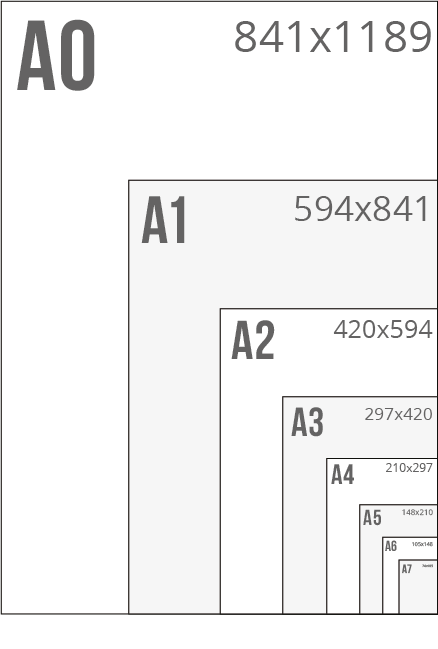
Page Sizes Printstore

How To Set Multiple Page Sizes In MS Word 2022 Challenge

How To Set Multiple Page Sizes In MS Word 2022 Challenge

Web There are two options for specifying a page size choosing a preset page size and creating your own You can choose from many preset page sizes ranging from legal size paper and envelopes to posters and Web pages If a preset page size does not meet your needs you can create a custom page size by specifying a drawing s dimensions You can

Web CorelDRAW provides multiple ways to change the width and height of a page When working in single page view you can resize a page by specifying new dimensions or choosing a different preset When working in multipage view you can also resize pages interactively in the drawing window

Web Jan 30 2023 nbsp 0183 32 How to set different page sizes to same document in CorelDraw CorelDraw Tutorial Graphic Nest 8 Likes Jan 30 2023 How to set different page

Web You can choose from many preset page sizes ranging from legal size paper and envelopes to posters and Web pages If a preset page size does not meet your needs you can create a custom page size by specifying a drawing s dimensions

Web Aug 9 2017 nbsp 0183 32 Corel Draw Tips amp Tricks Multiple Pages of Difference Sizes
Web In Draw 2019 when I save a custom page size the new size subsequently appears in the available page sizes list but none of the page size s properties height width or resolution appears with it So the custom page size has the name I gave it but retains the default page size s properties which of course renders the saved page size Web CorelDRAW makes it easy to view manage and edit all of your project s digital assets in one view with the Pages docker and Multipage View You can see all pages in a document simultaneously move objects across pages fluidly compare designs side by side and freely move pages around to arrange them as you wish Thanks for watching
Web Aug 22 2022 nbsp 0183 32 CorelDRAW provides an array of preset page sizes to choose from including standard North American and European sizes and it also lets you create your own custom page sizes You can use these settings to design a wide variety of publications from small Internet graphics to newsletters or giant posters In a multipage document