Outlook Rule Not Working Forward Relay Rule Not Working Rule Machine Hubitat How Do I Link An Outlook Email To An Excel Spreadsheet Design Talk How To Automatically Forward Emails In Outlook 365 App Design Talk Origin Barry A Million How To Set Auto Forward In Outlook Castle They Pop Rule Not Working In Outlook For Mac 2016 Seohcseojs 2 I am experiencing a problem with Outlook 365 Please read follow the following steps to replicate the problem Create a regular user account alpha example Create a shared user account beta example In the shared user account beta create an inbox rule that all messages will be redirected to user alpha
Outlook Rules not forwarding Wayne Khoo 26 May 17 2021 8 00 PM Hi there I tried looking up for the solutions on the web given by others but it does not seem to be working I have 5 forward rules to forward the email to different group of individual and it does not seem to be working I have already Recreate the rules Delete and redo the rules Double click the forward link select the boss s email address and click OK I ll use the same email address to keep things simple on my part but you ll be working with two email
Pop Rule Not Working In Outlook For Mac 2016 Seohcseojs 50 30 20 Rule Not Working Here s Why And What To Do About It Outlook Rules Not Working Try These 11 Fixes SOLVED Transport Rule Not Working For External Email MS Exchange Super Important AMC STOCK UPDATE Why Is AMC Continue To Sell Off Why Outlook Rule Not Working Microsoft Community Positive Outlook Rule 34 Positive Outlook Koffing Know Your Meme Using Exchange Transport Rules To Add Email Signatures Outlook Rules Not Moving Emails To Folder Easy Fixes 2023
Outlook Rule Not Working Forward
 Outlook Rule Not Working Forward
https://community.hubitat.com/uploads/default/original/3X/e/d/eddc4e3f981b26c8e3d3dabcc8a56f0489818a73.jpeg
The user Outlook 2016 wants to create a rule in his Outlook 2019 that auto forwards emails that come in to a specific D Group to an external address In testing I cannot get the rule to run automatically when an email matching that criteria comes in There is no evidence of the auto forwarded email in my Sent folder nor is there evidence of
Pre-crafted templates provide a time-saving service for producing a diverse variety of files and files. These pre-designed formats and layouts can be made use of for different personal and expert tasks, including resumes, invitations, leaflets, newsletters, reports, discussions, and more, enhancing the content production process.
Outlook Rule Not Working Forward
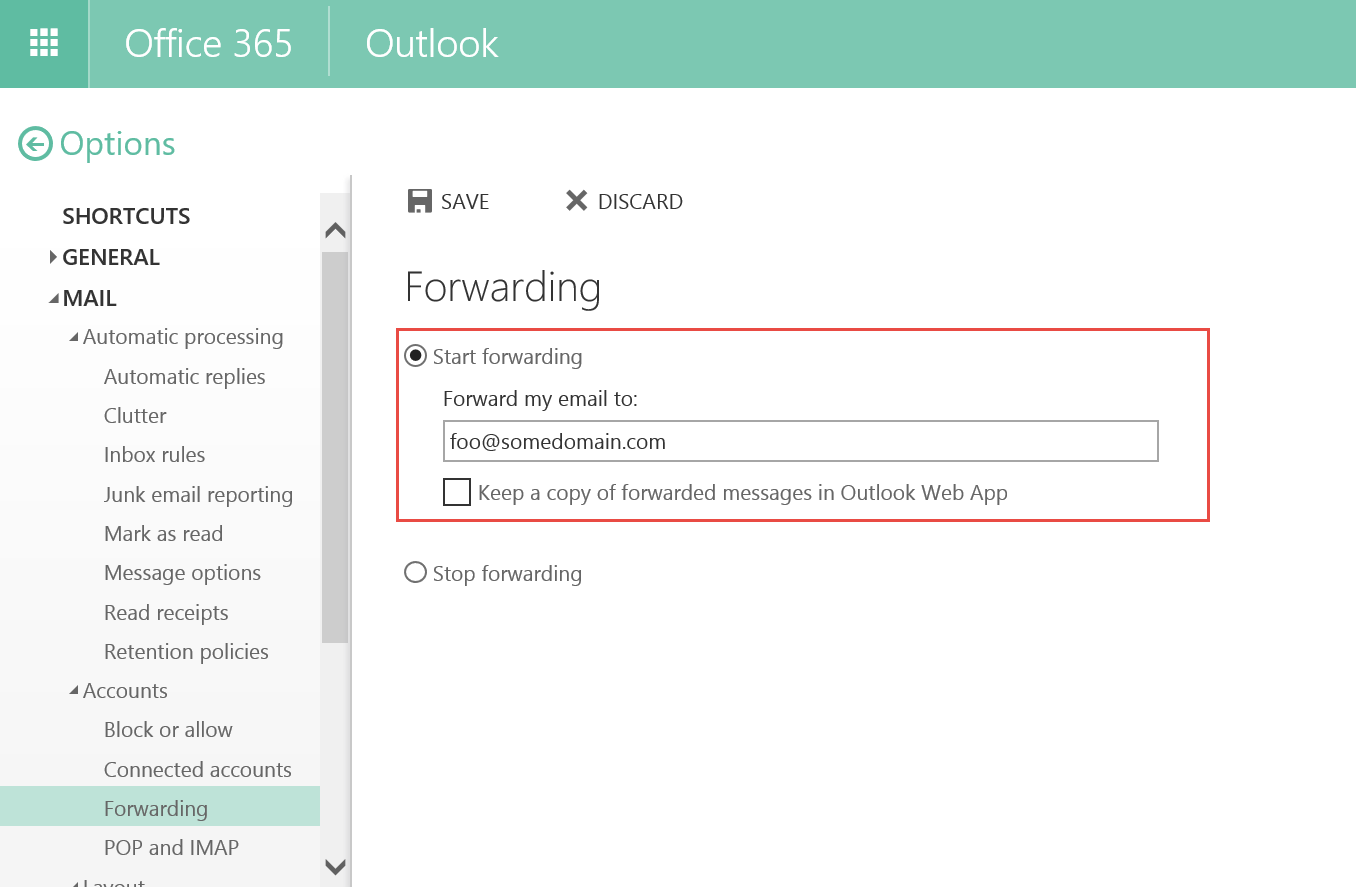
Beraadslagen Herkenning Toepassen How To Automatically Forward Emails

50 30 20 Rule Not Working Here s Why And What To Do About It
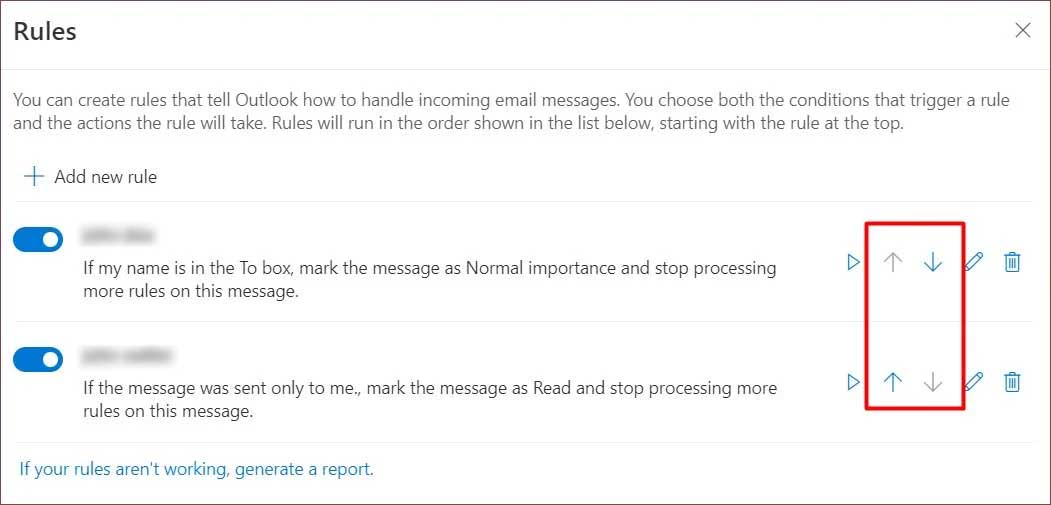
Outlook Rules Not Working Try These 11 Fixes

SOLVED Transport Rule Not Working For External Email MS Exchange

Outlook Rule Not Working Microsoft Community

Positive Outlook Rule 34 Positive Outlook Koffing Know Your Meme
Your Inbox rule that has an action forward messages doesn t work in Microsoft 365 Cause This behavior is by design when the rule is forwarding messages to 10 or more individual recipients This is a result of the forwarded limit in Microsoft 365 which is described at Exchange Online Limits Workaround

Solution Enable the rule On the Tools menu click Rules In the left pane of the Rules dialog box click the account type for the rule you want to edit If you don t know what type of account you have In the Rules dialog box click Show All and then under Personal Settings click Accounts

In Outlook Web App click Settings Options Organize Email Inbox Rules On the Inbox rules tab click the arrow next to the plus symbol and select Create a new rule for arriving messages Under When the message arrives select Apply to all messages Under Do the following click More options

To work around the issue run the following command to disable forwarding from the mailbox PowerShell Copy Set Mailbox user ID DeliverToMailboxAndForward False For more information see Inbox rule to redirect messages doesn t work if forwarding is set up on a mailbox

To set up an Outlook message rule right click a message and select Rules Create Rule Choose a condition and an action to take and select OK To make email rules in Outlook go to Settings View all Outlook Settings Mail Rules Add New Rule
You use the Set Mailbox cmdlet together with the DeliverToMailboxAndForward True parameter to specify that email messages that are sent to a particular user are delivered both to that user s mailbox and to another address Philipnicoles 5 mo ago There can be multiple reasons why the problem of Outlook rules not working can arise such as rules being disabled corrupt SRS files in Outlook exceeding the allowed space for rules outdated version of Outlook application and so on However Refer to this article which provides some useful solutions that can
Forwarded messages appear as messages that are forwarded by you Use a forward message rule when you want the replies to go to the address the messages are forwarded from and not to the original sender At the top of the page in Outlook Web App select Settings Options and then select one of the following Organize email Inbox rules New OR