Outlook 365 Rules Not Working Outlook Rules Not Working In Windows 10 Here s How To Fix It How Do I Fix Outlook Rules Not Working Fix Outlook 365 Search Not Working Spiritualholden What Should You Do If Outlook Rules Don t Work Outlook 365 Rules Not Running Automatically Solutions 2023 From the dropdown menu select the Edit Rule Settings option and then click on the Next button in the Select Condition window Make sure that the Stop Processing More Rules option is disabled If it s not click the checkbox once to make it unchecked When done click on the Next button Click Next then click Finish
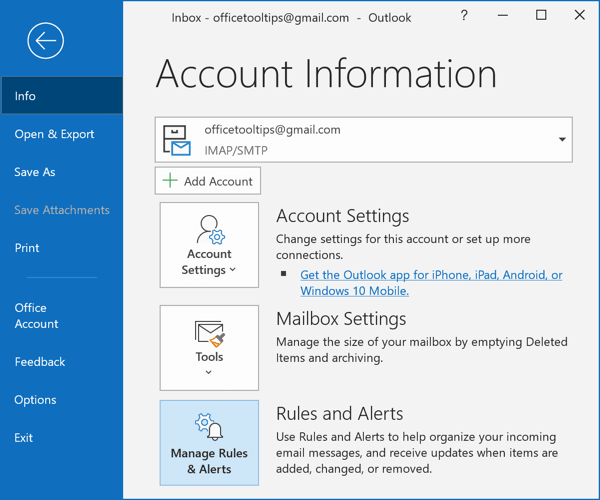
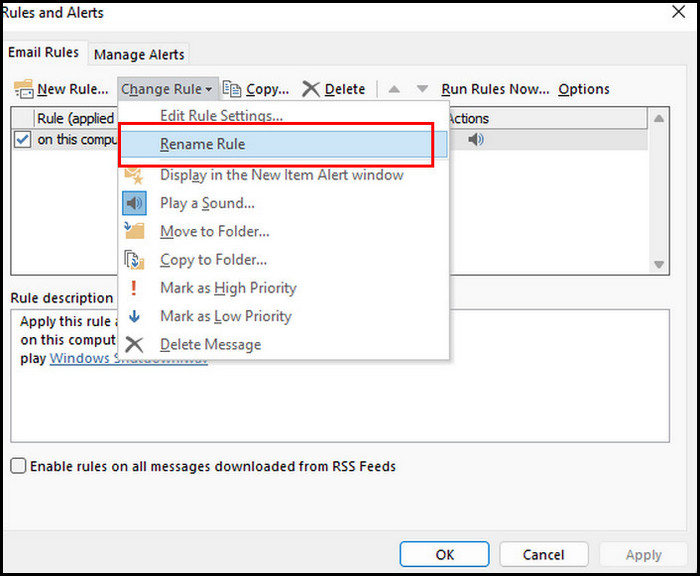
Solution 1 Reset the SRS File If the send receive settings file SRS file is damaged in Outlook it may cause the problem of Outlook rules not working You can reset the SRS file to make the rules work properly You can do this by following these steps Go to the following location C Users username AppData Roaming Microsoft Outlook In the Info tab click the Manage Rules Alerts button Under the Email Rules tab select the rule you want to rename Click Change Rule and select Rename Rule Type in a shorter name for the rule and hit OK Click Apply to save the changes 3 Delete Unwanted Outlook Rules
Outlook 365 Rules Not Running Automatically Solutions 2023 Export And Import Rules Microsoft Outlook 365 Outlook 365 Rules Not Running Automatically Solutions 2023 How To Create Rules In Outlook 365 Travis Gensler Outlook 365 Rules Not Running Automatically Solutions 2023 How To Set Up And Manage Microsoft Outlook Rules WiseStamp How To Fix Outlook Rules Not Working In Windows 10 SoftwareKeep Fix Outlook Rules Are Not Supported For This Account Error Mac Rules Do Not Work In Outlook 2016 Office365 For Mac Microsoft Community
Outlook 365 Rules Not Working
 Outlook 365 Rules Not Working
https://www.emaildoctor.org/blog/wp-content/uploads/2022/07/outlook-error.png
1 Check if Rules are enabled If the Outlook Rules are not enabled they will not work either on the Outlook app or Outlook Web Check if they are enabled by following the steps
Templates are pre-designed documents or files that can be utilized for numerous purposes. They can conserve effort and time by offering a ready-made format and design for developing various type of material. Templates can be used for personal or professional projects, such as resumes, invites, leaflets, newsletters, reports, discussions, and more.
Outlook 365 Rules Not Working

Outlook 365 Rules Not Running Automatically Solutions 2023
Export And Import Rules Microsoft Outlook 365

Outlook 365 Rules Not Running Automatically Solutions 2023
How To Create Rules In Outlook 365 Travis Gensler

How To Set Up And Manage Microsoft Outlook Rules WiseStamp

How To Fix Outlook Rules Not Working In Windows 10 SoftwareKeep
Updated on April 30 2022 Outlook rules are automatic actions performed on incoming email messages For example a rule can filter one sender s mail to a certain folder for you to review later Setting up these rules can streamline your inbox and help you become more efficient

1 Ensure Your Outlook Rules Are Enabled The first thing to check when your rules aren t working is if the rules are indeed enabled You or someone else may have disabled your email rules preventing them from running actions on your emails Take a quick look at your email rules and ensure the ones you want in action are turned on

I opened a case with Microsoft and I we have tried everything that you can think of recreating the rules doing them only from OWA seeing if run now works as opposed to working automatically creating logs and sending them to MS etc I opened the case with MS on 3 2 so it s been over 5 weeks

Select the conditions add the relevant information and then select OK Select Next Finish the rule setup Name the rule setup rule options and review the rule description Click an underlined value to edit Select Finish Certain rules will only run when Outlook is on If you get this warning select OK Select OK
Causes for Outlook Rules to Not Work There are several causes for your outlook rules to stop working We have listed a few of them down below Corrupt OST and PST Files Disabled Rules Feature Outdated Microsoft 365 Version Malware or Virus Corrupt send receive settings file Unsynchronized Mail Large Cache files Excess folders under rules
Rules Wizard Steps Conditions Actions Exceptions Within the Rules Wizard these exceptions can be set after you set the conditions and the actions For the above example turning the NOT rule into an exception rule would result in the following Apply this rule after the message arrives marked as high importance Solution Update the rule to reflect your current folders On the Tools menu click Rules In the left pane of the Rules dialog box click the account type for the rule you want to edit If you don t know what type of account you have In the Rules dialog box click Show All and then under Personal Settings click Accounts
Fix 1 Check the Rule settings There are certain rule settings that you must adhere to while creating a new rule in Outlook Shorten the rule name Make sure to name the rule something small Lengthier rule names can cause this problem Step 1 Launch the Outlook app on your device Step 2 Go to the File menu