Open Settings Open Settings Menu In Windows 10 Consuming Tech Quick Easy Ways To Open Settings App In Windows 10 Windows 10 How To Use The Audio Normalizer Or Adjust App Audio How To Find Settings In Windows 10 Easy Tips Tricks How To Change Date And Time Format In Windows 10 WinBuzzer Open the Windows 11 Settings from the shortcut next to the Power button 6 How to open the Windows 11 Settings using Search To access the Search in Windows 11 click or tap on the magnifying glass icon on the taskbar or use the keyboard shortcut Windows S Alternatively you can also open the Start Menu and either start typing or click tap the Type here to search field at the top
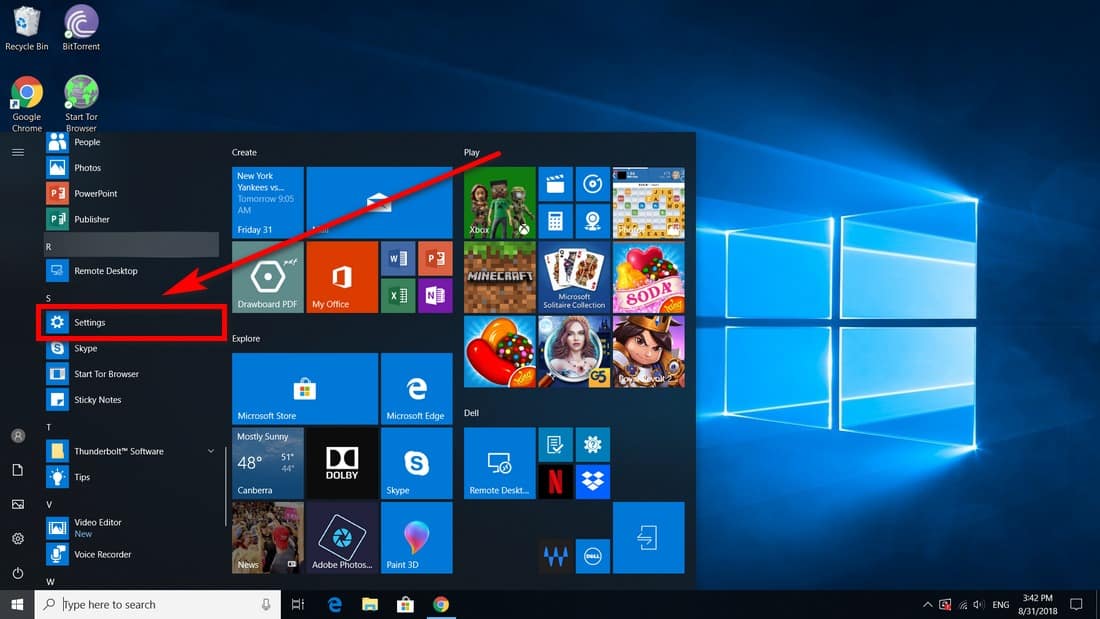
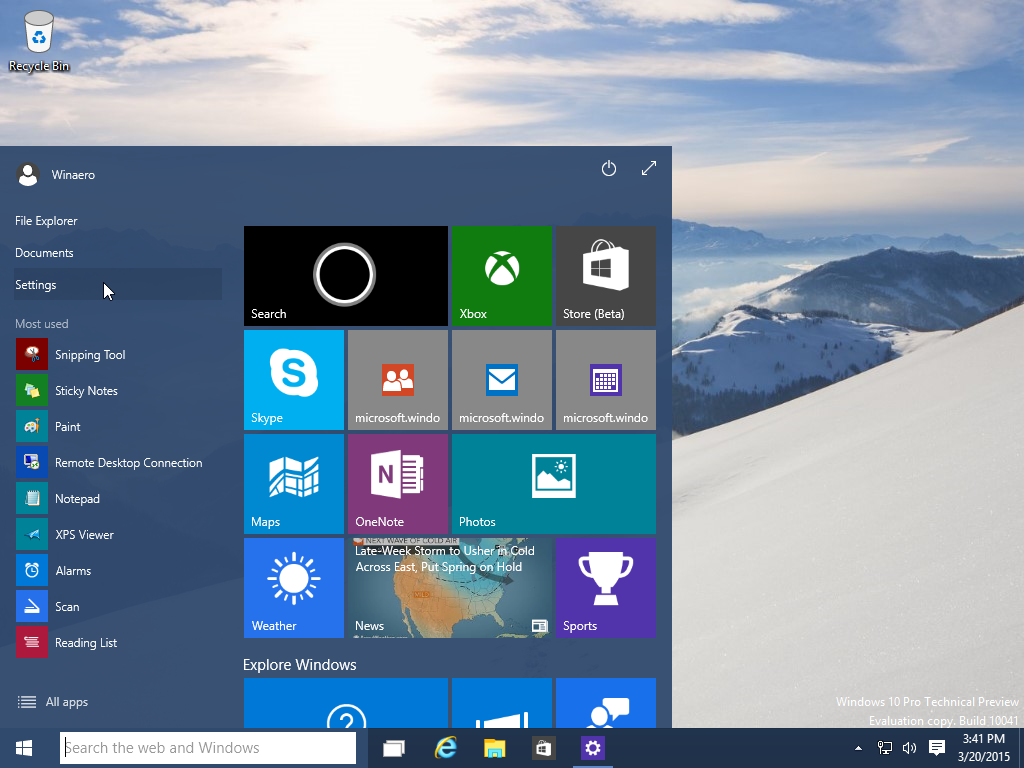
Open Settings From File Explorer Use the Action Center Use Task Manager Use the Control Panel Run a Command in the Run App Run a Command in Command Prompt Run a Command in Windows PowerShell The Settings app is a hub for almost all of Windows 10 s settings and you ll probably find yourself accessing it pretty frequently Luckily there Open Windows 10 settings from Start Step 1 Reveal the Start menu or screen by pressing the Windows logo key or clicking tap if you re on a touch device the Start button on the extreme left of the taskbar Step 2 On the left side of the Start simply click or tap the Settings or gear icon to launch the same Method 4 of 8
How To Change Date And Time Format In Windows 10 WinBuzzer 8 Best Ways To Fix Settings App Not Opening Or Working On Windows 11 All Possible Ways To Open Settings In Windows 10 3 Ways To Open PC Settings On Windows 10 Open Settings On Windows 10 Mobile Phone Tutorials How To Use The New Quick Settings Menu On Windows 11 Vrogue Windows 10 Settings How To Open Windows 10 Settings 15 Ways MiniTool Open settings Itechguides Open PC Settings In Windows 10 Tutorials
Open Settings
 Open Settings
https://consumingtech.com/wp-content/uploads/2017/05/All-apps-settings-app-03848.jpg
First open Settings by opening the Start Menu and clicking the gear icon on the left You can also press Windows I to quickly open a Settings window from anywhere in Windows 10 When the window opens locate the search box near the top that says Find A Setting Click the search box and type in what you re looking for for example mouse
Pre-crafted templates use a time-saving option for producing a diverse series of documents and files. These pre-designed formats and designs can be made use of for different individual and professional tasks, including resumes, invites, flyers, newsletters, reports, discussions, and more, streamlining the content production procedure.
Open Settings
Pin Settings To The Start Menu In Windows 10

8 Best Ways To Fix Settings App Not Opening Or Working On Windows 11

All Possible Ways To Open Settings In Windows 10
3 Ways To Open PC Settings On Windows 10

How To Use The New Quick Settings Menu On Windows 11 Vrogue

Windows 10 Settings How To Open Windows 10 Settings 15 Ways MiniTool

Find settings in Windows Windows 11 Windows 10 Find your Windows settings in a snap Select the Start button then select Settings From there browse the categories or use search to find what you re looking for Windows 11 Windows 10

Open Windows 10 Settings using the Run window Another method is to use the Run window To open it press Windows R on your keyboard type the command ms settings and click OK or press Enter on your keyboard Open Settings using the Run window

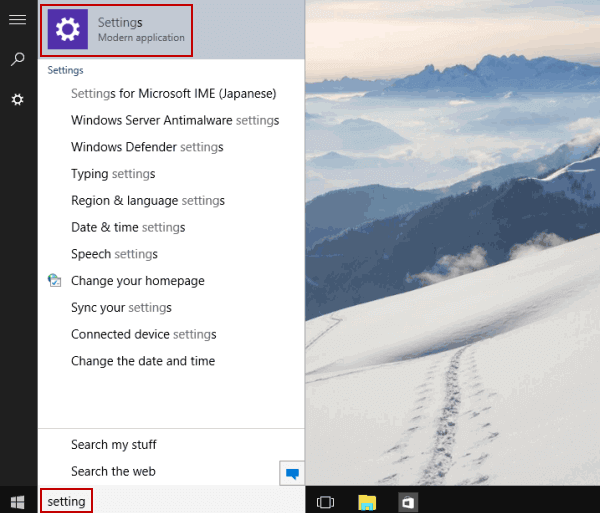
1 Use the Start menu Click or tap the Start button and select the settings gear in the lower left corner 2 Press the Win I keyboard keys at the same time This is a very quick and convenient way to open Settings 3 Use Cortana search Type settings and hit Enter or select the matching result

Option One Open Settings with Keyboard Shortcut Option Two Open Settings from Win X Quick Link Menu Option Three Open Settings from Start Menu Option Four Open Settings from Action Center Option Five Open Settings from Search Option Six Open Settings from File Explorer Option Seven Open Settings from Run

Open Control Panel in Windows In the search box next to Start on the taskbar type control panel Select Control Panel from the list of results Note Many Control Panel features are simpler and faster in Settings
Open Settings from the Run command box in Windows 11 Step 1 Open the Run command using the Windows logo and R keyboard shortcut You can also use the Start menu search to open the Run dialog Step 2 In the Run dialog type ms settings and then press the Enter key to open Settings Method 7 of 11 5 Open Settings from the File Explorer Just like the old control panel File Explorer has a dedicated option to access the settings app First open the File Explorer and click on the Computer tab Next click on the Open Settings button As soon as you press the button Windows 10 Settings will open
Follow the steps below to launch Settings from the Task Manager Press Ctrl Shift Esc to open the Task Manager Click on File Run new task from the menu bar Type ms settings and press Enter Additionally you can go to specific settings by entering the corresponding Run commands