Linux Vmware Bridged Network Not Working How To Fix VMware Bridged Network On VMnet0 Have No Internet Access Fix VMware Bridged Network Not Working On Windows 10 Host Fix VMware How To Fix The Bridged Connection Not Working In VMware Workstation Bridged Network Adapter Not Working Issue 1254 Mborgerson xemu Virtual Machine VMware Bridged Mode Is Not Working But NAT Mode Selecting NAT option under Network Connection in Network Adapter setting has done the trick for me You just need to Bridge your actual Ethernet port to VmWare port so that virtual machine get access to internet through that bridged connection 1 Configuring Bridged Networking Options on a Windows Host 2
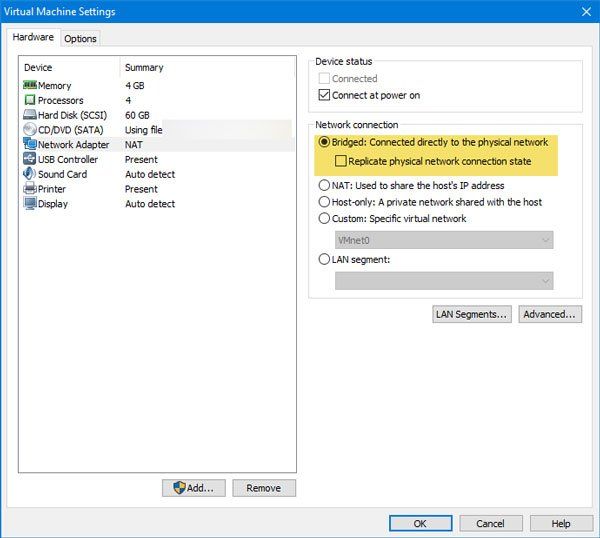
When you install Workstation Pro on a Windows or Linux host system a bridged network VMnet0 is set up for you Bridged networking connects a virtual machine to a network by using the network adapter on the host system If the host system is on a network bridged networking is often the easiest way to give the virtual machine access to that network Here s a quick guide on uninstalling your VPN client in order to resolve the bridged network issue Press Windows key R to open up a Run dialog box Then type appwiz cpl and press Enter to open up the Programs an Features screen Type appwiz cpl and Press Enter to Open Installed Programs List
Virtual Machine VMware Bridged Mode Is Not Working But NAT Mode Ellentmond A Tulajdonos K ny r g Router Linux On Vmware Sz dav z Mint How To Fix Bridged Network Not Working In VMware Workstation VMware Bridged Mre a Ne Radi Ili Se Ne Otkriva U Sustavu Windows 10 SOLVED Vmware Bridged Network Not Working MiniTool How To Create A Bridged Network For LXD Containers The New Stack VMware Bridged Network YouTube VMware Player Bridged Network Not Working YouTube VMware Bridged Vs NAT Choosing The Right Network Configuration
Linux Vmware Bridged Network Not Working
 Linux Vmware Bridged Network Not Working
https://i.ytimg.com/vi/PeJ1d74g7nM/maxresdefault.jpg
VMware can have a common issue with VM s will not get internet when the adapter is set to Bridged mode This is a quick and easy fix for this problem Often i
Templates are pre-designed documents or files that can be utilized for various functions. They can conserve time and effort by offering a ready-made format and design for creating various sort of material. Templates can be utilized for personal or expert projects, such as resumes, invitations, flyers, newsletters, reports, presentations, and more.
Linux Vmware Bridged Network Not Working

SOLVED Vmware Bridged Network Not Working MiniTool

Ellentmond A Tulajdonos K ny r g Router Linux On Vmware Sz dav z Mint

How To Fix Bridged Network Not Working In VMware Workstation
VMware Bridged Mre a Ne Radi Ili Se Ne Otkriva U Sustavu Windows 10

How To Create A Bridged Network For LXD Containers The New Stack

VMware Bridged Network YouTube

Step 1 Open File Explorer and go to the following location to locate vmnetcfg exe C Program Files x86 VMware VMware Workstation vmnetcfg exe Step 2 Right click on it and choose to Run as administrator Step 3 Hit Restore Defaults at the lower right corner of the Virtual Network Editor window

To resolve the issue manually assign an active physical network adapter to virtual network adapters For more information see Bridged networking does not work when loopback adapter is installed on host 1007250 Ensure that these processes are running If not then start them manually usr bin vmnet bridge on Linux hosts using Bridged networking

1 What helped me In the VMWare open Edit Virtual Network Editor On the bottom Change Settings Allow root privileges In the top list select VMNet0 It s type should be Briged In the VMnet Information section change the Bridged to to the adapter in which your host has connection Apply OK

VM software VMWare Workstation 14 Player Guest OS CentOS 7 I ve being using the NAT network setting previously and it worked fine Now I need to use the briged one Unfortunately it doesn t work Here s ifconfig result

Bridged networking with a wireless Ethernet adapter is supported in VMware Workstation 4 and later VMware Player 3 VMware Server and GSX Server 3 on Windows hosts If you are using older versions of these VMware products you may want to upgrade to the latest version of Workstation to gain this capability If your host has a wireless network
Yes you have right Host VM and gateway are in the same subnet 192 168 4 All the other system can ping Host or Gateway but can t ping the VM The VM can t comunicate with the external network And is right the VM can ping the Linux Host but no other network machine In the past earlier versions of Linux Mint and earlier versions of VMWare Player I could switch networking between NAT and Bridged and both would work as expected I settled on NAT Recently I had need to switch to Bridged and the guest Linux OS failed to connect Switch back to NAT and everything reconnects and works fine
Right click on the Network Bridge and choose Properties In the Adapters section make sure the adapters you chose are ticked Next navigate to the This Internet uses the following items section Here tick and select the Internet Protocol Version 4 TCP IPV4 option Then press the Properties button