Install Pyqt Pycharm How To Install Python PyQt Hashnode python Pyhton Pyserial PyQt Pycharm kevinc AET Install Pycharm Ergokaser 3 PyQt Pycharm How To Install PyCharm For Python On Windows Tutorials24x7 Web To install PyQt on Windows there are a few steps you need to take First use the installer from the qt project website from qt to install PyQt Next you want to install a Python version 3 3 or newer
Web Sep 13 2021 nbsp 0183 32 Open File gt Settings gt Project from the PyCharm menu Select your current project Click the Python Interpreter tab within your project tab Click the small symbol to add a new library to the project Now type in the library to be installed in your example quot PyQt5 quot without quotes and click Install Package Web Now you are ready to install the Qt for Python packages using pip From the terminal run the following command For the latest version pip install pyside6 For a specific version like 6 4 1 pip install pyside6 6 4 1 It is also possible to install a specific snapshot from our servers To do so you can use the following command
How To Install PyCharm For Python On Windows Tutorials24x7 Windows10 Anaconda python3 6 labelling 1073741819 0xC0000005 Python Pycharm CSDN PyCharm GUI PyQt PyQT5 Xbee Qt Forum pyqt pycharm PyUIC SyntaxError invalid Syntax whalefall PyQt PyQt5 Pycharm GUI Python opencv opencv contrib Anaconda pyqt pycharm Environment QT pyqt layout
Install Pyqt Pycharm
 Install Pyqt Pycharm
https://cdn.hashnode.com/res/hashnode/image/upload/v1584290681846/ZAV6ze7CE.png?w=1600&h=840&fit=crop&crop=entropy&auto=compress
Web Feb 4 2022 nbsp 0183 32 0 00 10 40 installation pyqt5 and setup qt designer pyqt5 tutorial 1 ODNI 147 subscribers Subscribed 214 26K views 2 years ago This tutorial series will focus on the basics of
Pre-crafted templates offer a time-saving service for developing a diverse range of documents and files. These pre-designed formats and designs can be utilized for different individual and expert projects, consisting of resumes, invites, flyers, newsletters, reports, discussions, and more, simplifying the content creation process.
Install Pyqt Pycharm

Pycharm PyQt5 s NoteBook

Windows10 Anaconda python3 6 labelling

1073741819 0xC0000005 Python Pycharm CSDN
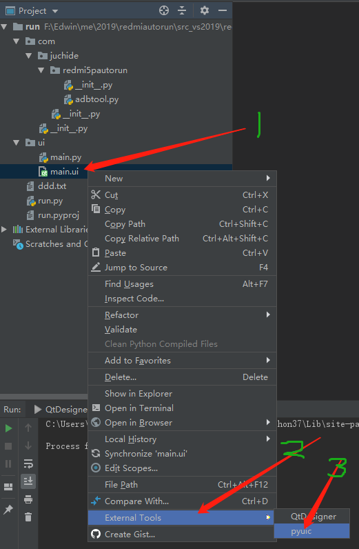
PyCharm GUI PyQt
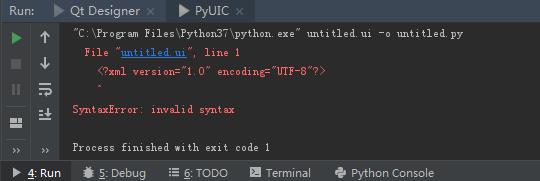
pyqt pycharm PyUIC SyntaxError invalid Syntax whalefall

PyQt PyQt5 Pycharm GUI

Web 6 Answers PyCharm gt file gt settings gt project your project project interpreter gt gt install PyQt5 Install PyQt5 from the installer on the PyQt website It probably just installs PyQt as a site package to the python version you point to in your Path although it may ask for your preference cant remember

Web Nov 25 2022 nbsp 0183 32 Home How to install pyqt5 and how to run pyqt5 in pycharm Ask Question Asked 1 year 2 months ago Modified 1 year 2 months ago Viewed 128 times 0 I m trying to use pyqt5 in pycharm but I keep getting ModuleNotFoundError No module named PyQt5 error

Web The Qt designer is not installed with the pip installation You can either download the full download from sourceforge probably won t be the last pyqt release and might be buggy on presence of another installation like yours or install it with another unofficial pypi package pyqt5 tools pip install pyqt5 tools then run the designer

Web In this video we are going to see How to install PyQt5 in Pycharm Install PyQT5 in PyCharm in Windows 10 ProgrammingKnowledge Python PyQt5 Top Online C

Web May 15 2010 nbsp 0183 32 Documentation The documentation for the latest release can be found here Installation The GPL version of PyQt5 can be installed from PyPI pip install PyQt5 pip will also build and install the bindings from the sdist package but
Web STEP 1 Download 182 Download the free Community version at JetBrains official website Link STEP 2 Install 182 Run the downloaded file Choose the install location Create desktop shortcut and create association for files with py extension Choose the Start Menu Folder or enter a name for new folder and click Install Web Jul 8 2020 nbsp 0183 32 0 00 5 20 Install and Setup PyQt5 and Qt Designer PyQt5 tutorial Code First with Hala 31 6K subscribers Subscribed 1K 121K views 3 years ago Tutorial to install and setup
Web As a cross platform toolkit PyQt can run on all major opera PyQt5 is a toolkit for creating Python GUI applications As a cross platform toolkit PyQt can run on all major opera interface language content language All English Fran 231 ais countries