Find Service By Pid Arduino da Ink bat r Termostat Veya PID Reg lat r Dijital PID Controller Control Unit Control Valves Control System C Code PID Controller Auto tuning Library And Example For DC Motor Hackster PID What It Is How To Find It Kill Pid All Answers Ar taphoamini Web Aug 17 2013 nbsp 0183 32 11 Answers Sorted by 391 On all POSIX compliant systems and with Linux you can use ps ps p 1337 o comm
Web Jul 14 2023 nbsp 0183 32 To find out the PID of a process you can use pidof a simple command to print out the PID of a process pidof firefox pidof python pidof cinnamon Find Linux Process PID Coming back to our point of focus assuming you already know the PID of a process you can print its name using the command form below ps p PID o format Web Oct 31 2020 nbsp 0183 32 The process identifier a k a process ID or PID is a number used to uniquely identify an active process In this short note i will show how to display information about the Windows process incl the process name and path to an executable file by PID from the command line prompt CMD or a Windows PowerShell
Kill Pid All Answers Ar taphoamini J Clin Gynecol Obstet Kill Processes In Windows Urinberleu Ball balancing pid GitHub Topics GitHub How To Find PID Of Process Listening On A Port In Linux Netstat And Analysis Of The Pid File Of Big Data Learning Hdfs Programmer Sought PID Control TUTORIAL ARDUINO Control RPM Speed Kecepatan DC Motor Powershell How To Get Process Id By Its Service Name With A Script To Uses Windows 8 Serial Number For Windows 10 Gasmonsters
Find Service By Pid
 Find Service By Pid
http://arduinolab.pw/wp-content/uploads/2018/02/IMG_7332.jpg
Web How I can find what service or app is using the 443 port quot netstat aon quot shows me only UDP 0 0 0 0 443 4252 The OS is Windows And yes I had VisualSvn Server installed on this computer before Then I removed it I do not see any SVN service running and would like to reinstall Also I d like to know what Authentication mode should I choose
Pre-crafted templates provide a time-saving option for developing a diverse range of documents and files. These pre-designed formats and layouts can be utilized for various personal and expert tasks, consisting of resumes, invites, leaflets, newsletters, reports, discussions, and more, enhancing the material development process.
Find Service By Pid

P Id Schematic Symbols
J Clin Gynecol Obstet
Kill Processes In Windows Urinberleu
Ball balancing pid GitHub Topics GitHub

Analysis Of The Pid File Of Big Data Learning Hdfs Programmer Sought

PID Control TUTORIAL ARDUINO Control RPM Speed Kecepatan DC Motor

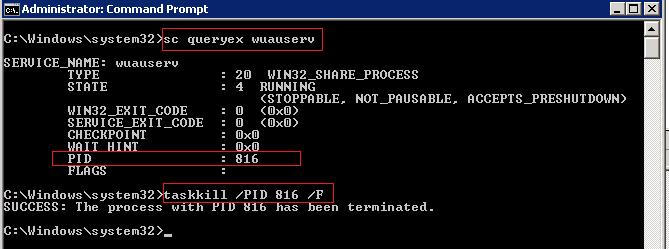
Web May 17 2017 nbsp 0183 32 1 Answer Sorted by 1 sc queryex lt name gt See SC Example gt sc queryex Tomcat9 SERVICE NAME Tomcat9 TYPE 10 WIN32 OWN PROCESS STATE 4 RUNNING STOPPABLE NOT PAUSABLE ACCEPTS SHUTDOWN WIN32 EXIT CODE 0 0x0 SERVICE EXIT CODE 0 0x0 CHECKPOINT 0x0

Web Jan 23 2023 nbsp 0183 32 On Windows 10 you can find the process ID of an app or service in several different ways and in this guide we ll show you how from Task Manager Resource Monitor Command Prompt and

Web Nov 23 2015 nbsp 0183 32 Process Hacker can show the service name properties of process gt tab threads gt column service So far I have found the process and also the thread var p Process GetProcessById pid var t p Threads Cast lt ProcessThread gt SingleOrDefault t gt t Id threadId
Web Apr 24 2020 nbsp 0183 32 Launch an elevated Command Prompt and Type the following command below to kill the service taskkill f pid PID Where PID is the value associated the service name as shown above Note The f flag is used to kill the process forcefully Failure to use the F flag will result in nothing happening in some cases
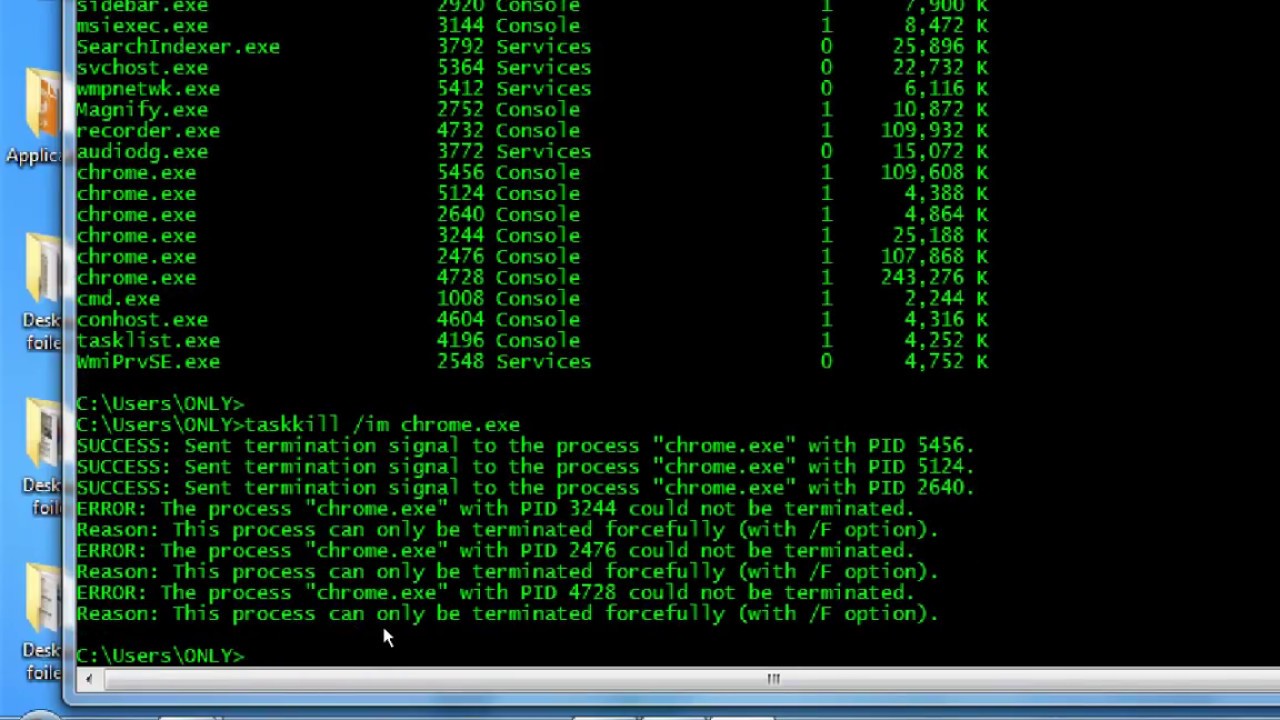
Web Dec 20 2023 nbsp 0183 32 When you run TList from the command prompt it will display a list of all the user mode processes in memory with a unique PID number For each process it shows the PID process name and if the process has a window the title of that window
Web Jan 8 2015 nbsp 0183 32 You can get Process Name from Process ID PID using the command tasklist in command prompt TaskList command displays all running applications and associated services with their Process ID PID The following command displays the associated Process Name for the Process ID 488 Web answered Feb 1 2022 at 14 48 Gerald Schneider 1 723 1 13 18 Add a comment 1 You will have to store the output of your command and then parse it tasklist v fi quot imagename EQ Wireshark exe quot FO LIST FIND quot PID quot gt temp temp txt set p variable lt temp temp txt echo variable 17
Web 11 Answers Sorted by 183 Open another terminal and run ps ax grep foo where foo is the name of the unresponsive program This should return a line of output that looks something like this ps ax grep firefox 2222 S 0 00 bin sh usr lib firefox 3 6 9 firefox 2231