Exchange Powershell Command To Increase Mailbox Size How To Increase Mailbox Size In Office 365 Using PowerShell How To Increase Mailbox Size In Office 365 Using PowerShell How To Increase Mailbox Size In Office 365 Using PowerShell How To Increase Mailbox Size In Office 365 Using PowerShell Most Useful PowerShell Cmdlets To Manage Exchange Online Mailboxes You can use the Exchange admin center EAC or the Exchange Management Shell to change the mailbox storage quotas for certain mailboxes
How to Increase the Office 365 Mailbox Size in PowerShell Click Start type cmd right click the cmd shortcut and in the context menu click Exchange server mailbox size can be increased either by EAC Exchange Administration Console or Powershell It s quite easy to expand mailbox
Most Useful PowerShell Cmdlets To Manage Exchange Online Mailboxes How To Increase The Mailbox Size In Office 365 Lifescienceglobal How To Increase Mailbox Size In Office 365 Using PowerShell How To Increase Office 365 Mailbox Size Limits How To Increase Office 365 Mailbox Size Limits Increase Mailbox Size In The Billing System Hosting Knowledge Base Increase Mailbox Size On The Host Panel Hosting Knowledge Base Powershell Command To Increase Mailbox Size In Office 365 PDF How To Increase Mailbox Size In Office 365 Exchange Online
Exchange Powershell Command To Increase Mailbox Size
 Exchange Powershell Command To Increase Mailbox Size
https://m365scripts.com/wp-content/uploads/2022/07/Increase-Mailbox-size.png
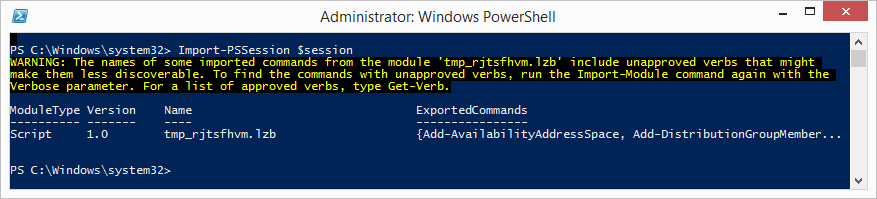
Launch Windows PowerShell as a Windows admin To do that Hit Start Type cmd Right click the cmd shortcut In the context menu that appears hit
Pre-crafted templates offer a time-saving service for producing a varied range of files and files. These pre-designed formats and layouts can be made use of for various personal and expert jobs, consisting of resumes, invites, flyers, newsletters, reports, presentations, and more, streamlining the content production procedure.
Exchange Powershell Command To Increase Mailbox Size

Increase Mailbox Size In The Billing System Hosting Knowledge Base
How To Increase The Mailbox Size In Office 365 Lifescienceglobal

How To Increase Mailbox Size In Office 365 Using PowerShell

How To Increase Office 365 Mailbox Size Limits

Increase Mailbox Size In The Billing System Hosting Knowledge Base

Increase Mailbox Size On The Host Panel Hosting Knowledge Base
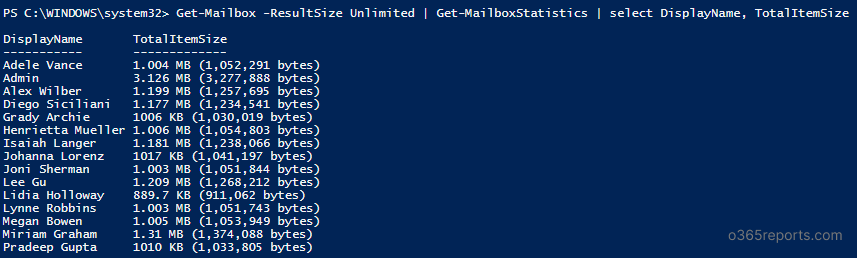
To get mailbox size you can use the Get MailboxStatistics cmdlet as below To use Exchange Online PowerShell cmdlets you must connect to
Open the Exchange Admin Center Expand Recipients and open Mailboxes Select the mailbox Scroll a bit down the view the mailbox size

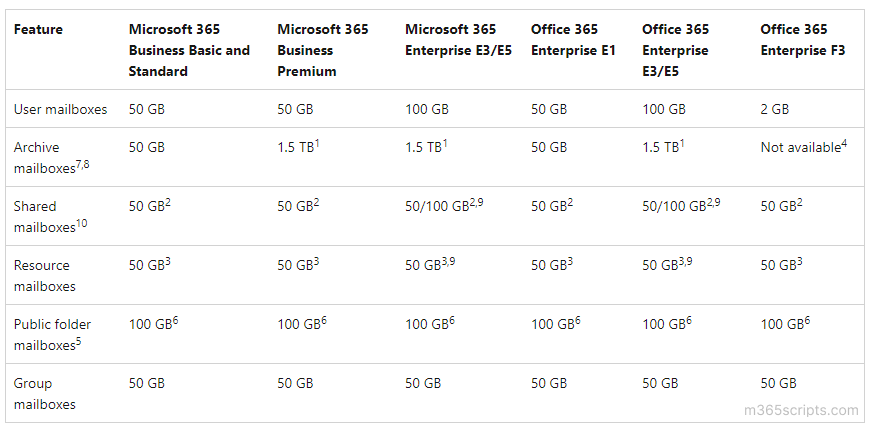
Here you can see that each mailbox is allowed to be 2 3 GB by default These thresholds are of great importance because an admin can use them

One way to increase the mailbox size limit is by using Exchange PowerShell cmdlets But for that you need to run PowerShell as administrator
Run the following PowerShell command to set the mailbox size for a single user Set Mailbox ProhibitSendQuota ProhibitSendReceiveQuota
This will increase the mailbox storage limit from 50 GB to 100 GB Enable Exchange Online Archiving Depending on your Microsoft 365 license Change Exchange Mailbox Size in Exchange 2010 Using EMC To begin with open Exchange Management Console and from the left menu select
Make use of the RecipientTypeDetails parameter to filter the results on shared mailboxes Run the command to get all shared mailboxes size in