Excel Stop Auto Format To Scientific Notation Prevent Scientific Notation On Import Excel Tips MrExcel Publishing Convert Standard Form To Scientific Notation Partners In Prime YouTube Batch Import How To Avoid Scientific Number In Excel How To Stop Excel From Changing Numbers To Scientific Notation Convert Number From Scientific Notation To Standard Form Standard How to Disable automatic conversions to Scientific format in Excel On open Excel converts documents previously exported to CSV from other sources and makes them unreadable due to this automatic conversion of numbers to Scientific format and there is no way of retrieving them like to personal numbers used in Sweden or
Right click the cell where you want to remove scientific notation and choose Format Cells In the Format Cells window select the Number category set the number of decimal places to 0 and click OK Now the scientific notation is removed How to Disable Scientific Notation in Excel By Adam Davidson Published August 8 2023 By default Excel converts longer numbers into scientific notation to save space Learn how to
Convert Number From Scientific Notation To Standard Form Standard SOLVED Convert To Scientific Notation 8 409 10 11 How To Stop Excel From Auto Formatting Numbers 3 Easy Ways How To Stop Or Control Excel s Green Error Checking Markers Solved Convert Number To Scientific Notation And Obtain 9to5Answer SOLVED Convert To Scientific Notation 953 400 000 000 SOLVED Convert To Scientific Notation 0 000000437 Introduction To Scientific Notation Studocu SOLVED Change Numbers In Ordinary Notation To Scientific Notation Or
Excel Stop Auto Format To Scientific Notation
 Excel Stop Auto Format To Scientific Notation
https://www.mrexcel.com/img/excel-tips/2017/05/prevent-scientific-notation-on-import-lg.jpg
Written by Sabrina Ayon Last updated Dec 28 2023 Get FREE Advanced Excel Exercises with Solutions In Microsoft Excel large and small numbers are stored automatically into Scientific Notation by default Excel
Templates are pre-designed files or files that can be utilized for numerous purposes. They can save time and effort by offering a ready-made format and layout for creating different kinds of material. Templates can be utilized for individual or professional projects, such as resumes, invites, leaflets, newsletters, reports, presentations, and more.
Excel Stop Auto Format To Scientific Notation
Editing CSV File In Excel Always Converts Number Column To Scientific

SOLVED Convert To Scientific Notation 8 409 10 11
How To Stop Excel From Auto Formatting Numbers 3 Easy Ways

How To Stop Or Control Excel s Green Error Checking Markers
SOLVED Convert To Scientific Notation 953 400 000 000

SOLVED Convert To Scientific Notation 0 000000437

Excel s default cell format is general so the string is presented in scientific notation as 1 2408E 12 Right click on the cell select Format Cells set the format to Text The cell is still displayed in scientific notation even though the format has been set to text Now if I do the steps in a different order Format an empty cell as text

Microsoft excel microsoft excel 2007 Share Improve this question Follow edited Jul 24 2012 at 9 18 VBwhatnow 2 189 2 17 22 asked Jul 24 2012 at 8 50 Pierre Gardin 1 492 2 10 10 Possibly relevant if you re importing a file How can you make Excel 2007 stop formatting large numbers as scientific notation Bob Jul 24 2012 at 9 59 1
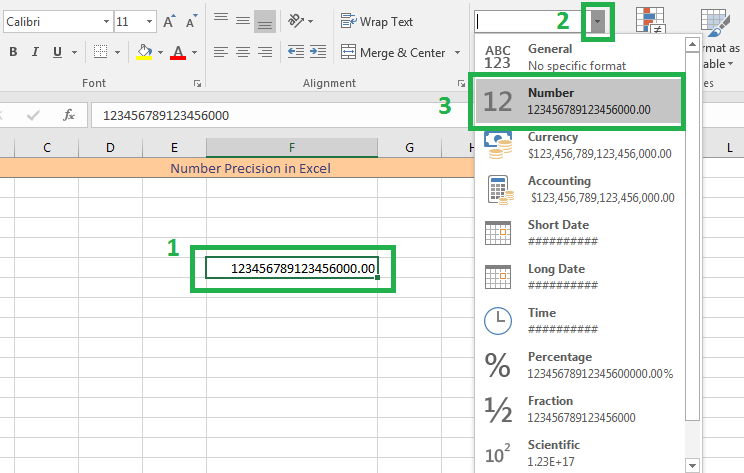
Keyboard Shortcut to open Format Cells option Select the cell and use the keyboard shortcut CTRL 1 hold the CNTRL key and then hit the 1 key Right click on the range selected in step 1 and in the options that show up click on the Format Cells option Using the Formatting Option in the Ribbon

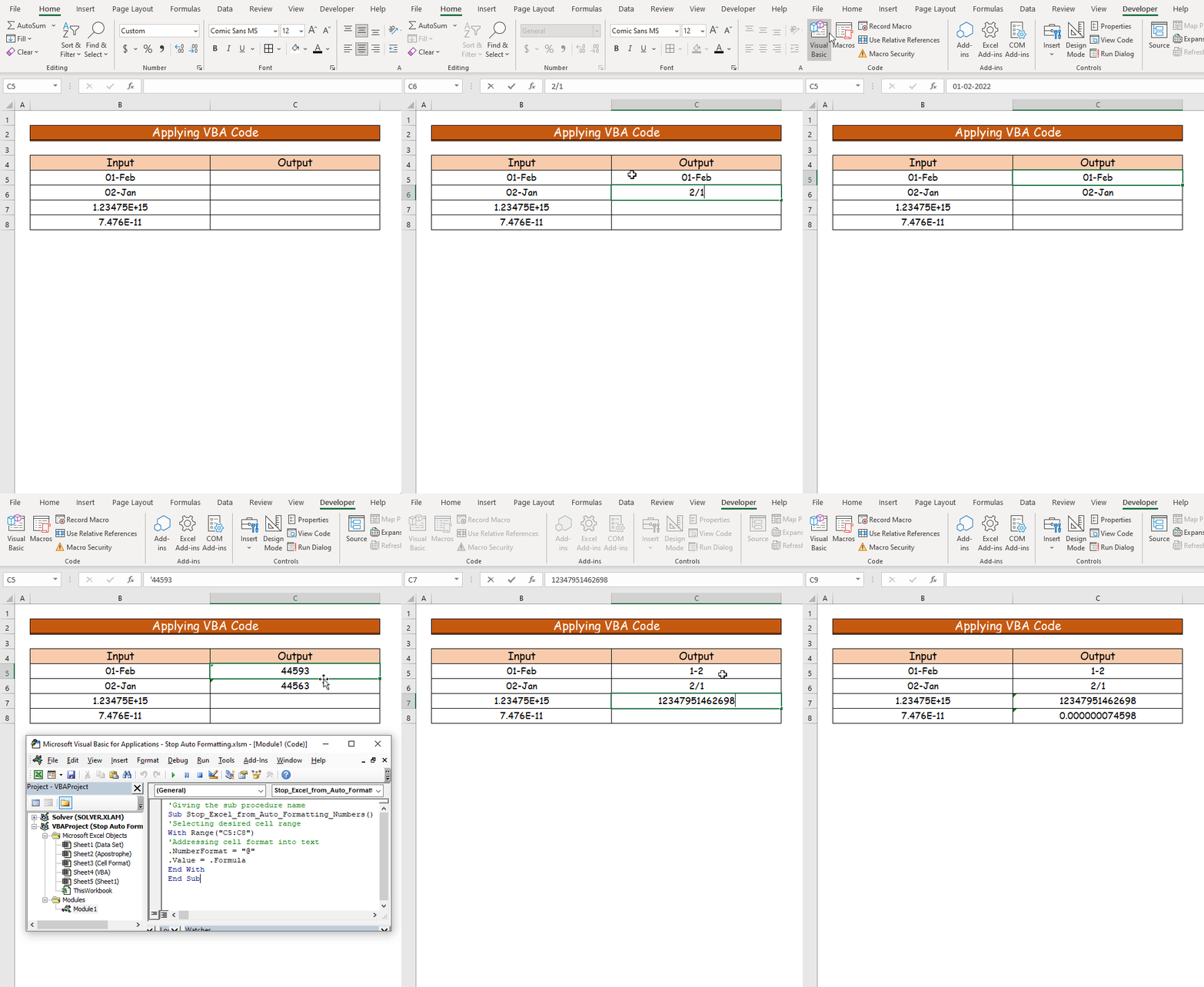
Steps In the first place move to the D5 cell and enter the formula given below UPPER C5 Here the C5 cell indicates the Invoice Number Then use the Fill Handle tool to copy the formula into the cells below Eventually the output should look like the picture shown below Method 3 Applying TRIM Function

Adjusting cell formatting using the TEXT function and utilizing custom number formats are effective ways to prevent Excel from changing numbers to scientific notation Maintaining accurate number display in Excel is crucial for data analysis visualization and reporting Understanding Scientific Notation in Excel
[desc-11] [desc-12]
[desc-13]