Excel Online Text To Columns Fixed Width 8 Text To Columns In Excel 2019 How To Convert Text Into Columns In Microsoft Excel Text To Columns Fixed Width Excel Microsoft Excel EXCEL PRO TIP Splitting Text To Columns YouTube Excel Tutorial Text To Columns YouTube 20 MS Excel Text To Columns YouTube Key Takeaway Fixed width settings are an effective tool for converting text to columns in Excel by separating text based on specific spacing or character lengths The benefits of using fixed width settings in Excel include precise data organization and formatting and the ability to handle large sets of data at once
Excel has the functionality to import fixed width text files where it presents a dialog that lets you choose where the begins and ends of fields are which it puts into columns Does it also have functionality where given an existing spreadsheet you can export to a fixed width text file If so how do I access this 00 00 Creating easy templates with formulas for fixed width text to columns00 25 Set up cells to help with the formula make it easy to copy across not re
20 MS Excel Text To Columns YouTube How To Use Text To Column In Excel Earn Excel Text To Columns In Excel Get Perfect YouTube Text to columns Excel Practice Online Excel 2016 Convert Text To Columns YouTube Download Microsoft Excel Split Cells Gantt Chart Excel Template How To Use Text To Columns In Excel 1 10 Text To Columns Fixed Width YouTube 7 Amazing Things Excel Text To Columns Can Do For You In 2021 Excel
Excel Online Text To Columns Fixed Width
 Excel Online Text To Columns Fixed Width
https://i.ytimg.com/vi/kEcC0uWIlt0/maxresdefault.jpg
1 Milda needs to use Excel s Convert Text to Columns feature quite often for one of her work projects She needs to use the fixed width parsing in the tool and Excel looks at the source data and suggests places where the data should be broken Milda finds this annoying as Excel normally guesses wrong
Pre-crafted templates use a time-saving option for creating a diverse series of documents and files. These pre-designed formats and layouts can be used for different individual and professional tasks, including resumes, invites, leaflets, newsletters, reports, presentations, and more, enhancing the content creation process.
Excel Online Text To Columns Fixed Width

MS Excel Text To Columns Lecture 10 YouTube

How To Use Text To Column In Excel Earn Excel

Text To Columns In Excel Get Perfect YouTube

Text to columns Excel Practice Online
Download Microsoft Excel Split Cells Gantt Chart Excel Template

How To Use Text To Columns In Excel

How can I convert text to columns with fixed width from the right or end of the cell

Key Takeaways Using fixed width settings in Excel is crucial for accurately and efficiently converting text into columns Fixed width settings ensure accurate data formatting proper alignment of data and flexibility in defining column widths

Text to Columns with Fixed Width Text Converting US Dates to European Format Converting International Number Formats Excel s Text to Columns feature splits text in a cell into multiple columns This simple task can save a user the heartache of manually separating the text in a cell into several columns

The Split Text to Columns for Excel online utility will help you automate splitting text across multiple columns Select the column with the records you would like to divide Note If you select more than one column the add in will process values in the leftmost selected column Tick off the delimiters that are used for your values

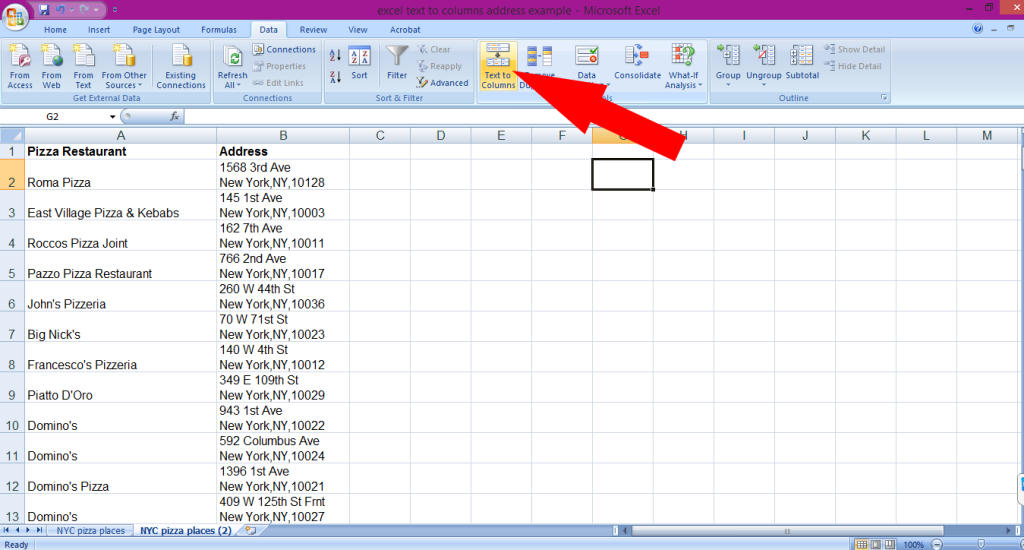
Now to separate cells using fixed width Select the data set Go to Data Tab Select the Text to Columns option from the Data tools group Select Fixed Width from the data type Click Next Create a Break Line and move it to the desired width we placed it at the 5th count
Step 1 Select the data range Step 2 Go to the Data tab and select the Text to Column Excel option ALT A E It would open up the Convert Text to Columns Wizard window Step 3 Select the Fixed width option and click on Next Step 4 The fixed width divider vertical line marks called break line in the In this video you ll learn how to use the Text to Column feature Delimited and Text to Column as Fixed to Width Excel Text to Column feature is used to sepa
1 I have a fixed width format text file that I need to convert to an Excel spreadsheet I know how to use Text to Columns and that s no problem The problem is that I will need to do this multiple times to different files over a period of time Is there a way to store save remember the column widths so I don t have to enter it every time