Excel Text To Columns Fixed Width From Right 1 10 Text To Columns Fixed Width YouTube Excel Tutorial Text To Columns YouTube 7 Amazing Things Excel Text To Columns Can Do For You In 2021 Excel Excel 07 Text To Columns Fixed Width YouTube Text To Column In Excel Fixed Width YouTube 1 Does anyone know how to get the Text to Columns function to operate from the right side of the data in the cells Normally what I need this for is when I copy subtotals into a new sheet then want to get rid of the Totals wording i e I ve copied over values for Amy D Total 100 00 Benny F Total 500 00 Cary G Total 1 000 00
How to paste Excel data as fixed width text Ask Question Asked 10 years 11 months ago Modified 9 months ago Viewed 33k times 19 If I copy data in Excel and paste it in a text file I get tabs between cells That s not good I want spaces and I want the columns to be aligned 2 Answers Sorted by 0 I would not add any numbers unless your data is being cut off at the right or you have leading white spaces in any of your cells In your example you have your second column starting at position 12 Column 1 has twelve 1 s and no trailing blank space
Text To Column In Excel Fixed Width YouTube Download Microsoft Excel Split Cells Gantt Chart Excel Template How To Move Columns In Excel How To Use Text To Column In Excel Earn Excel How To Fix Columns In Excel Microsoft Excel Tips How To Separate Names Using Text To Columns Excel 2016 Convert Text To Columns YouTube How To Use Text To Columns In Excel How To Use Text To Columns In Excel YouTube
Excel Text To Columns Fixed Width From Right
 Excel Text To Columns Fixed Width From Right
https://i.ytimg.com/vi/-Xu3cjOasNk/maxresdefault.jpg
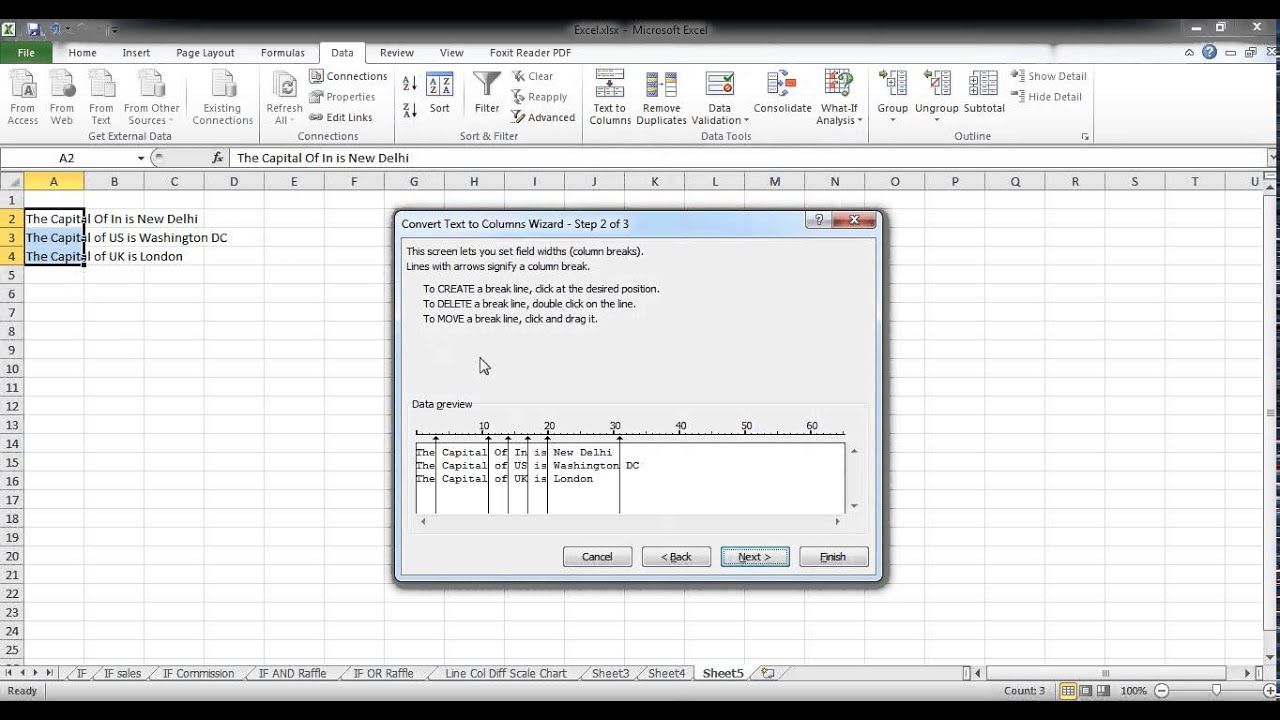
1 Milda needs to use Excel s Convert Text to Columns feature quite often for one of her work projects She needs to use the fixed width parsing in the tool and Excel looks at the source data and suggests places where the data should be broken Milda finds this annoying as Excel normally guesses wrong
Pre-crafted templates use a time-saving option for creating a varied range of files and files. These pre-designed formats and layouts can be made use of for numerous individual and professional tasks, including resumes, invites, flyers, newsletters, reports, discussions, and more, enhancing the content development process.
Excel Text To Columns Fixed Width From Right
How To Split Text Into Multiple Columns Using Text To Column In Excel
Download Microsoft Excel Split Cells Gantt Chart Excel Template
How To Move Columns In Excel

How To Use Text To Column In Excel Earn Excel

Microsoft Excel Tips How To Separate Names Using Text To Columns

Excel 2016 Convert Text To Columns YouTube

4 The following formulas will allow quick conversion of your data to a form that Text to Columns will readily parse right justified as you describe D5 formula appends a semicolon if absent IF RIGHT B5 1 B5 B5 G5 formula prepends necessary number of semicolons

Fixed width settings are an essential tool for precise text to column conversions in Excel This format allows users to set specific column widths that will apply to an entire dataset This ensures that the data is accurately split into the required columns and avoids any errors or discrepancies

Fixed width settings allow you to specify the exact positions at which Excel should split text into columns based on a predetermined width By using fixed width settings you can ensure that your data is split correctly preventing any potential errors or inconsistencies

Step one is to specify how the content is separated Delimited means the different pieces of text you want to pull apart are separated by a special character such as space comma or slash That s the one we re going to choose here We ll talk about the fixed width option in the next section In the second step specify the delimiter character

Fixed width settings are used in Excel when dividing text into columns It is helpful when there are no consistent separators or if you need more precision Following this 5 step guide can help you understand how to use them Find where to split the text Identify the character or space that separates the text
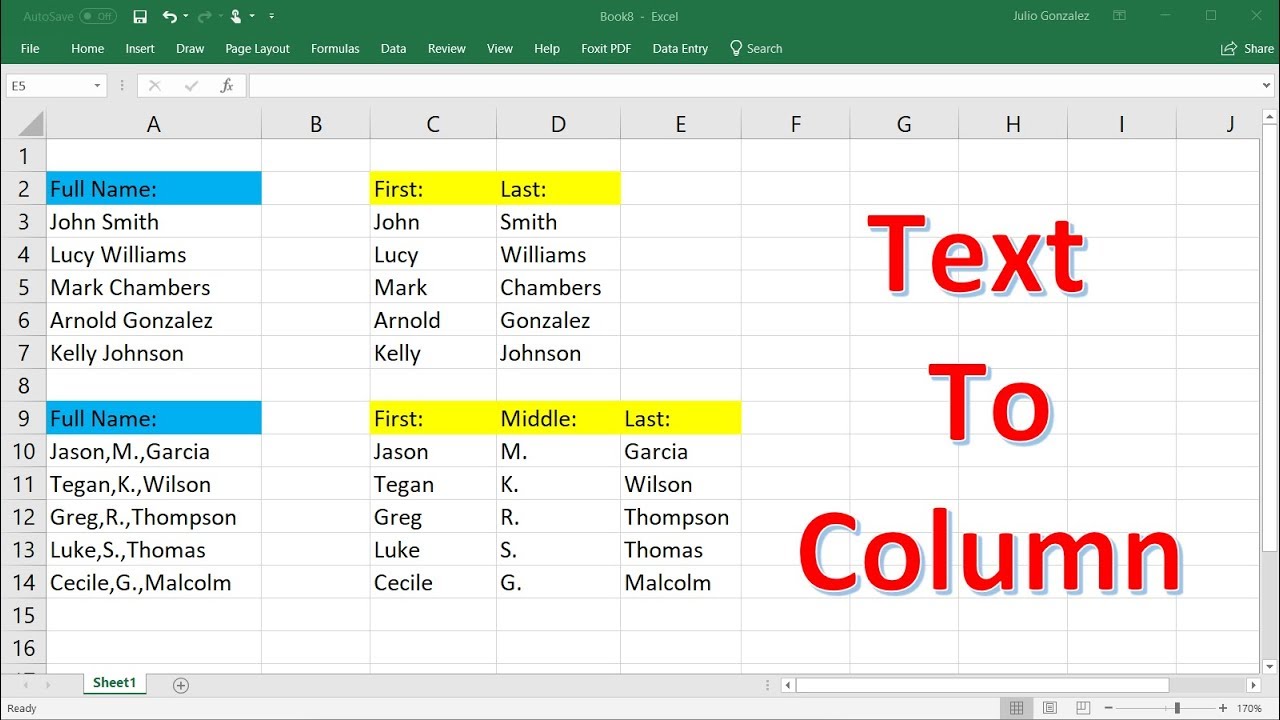
Select Fixed width as the delimiter option Drag the vertical lines representing your desired column widths Implementing fixed width settings for converting text to columns in Excel To split your text into columns Select the data you want to convert Click on Text to Columns Choose Fixed Width from the list and click Next The keyboard shortcut to open text to columns is ALT A E How to Split Text to Columns in Excel with Examples You can download this Text to Columns Excel Template here Text to Columns Excel Template Examples 1 Split First Name and Last Name Assume you have a list of names that includes both first and last names in a single column
Fixed Width Settings when Converting Text to Columns Written by Allen Wyatt last updated June 15 2020 This tip applies to Excel 97 2000 2002 and 2003 2 Milda needs to use Excel s Convert Text to Columns Wizard quite often for one of her work projects