Do Not Open Pdf In Browser Chrome EDGE DOWNLOAD PDF INSTEAD Of OPENING Edge Don t Open PDF In Browser Solved Re Could Not Open pdf Due To An Unknown Error Adobe Kibana Guide Cn File Does Not Begin With Pdf C Australia Guid Working Guide Firefox Can Not Open PDF In Mac Os X YouTube Web Jun 1 2023 nbsp 0183 32 1 Click the three dot menu in Chrome 2 Go to Settings gt Privacy and security gt Site settings 3 Scroll down to the Content section and then click Additional content settings
Web Sep 19 2023 nbsp 0183 32 Solution You need to set the Default behavior to Open PDFs in Chrome from chrome settings content pdfDocuments Workaround Got to Chrome Browser Web Oct 21 2023 nbsp 0183 32 1 Enable the Option for Opening PDFs in Chrome 2 Use Incognito Mode 3 Remove Cookies and Cache in Chrome 4 Re Enable Hardware Acceleration in Chrome
Firefox Can Not Open PDF In Mac Os X YouTube Microsoft Office Word Excel Powerpoint More Bug Report CCSv 5 3 0 00090 Does Not Open PDF Help Files On Linux The Comprehensive List Of The Best Chrome PDF Editor How To Open Pdf In Browser In Firefox YouTube Internet Explorer Do Not Open Pdf In Browser Mac Folder Structure Diagram Truthblog How To Securely Open PDF In Browser Using NET Core CoreProgram Singularity Container Ation User Guide 2 6
Do Not Open Pdf In Browser Chrome
 Do Not Open Pdf In Browser Chrome
https://i.ytimg.com/vi/Rg9UzlosxzY/maxresdefault.jpg
Web May 23 2023 nbsp 0183 32 Click the Enable extension button Using Open in Acrobat Reader option for PDFs opened in Chrome browser When you open a PDF in Chrome you see the
Templates are pre-designed files or files that can be used for various functions. They can save time and effort by providing a ready-made format and design for developing different sort of content. Templates can be utilized for personal or expert tasks, such as resumes, invites, leaflets, newsletters, reports, presentations, and more.
Do Not Open Pdf In Browser Chrome
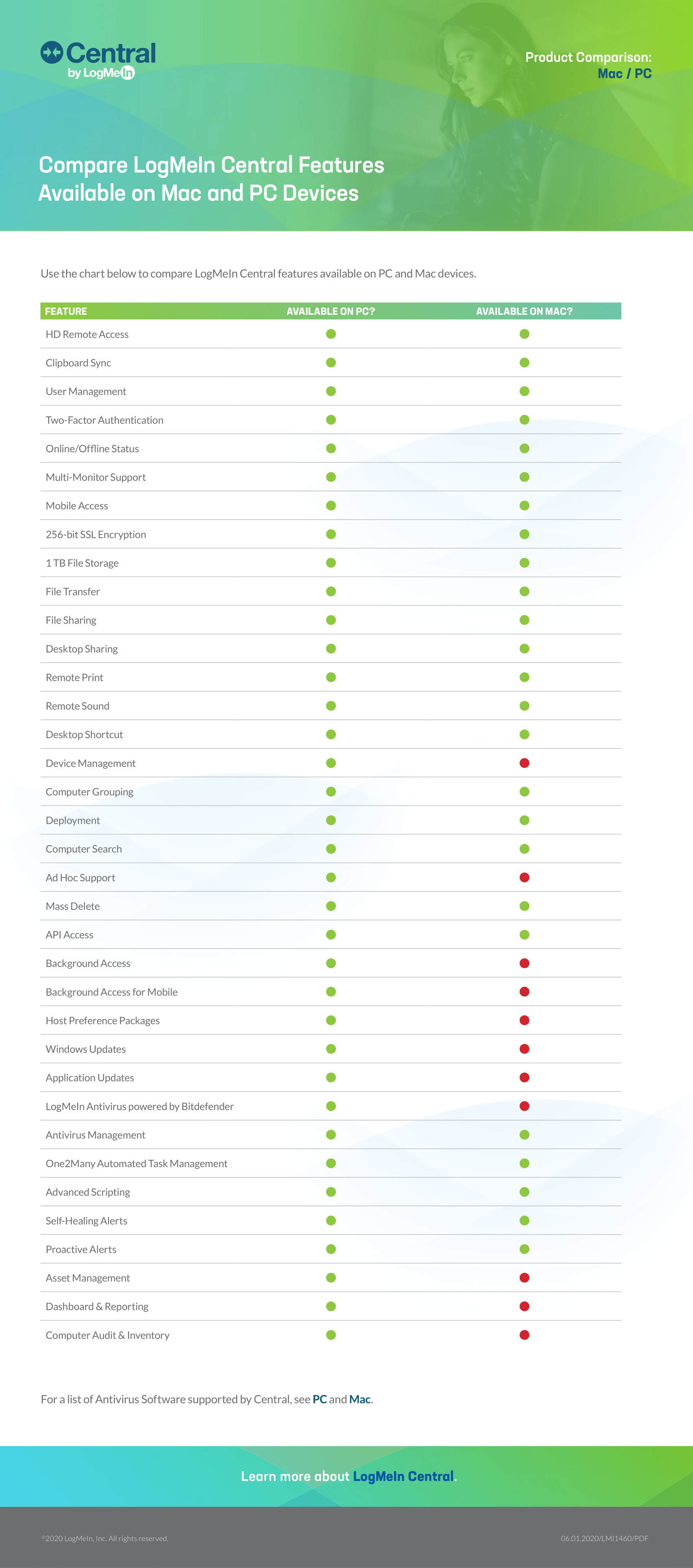
LogMeIn Central Mac Vs PC Comparison

Microsoft Office Word Excel Powerpoint More

Bug Report CCSv 5 3 0 00090 Does Not Open PDF Help Files On Linux
The Comprehensive List Of The Best Chrome PDF Editor

Internet Explorer Do Not Open Pdf In Browser

Mac Folder Structure Diagram Truthblog

Web Your default settings on your PDF software might be set to a web browser You haven t turned off Chrome s automatic setting to work as a PDF viewer You have installed the

Web Mar 31 2014 nbsp 0183 32 1 Go to chrome settings 2 Click on quot Privacy quot gt quot Content Settings quot 3 At the bottom click on quot PDF Documents quot gt quot Open PDF files in the default PDF viewer application quot This should solve the

Web Jun 25 2023 nbsp 0183 32 How to Fix When Chrome Won t Load PDFs Instead of opening the PDF file Chrome PDF Viewer might display a black screen similar to the one that appears

Web This way you will open every PDF with the right tools for annotating or editing Open Acrobat Reader and select Preferences Click Internet in the left panel of the Preferences menu and then select Internet Settings

Web Feb 5 2022 nbsp 0183 32 Click quot Site Settings quot on the right Scroll down in Site Settings and click quot Additional content settings quot at the very bottom In the expanded menu select quot PDF documents quot Toggle on the quot Download
Web There are two ways to view PDFs in Chrome The Chrome PDF viewer which is built into the browser The Adobe Acrobat extension for Google Chrome which you can easily Web May 29 2022 nbsp 0183 32 Method 1 How to Fix PDF Document Not Opening or Crashing in Chrome Browser Using Settings Method 2 Turn Off Make searches and browsing better
Web Sep 14 2023 nbsp 0183 32 Fix 1 Turn off Download PDFs Fix 2 Check Internet Connection Fix 3 Try Incognito Mode Fix 4 Update Google Chrome Fix 5 Clean Caches and Cookies Fix 6