Cups Print Command Coffee Cup Owl Coffee Bar Decor Kitchen Decor Etsy In 2020 Bar Measuring Cup Organization 12 Command Hooks And A Label Marker Needed Using The Stick On Hooks By Command I Hung Measuring Spoons Cups Pin On Mugs CUPS Unix cups Unix CSDN Web CUPS provides various commands to set up printers and make those printers accessible to
Web CUPS provides various commands to set up printers and make those printers accessible to systems on the network In addition CUPS supports several printer specific options that enable you to control printer configuration The following table Web Forces encryption when connecting to the server Specifies the username to use when connecting to the server Prints files to the named printer Specifies an existing job to modify Sends an email when the job is completed Sets the number of copies to print Sets one or more job options See quot COMMON JOB OPTIONS quot below
CUPS Unix cups Unix CSDN How To Print Any Document On A Mac HelloTech How My Solution For Coffee Cups Use Command Hooks On Underside Of The How To Resume CUPS Printer From Command Line 11 Solutions YouTube Controlling CUPS In The Shell Raspberry Pi Geek Double Row Of Command Hooks In 2020 Home Home Diy Mug Storage Hidden Customized Kitchen Organization With Command Hooks Yeah I Magenta And Lime Measuring Cup Organization Measuring Cups Cup Hooks Figure Out A Way To Do This In The Apartment Without
Cups Print Command
 Cups Print Command
https://i.pinimg.com/originals/00/9c/ab/009cabf2531830113105aa9a5f0a800e.jpg
Web Jul 18 2017 nbsp 0183 32 1 Answer Sorted by 9 Is this really the CUPS based lpr or is it a remnant of another spooling system which was not removed before installing CUPS Check it by running ldd which lpr and see if there is any reference to libcups Also the complete command should be lpr P printername file pdf
Templates are pre-designed files or files that can be utilized for various purposes. They can conserve time and effort by supplying a ready-made format and layout for producing different sort of content. Templates can be used for individual or professional projects, such as resumes, invitations, flyers, newsletters, reports, discussions, and more.
Cups Print Command

Command Hooks To Hang Coffee Cups On Side Of Cupboard I Did It Dorm
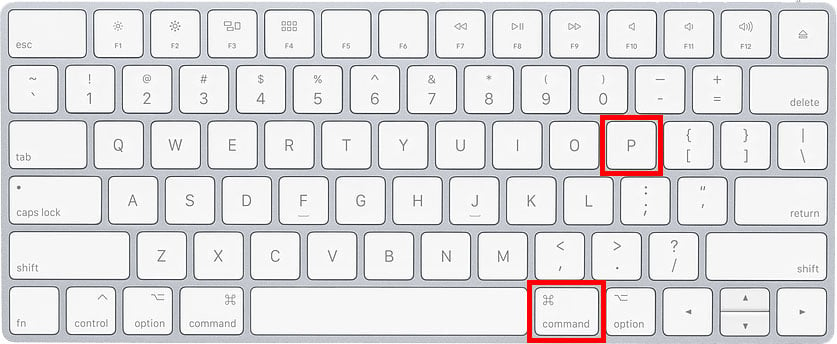
How To Print Any Document On A Mac HelloTech How

My Solution For Coffee Cups Use Command Hooks On Underside Of The

How To Resume CUPS Printer From Command Line 11 Solutions YouTube

Double Row Of Command Hooks In 2020 Home Home Diy Mug Storage

Hidden Customized Kitchen Organization With Command Hooks Yeah I

Web The CUPS sample drivers the quot drv sample drv quot lines above can be used for quot legacy quot printers For example the following command creates a destination for a HP LaserJet printer at IP address 11 22 33 44 lpadmin p printername E v socket 11 22 33 44 m drv sample drv laserjet ppd

Web Oct 15 2020 nbsp 0183 32 To print a file use the lp command followed by the file you wish to print CUPS can interpret most types of files including text PDF images etc lp filename CUPS will attempt to send this print job to your default printer You can specify a particular printer with P lp P printer filename Or to change your default printer use the

Web CUPS Print Server The primary mechanism for Ubuntu printing and print services is the Common UNIX Printing System CUPS This printing system is a freely available portable printing layer which has become the new standard for printing in most Linux distributions

Web p lt printer name gt Sets the name of the printer in CUPS E Enables the printer and CUPS accepts jobs for it Note that you must specify this option after p See the option s description in the man page for further details v lt uri gt Sets the URI to the printer or remote print server queue
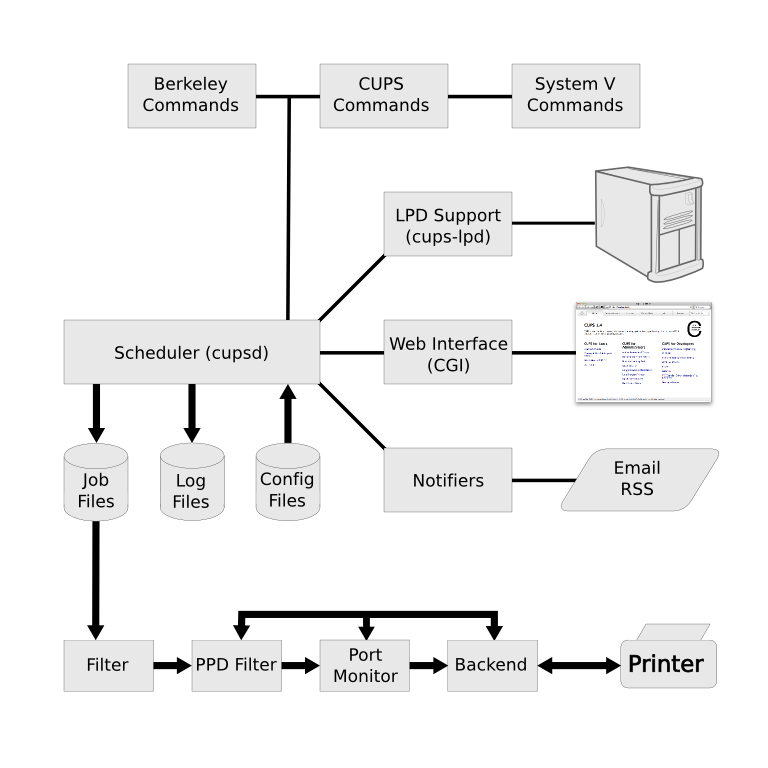
Web CUPS provides both the System V quot lp quot and Berkeley quot lpr quot commands for printing lp filename lpr filename Both the quot lp quot and quot lpr quot commands support printing options for the driver lp o media A4 o resolution 600dpi filename lpr o media A4
[desc-11] [desc-12]
[desc-13]