Convert Table To Text Excel 365 convert Table To 5 11 I Convert Table To Text I YouTube Convert Table To Text In Word 365 Eulasopa Norm Nociv n Aer Liber Convert Table To Text In Word Destul Cu Alte Convert Text Into Tables And Tables Into Text In Word Syntax ARRAYTOTEXT array format The ARRAYTOTEXT function syntax has the following arguments Notes The concise format returns a list of values inside one cell whereas the strict format returns an array of the same size and shape as the input If format is anything other than 0 or 1 ARRAYTOTEXT returns the VALUE error value Examples
Go to File Open and browse to the location that contains the text file Select Text Files in the file type dropdown list in the Open dialog box Locate and double click the text file that you want to open If the file is a text file txt Excel starts the Import Text Wizard 1 Position the cursor anywhere in the table This is usually done by clicking text 2 From the Layout tab choose Convert to Text Data group 3 Choose how to separate the text between table cells 3a If you choose Tabs the table layout is preserved with tab stops between cells as shown
Convert Text Into Tables And Tables Into Text In Word Convert OneNote Table To Text Office OneNote Gem Add Ins WORD 2010 Dodaci Tabela TABLE Pretvaranje Tabele U Tekst UWP Convert Table To Text In OneNote Office OneNote Gem Add Ins Convert Table To Text And Vise Versa In Microsoft Word YouTube Carolina Fereastr Rafinat How To Convert Text To Table In Word 2010 La How To Convert Table To Text In Word Updated 2022 EaseUS UWP Convert Table To Text In OneNote Office OneNote Gem Add Ins Mac How To Convert A Table To Text In Mac OneNote Office OneNote Gem
Convert Table To Text Excel 365
 Convert Table To Text Excel 365
https://i.ytimg.com/vi/y4IQDJCfM4w/maxresdefault.jpg
How it works Capture your data from an image There are two methods After you have selected the picture the Data from Picture dialog box shows Excel s progress analyzing the image for data Review the results make any data corrections necessary and then click Insert Data Scenarios to try
Pre-crafted templates offer a time-saving solution for creating a varied range of documents and files. These pre-designed formats and layouts can be used for numerous individual and expert tasks, including resumes, invitations, leaflets, newsletters, reports, presentations, and more, simplifying the material production process.
Convert Table To Text Excel 365
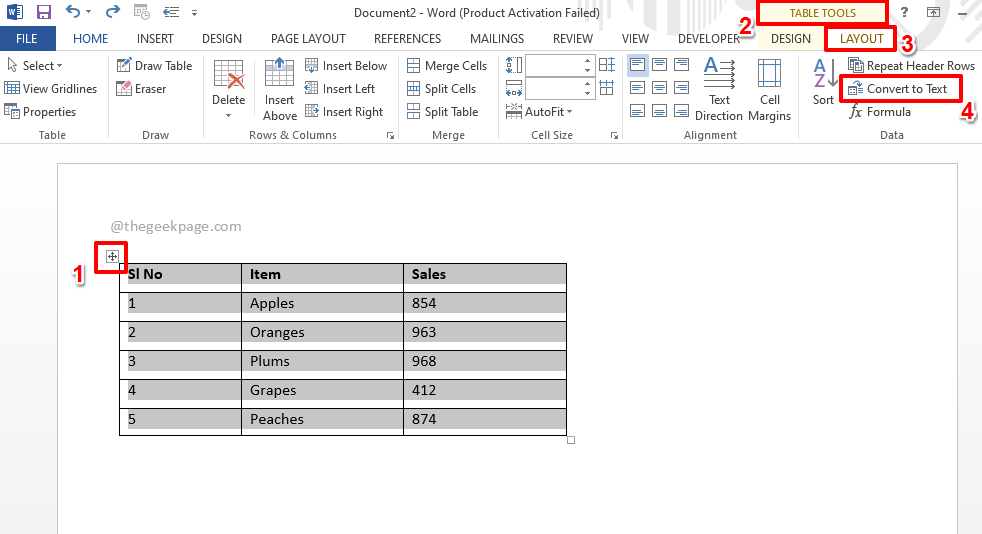
How To Convert Table To Text In MS Word
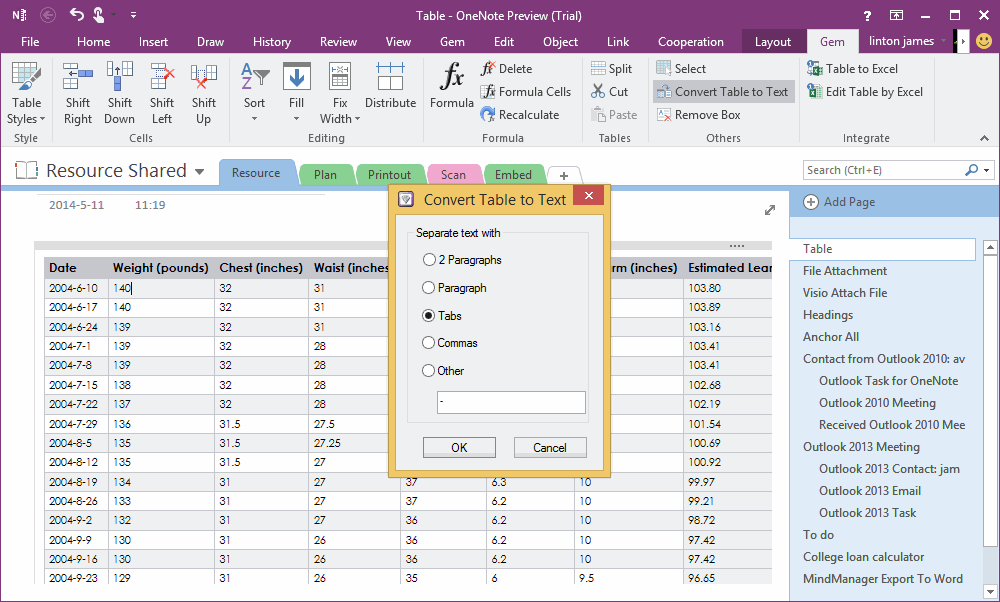
Convert OneNote Table To Text Office OneNote Gem Add Ins
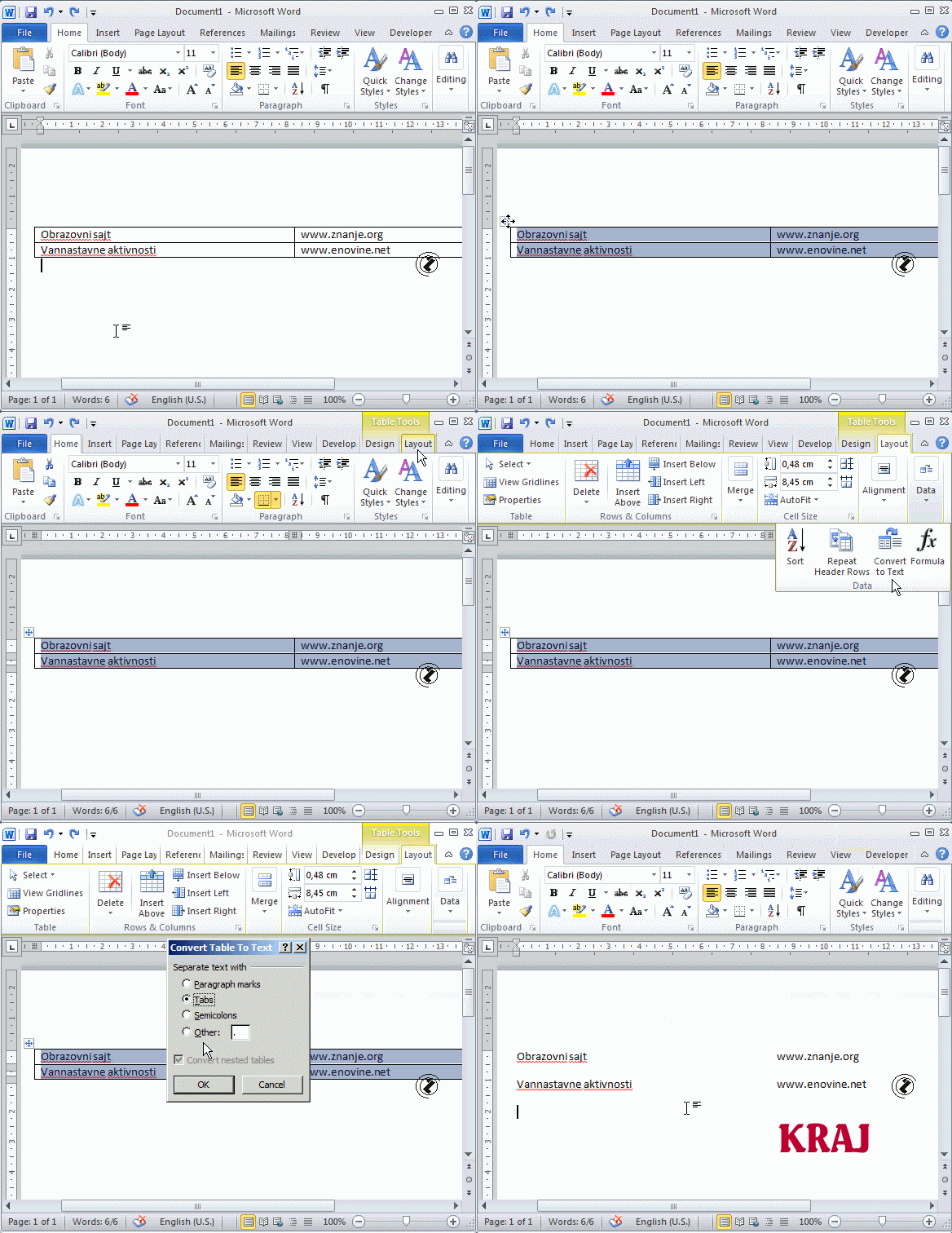
WORD 2010 Dodaci Tabela TABLE Pretvaranje Tabele U Tekst

UWP Convert Table To Text In OneNote Office OneNote Gem Add Ins

Carolina Fereastr Rafinat How To Convert Text To Table In Word 2010 La
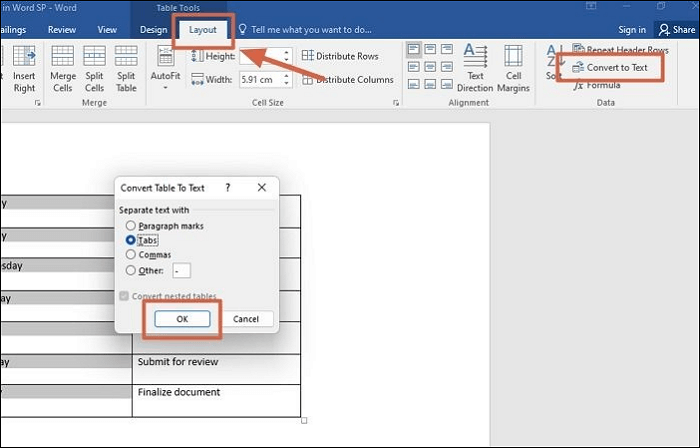
How To Convert Table To Text In Word Updated 2022 EaseUS

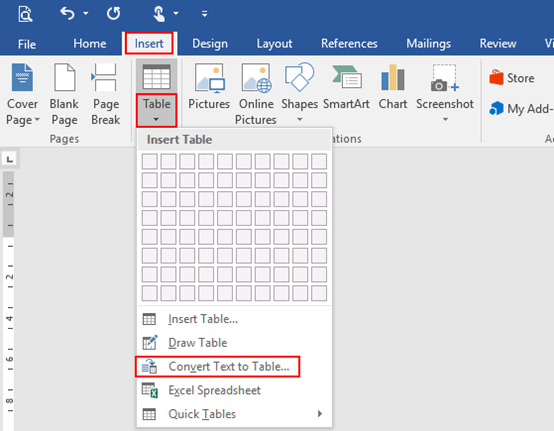
Select the text that you want to convert and then click Insert Table Convert Text to Table In the Convert Text to Table box choose the options you want Under Table size make sure the numbers match the numbers of columns and rows you want Under AutoFit behavior choose how you want your table to look

Convert an Excel table to a range of data Microsoft Support Convert an Excel table to a range of data Excel for Microsoft 365 Excel for Microsoft 365 for Mac Excel for the web More After you create an Excel table you may only want the table style without the table functionality

First open the Excel file that contains the table you want to convert to text Locate the specific table within the worksheet Select the entire table or specific rows and columns to convert Next select the entire table or the specific rows and columns that you want to convert to text
You need to select any cell in the table so the Table Tools Design tab is shown Then select Convert to Range from the Table Tools Design tab 0 Likes Reply

Select the text that you want to convert and then click Insert Table Convert Text to Table In the Convert Text to Table box choose the options you want Under Table size make sure the numbers match the numbers of columns and rows you want Under AutoFit behavior choose how you want your table to look
Click on the Action Pen and the worksheet zooms so each cell is larger with enough space for writing Use a digital pen or draw on a touch screen to write data into a cell Pause for just a moment and the digital writing is converted to standard values There s no convert button just pausing writing for a moment triggers an ink to text Type directly into a cell Copy and paste from external sources e g a web page Open a csv or txt file Find and replace operations Select Data Text to Columns and then use the Convert Text to Columns Wizard NOTE in our tests of the current Insiders Beta releases Automatic Data Conversion was NOT reliable
Here is my proposal 1 Get Tables 2 List rows present in a table 3 Create CSV table 4 Create File all works fine but the TXT file has quotation marks as first and last digit of each line Thanks